Clinic Workflow for Wellness Practices: How to Build an Efficient Patient Journey
30.06.26
Every patient visit follows a workflow, whether it’s carefully designed or simply develops over time. From booking an appointment to completing SOAP notes and billing, each step affects how efficiently your practice operates. Even when a single part of that process slows down, it creates delays that impact both your team and your patients.
For wellness practices, an efficient clinic workflow involves reducing administrative work, minimizing scheduling and documentation errors, improving patient experience, and so on.
The good news is that improving your workflow doesn’t necessarily mean changing the way you deliver care. In many cases, it’s about removing unnecessary steps, connecting routine processes, and making the patient journey smoother from start to finish. This guide will show you where those improvements can make the biggest difference.
What Is a Clinic Workflow and Why Does It Matter for Wellness Practices?
A clinic workflow is the sequence of tasks and interactions that take place throughout a patient’s journey, from scheduling an appointment to completing documentation, billing, and follow-up care. It defines how information, staff, and patients move through your practice, helping ensure that every step is completed accurately and efficiently.
For wellness practices such as chiropractors or massage therapists, a clinic workflow typically includes appointment booking, digital intake forms, patient check-in, treatment, SOAP notes, billing, reminders, and ongoing patient communication. Only when these steps are connected and organized do practitioners spend less time on administrative tasks and more time delivering quality care.
An efficient clinic workflow helps wellness practices:
Reduce administrative work and repetitive manual tasks
Improve scheduling accuracy and minimize appointment conflicts
Speed up patient check-in and checkout
Complete SOAP notes and documentation more consistently
Reduce no-shows with automated reminders and follow-ups
Improve communication between practitioners and front desk staff
Create a smoother, more professional patient experience
Support more consistent billing and fewer administrative errors
Save time throughout the day, allowing practitioners to focus on patient care
Build a scalable process that grows with the practice
Every patient interaction is connected. With information flowing smoothly from one stage to the next, your team spends less time switching between systems, repeating administrative tasks, or searching for patient information. Instead, appointments run on time, documentation is completed faster, and patients enjoy a more organized experience.
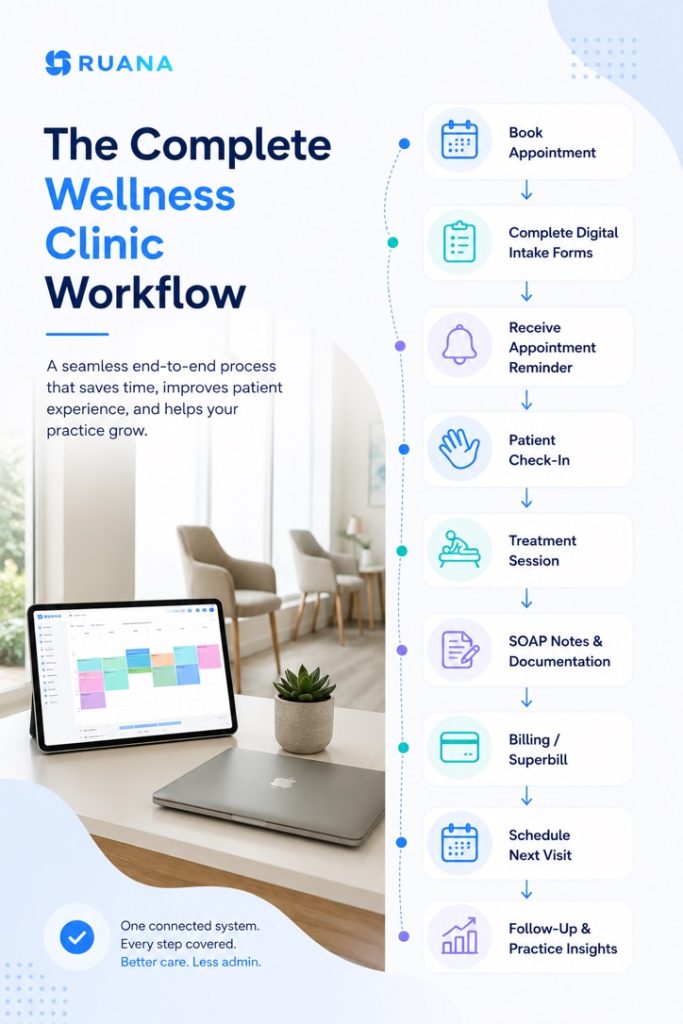
A modern wellness clinic workflow begins before the patient arrives and continues long after the appointment ends. Each step builds on the previous one, creating a consistent process for both practitioners and front desk staff. Whether you run a solo practice or a growing clinic, having a structured workflow helps reduce bottlenecks, improve communication, and keep daily operations running efficiently.
Below is an example of a complete clinic workflow diagram in a modern wellness practice.
Step-by-Step Breakdown of an Efficient Clinic Workflow
An efficient clinic workflow is the result of multiple connected processes working together, from the moment a patient books an appointment to the final follow-up after treatment. When each step is organized and information moves seamlessly between them, practices spend less time on administration, reduce avoidable errors, and create a smoother experience for both patients and staff.
Below, we’ll walk through each stage of a modern wellness clinic workflow and explain how small improvements at every step can make a significant difference in your daily operations.
Step 1. Online Appointment Booking
The patient journey begins long before they arrive at your clinic. A simple, accessible booking process sets the tone for the entire experience while reducing the administrative burden on your front desk.
Instead of relying solely on phone calls or email requests, many wellness practices now allow patients to request or book appointments online at any time. Patients can choose an available time that fits their schedule, while your team spends less time managing calendars manually.
An effective appointment booking process should allow you to:
Display real-time practitioner availability
Accept appointment requests or instant bookings
Reduce scheduling conflicts and double bookings
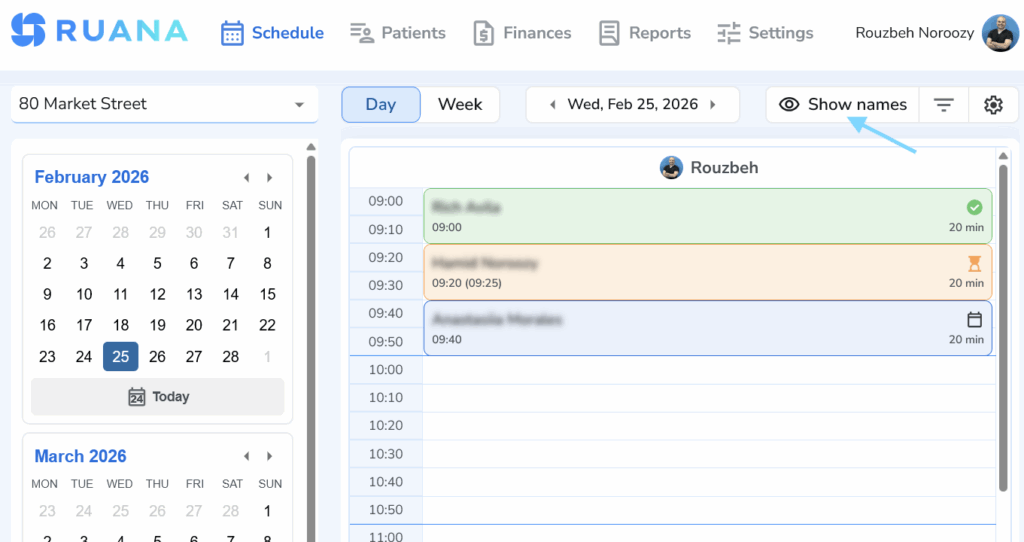
Keep all appointments organized in one calendar
Make it easy to reschedule or cancel appointments when needed
When scheduling is connected to the rest of your medical clinic workflow, appointment information automatically becomes available for the next stages, eliminating duplicate data entry and helping the day run more smoothly.
Step 2. Send Digital Intake Forms Before the Visit
Collecting patient information before the appointment saves valuable time for both your team and your patients. Rather than completing paperwork in the waiting room, patients can provide their medical history, consent forms, and other required information before they arrive.
This allows practitioners to review important details in advance and begin appointments with a clearer understanding of the patient’s needs.
Give practitioners access to patient information before treatment
When intake forms are part of the same workflow as scheduling and patient records, information only needs to be entered once. This creates a more efficient process for your staff while giving patients a smoother, more professional experience from their very first interaction with your practice.
Even the most organized schedule can be disrupted when patients forget about their appointments. Missed visits create gaps in the calendar, reduce revenue, and often leave time that cannot be filled at short notice.
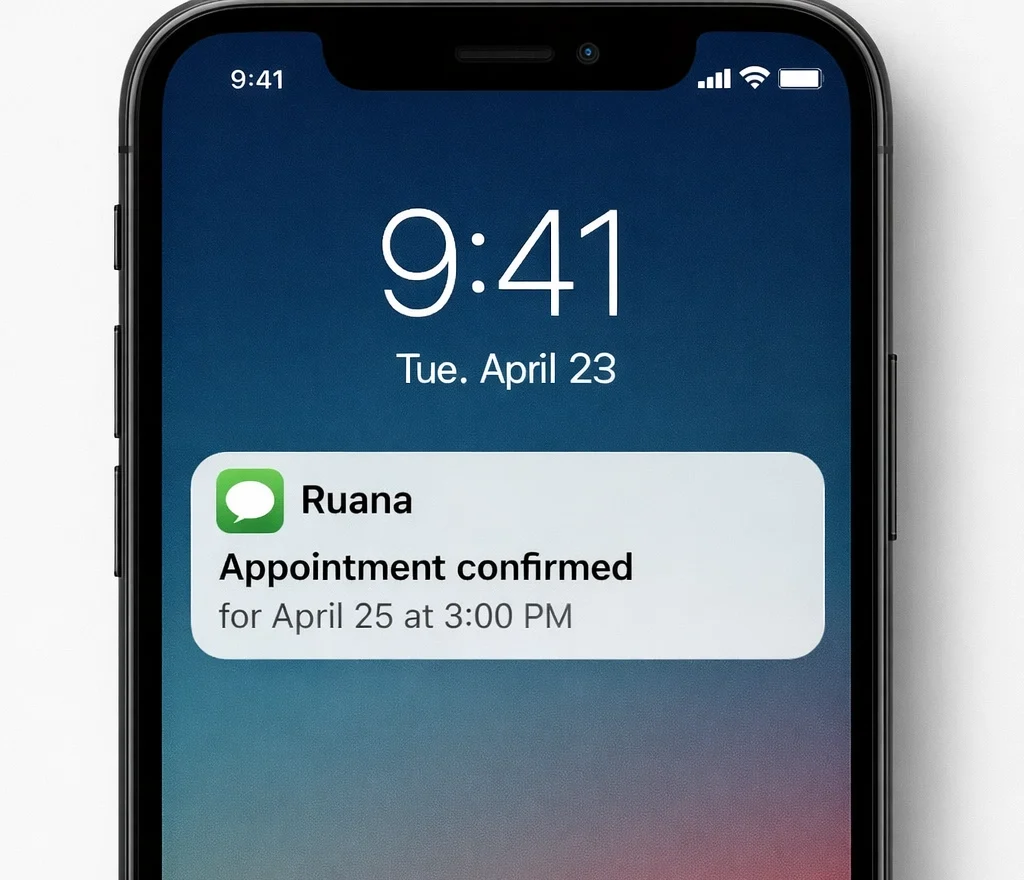
Automated appointment reminders help keep patients informed without requiring your staff to make phone calls or send manual messages throughout the day. A simple reminder before the visit can significantly reduce patient no-shows and help you maintain a more predictable schedule.
Instant patient engagement: Delivering automated, real-time appointment confirmations via SMS to reduce no-shows.
Step 4. Simplify Patient Check-In
Patient check-in is one of the busiest moments in the clinic workflow. If forms are incomplete, patient information needs updating, or staff have to switch between multiple systems, even a few extra minutes per patient can quickly add up throughout the day.
A few simple changes can make patient check-in much more efficient:
Ask patients to complete intake forms before arriving.
Verify contact and insurance information in advance whenever possible.
Keep appointment details and patient records accessible from one screen.
Standardize the check-in process so every staff member follows the same steps.
Use appointment status indicators to track arrivals, late patients, and no-shows.
Minimize paperwork at the front desk by using digital forms and electronic signatures.
Keep the reception area organized to reduce waiting times during busy hours.
Step 5. Complete SOAP Notes Immediately After Treatment
Documentation is an essential part of patient care, but it’s also one of the most time-consuming administrative responsibilities for many practitioners. Delaying notes until the end of the day often leads to longer working hours and increases the risk of forgetting important clinical details.
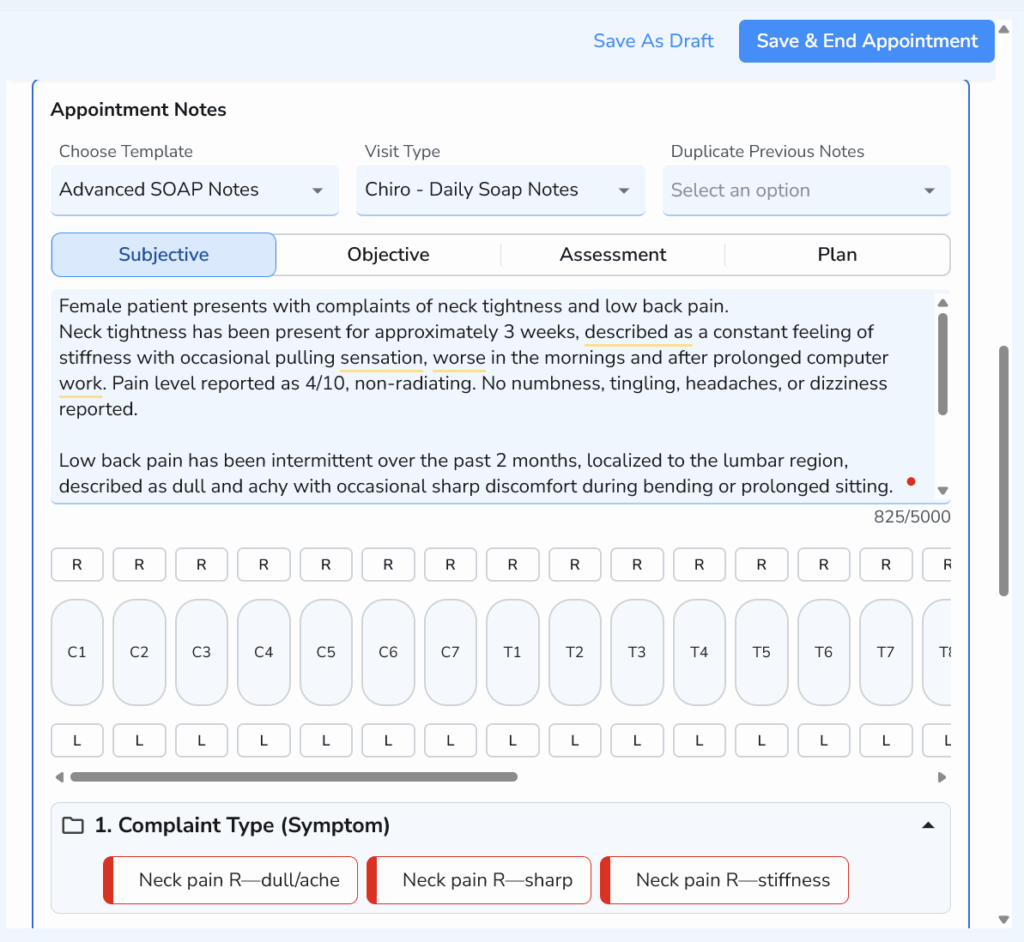
Completing SOAP notes immediately after each appointment keeps documentation accurate while the visit is still fresh in your mind. It also ensures patient records are updated before the next stage of the workflow, whether that’s billing, follow-up care, or future appointments.
An efficient documentation process should help you:
Record clinical information while it’s still accurate
Maintain consistent documentation across all patient visits
Reduce time spent writing notes after clinic hours
Keep patient records organized and easy to review
Support smoother billing and continuity of care
For many wellness practices, faster documentation comes from using structured templates and connected patient records rather than repeatedly entering the same information. Features such as advanced SOAP note workflows can reduce documentation time even further while maintaining complete clinical records.
No visit is complete until the administrative side is finished. Delaying billing can often lead to extra follow-up, missing information, and additional work for both practitioners and front desk staff. Completing billing while the visit is still fresh helps keep your workflow moving and ensures every appointment is properly documented.
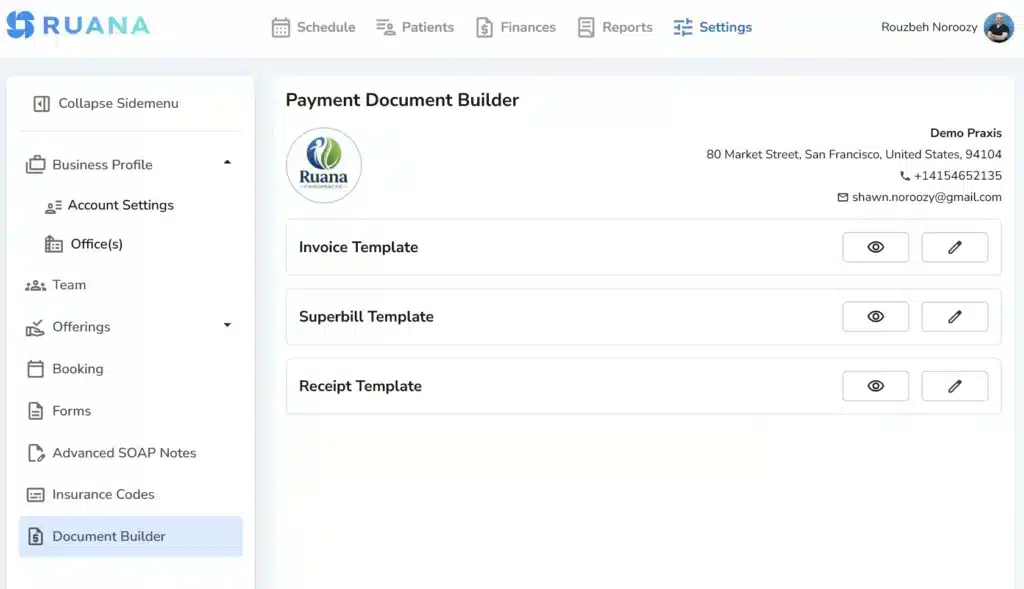
Whether you generate an invoice, create a superbill, or process a membership visit, having patient information, treatment details, and documentation already connected makes checkout much faster and reduces the chance of errors.
When billing becomes a natural extension of the clinical workflow instead of a separate administrative task, practices spend less time correcting mistakes and more time serving patients.
Step 7. Keep Patients Engaged After the Visit
Consistent follow-up helps patients stay committed to their treatment plan, strengthens long-term relationships, and increases the likelihood that they’ll return when they need care again.
Of course, this doesn’t mean sending reminders and calling them every day to force another visit. Depending on your practice, follow-up may include occasional appointment reminders, home care instructions, progress updates, satisfaction surveys, etc.
Small, consistent touchpoints help patients feel supported between visits while creating a more predictable schedule for your practice.
Simple ways to improve patient follow-up include:
Encourage patients to schedule their next appointment before they leave.
Send automated reminders for upcoming visits.
Share post-treatment instructions or home care recommendations.
Follow up with patients who miss appointments.
Check in with inactive patients who haven’t returned in several months.
Review patient retention trends to identify opportunities for improvement.
Common Workflow Problems That Slow Down Wellness Clinics
Even well-run practices can face workflow problems over time. The good news is that most of them are easy to identify and improve with small process changes.
Here’s what years of our own practice have taught us:
Common Workflow Problem
How to Improve It
Patients complete paperwork at reception, causing delays.
Send digital intake forms before the appointment.
Staff switch between multiple software systems throughout the day.
Centralize scheduling, patient records, documentation, and billing in one workflow.
Frequent no-shows and last-minute cancellations.
Use automated appointment reminders and make rescheduling simple.
Practitioners finish SOAP notes after clinic hours.
Complete documentation immediately after each appointment using structured templates.
Long queues during patient check-in.
Standardize the check-in process and collect patient information in advance.
Billing is postponed until the end of the day.
Generate invoices or superbills before the patient leaves the clinic.
Patients don’t return for recommended follow-up care.
Schedule the next appointment before checkout and automate follow-up reminders.
Team members rely on handwritten notes or verbal updates.
Keep patient information updated in a shared digital system that everyone can access.
Practice performance is difficult to measure.
Regularly review scheduling, no-show, and patient retention reports to identify trends.
How Practice Management Software Improves Clinic Workflow
A step-by-step process plus supporting clinic workflow automation tools can work magic.
When scheduling, intake forms, documentation, billing, reminders, and patient records work together, your team spends less time on repetitive administrative tasks and more time focusing on patient care.
A connected practice management platform can help your clinic:
Eliminate duplicate data entry by keeping patient information in one place.
Reduce administrative bottlenecks by connecting everyday tasks into a single workflow.
Improve communication between practitioners and front desk staff.
Make documentation, billing, and follow-ups a natural continuation of the patient visit instead of separate tasks.
Gain better visibility into appointments, patient activity, and practice performance through built-in reporting.
Built by a chiropractor and a medical doctor after years of managing a busy wellness practice, Ruana was designed around the realities of everyday clinic operations. Instead of replacing your workflow, our software helps simplify and connect the one you already have, making it easier for everyone to keep the day running smoothly.
Final Thoughts
Our key lesson is that small improvements at each stage of the patient journey can add up to significant time savings and a better experience for both patients and staff.
If you’re choosing clinic workflow software for your wellness practice, prioritize a system that keeps your entire workflow connected from appointment booking to follow-up care. Ruana was built with this approach in mind, helping practitioners spend less time on administration and more time with patients.
About the Authors
★★★★★4.9 · 329 Reviews
Rouzbeh NoroozyChiropractor & Co-Founder · Palmer West · UC Berkeley · 14 Years of ExperienceRouzbeh Noroozy is a chiropractor with 14 years of clinical experience and co-founder of Ruana practice management software. He completed his undergraduate studies at the University of California, Berkeley and graduated from the renowned Palmer College of Chiropractic West in California. As a practicing clinician and clinic owner, he understands firsthand the administrative challenges practices face — and which digital tools genuinely help streamline day-to-day operations.
Anastasiia NoroozyMedical Graduate & Co-Founder · 8 Years of ExperienceAnastasiia Noroozy is a medical graduate and co-founder of Ruana with 8 years of experience working directly with patients at the clinic in Cologne. She manages the day-to-day flow of the practice and knows every patient-facing process from the inside out — from intake and scheduling to follow-up care. Her hands-on clinical and operational experience directly shapes how Ruana is built to work in the real world.
To provide the best experiences, we use technologies like cookies to store and/or access device information. Consenting to these technologies will allow us to process data such as browsing behavior or unique IDs on this site. Not consenting or withdrawing consent, may adversely affect certain features and functions.
Functional
Always active
The technical storage or access is strictly necessary for the legitimate purpose of enabling the use of a specific service explicitly requested by the subscriber or user, or for the sole purpose of carrying out the transmission of a communication over an electronic communications network.
Preferences
The technical storage or access is necessary for the legitimate purpose of storing preferences that are not requested by the subscriber or user.
Analytics
The technical storage or access that is used exclusively for statistical purposes.The technical storage or access that is used exclusively for anonymous statistical purposes. Without a subpoena, voluntary compliance on the part of your Internet Service Provider, or additional records from a third party, information stored or retrieved for this purpose alone cannot usually be used to identify you.
Marketing
The technical storage or access is required to create user profiles to send advertising, or to track the user on a website or across several websites for similar marketing purposes.
To provide the best experience for our practitioners, we use cookies to personalize content, analyze our traffic, and support our marketing efforts. By clicking 'Accept', you consent to our use of these technologies. You can manage your preferences at any time.
Functional
Always active
The technical storage or access is strictly necessary for the legitimate purpose of enabling the use of a specific service explicitly requested by the subscriber or user, or for the sole purpose of carrying out the transmission of a communication over an electronic communications network.
Preferences
The technical storage or access is necessary for the legitimate purpose of storing preferences that are not requested by the subscriber or user.
Analytics
The technical storage or access that is used exclusively for statistical purposes.The technical storage or access that is used exclusively for anonymous statistical purposes. Without a subpoena, voluntary compliance on the part of your Internet Service Provider, or additional records from a third party, information stored or retrieved for this purpose alone cannot usually be used to identify you.
Marketing
The technical storage or access is required to create user profiles to send advertising, or to track the user on a website or across several websites for similar marketing purposes.