How to Write SOAP Notes Faster: 10 Practical Tips for Busy Practitioners
06.05.26
Clinical documentation doesn't have to consume your entire evening. Learn six practical strategies that help healthcare practitioners complete SOAP notes efficiently while maintaining thorough, accurate patient records.
Still finishing SOAP notes after your last client has already left?
That usually means the problem is not only the note itself, but also the workflow around it.
SOAP notes take time when practitioners start from a blank page, rewrite the same findings, switch between intake forms and treatment history, or leave documentation until the end of the day. For a busy chiropractor, massage therapist, wellness provider, or mental health practitioner, those small delays can quickly turn into hours of extra admin work each week.
Knowing how to write SOAP notes faster is key to creating a cleaner system for capturing the right information while it is still fresh. Templates, reusable note blocks, previous-note duplication, intake forms, voice-to-text, and connected practice management software can all help reduce the repetitive parts of SOAP note writing.
In this guide, we’ll break down practical ways to write SOAP notes faster without losing the structure, accuracy, or clinical context your records need.
TL;DR
Batch notes in short blocks, but do not let notes roll into the next day.
Start with templates for your most common visit types, using reusable phrases or quick-click note blocks for repeated findings.
Duplicate previous notes only when the visit is clinically similar.
Capture key details during the session, not hours later.
The real delay usually comes from the small decisions practitioners have to make every time they sit down to document a visit.
What should I include? How much detail is enough? Should I rewrite the same treatment plan again? Where did the intake form go? What exactly did the client say about their pain level?
Those questions add up fast during a full clinic day.
Many practitioners treat SOAP notes as something slowing them down, because documentation happens around patient care instead of inside a clear workflow. You may move from one session to the next, then try to recreate the details later from memory. By that point, even simple notes feel heavier than they should.
Common reasons SOAP notes take longer than expected include:
Using disconnected tools: Intake forms, appointment history, billing details, and previous notes may live in separate places, forcing practitioners to switch tabs or search manually.
Writing too much for routine visits: Some practitioners document every minor detail instead of focusing on the information that supports care, progress, and record accuracy.
Poor template setup: A template that is too generic still requires too much writing. A template that is too bloated creates extra cleanup.
As a rule, knowing how to write SOAP notes faster means having a system that reduces repeated work. For instance, a massage therapist should have quick ways to document treated areas, tissue response, pressure tolerance, and client feedback. A chiropractor should be able to record common findings, adjustments, care plans, and re-evaluations without rebuilding each note from scratch, and so on.
Once the structure is already in place, you can focus on the actual visit instead of wrestling with the note.
How Long Should a SOAP Note Take?
A routine SOAP note should usually take a few minutes once your templates, previous notes, and reusable phrases are set up properly. Simple follow-up visits, maintenance care, and recurring treatment sessions should move quickly because much of the structure already stays the same.
Longer notes are normal for:
New patient or client visits
Complex symptoms
Injury cases
Insurance-related documentation
Re-evaluations
Major treatment plan changes
The real issue is consistency. If every note takes 10-15 minutes, the workflow likely needs cleanup. Practitioners may be typing too much from scratch, searching for previous details, or documenting hours after the visit.
A better benchmark is simple: routine notes should feel easy to complete close to the appointment, while complex notes should take extra time for clear clinical reasons.
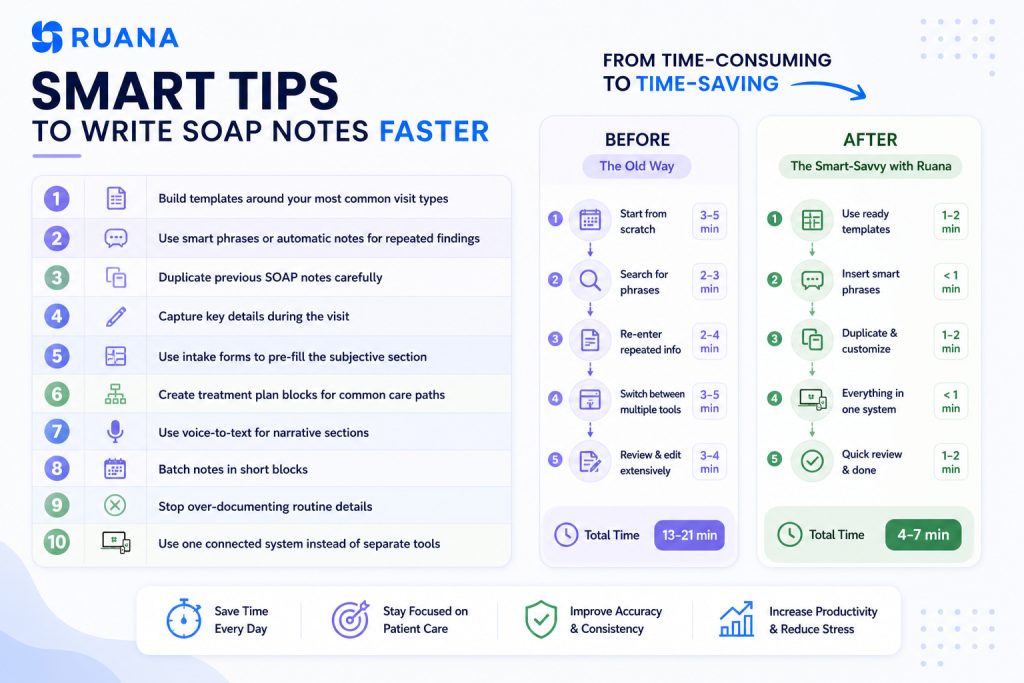
10 Ways to Write SOAP Notes Faster
Faster SOAP notes come from removing the repeated work around documentation. Most of your colleagues p lose time on the same few things: rebuilding note structure, typing common findings again, searching through intake details, or trying to remember visit specifics later in the day.
The tips below come from years of working inside real clinic workflows and seeing where documentation actually slows practitioners down. They focus on simple changes that help practitioners write SOAP notes more efficiently, while keeping the structure complete and useful for future care.
1. Build Templates Around Your Most Common Visit Types
Staring at a blank screen after each patient appointment wastes precious minutes. Yet, having a clear SOAP note template ensures that every visit is properly documented, so you can move through Subjective, Objective, Assessment, and Plan without having to rebuild the note from scratch.
Different patient scenarios require different documentation approaches. Create distinct templates for:
New patient comprehensive assessments with more room for history, goals, symptoms, and baseline information
Follow-up visit templates focusing on progress and treatment response
Maintenance or wellness visits with abbreviated assessment sections
Specialty-specific templates for procedures unique to your practice
Brief re-evaluation templates for updated findings, plan changes, or progress
Each template should include standard elements while leaving room for patient-specific observations. This approach maintains documentation consistency across your practice while preserving the personalized care that makes each patient’s record unique.
💡Implementation Strategy
You can save by an average of 35-40% while improving record completeness with the right templates. Just start with your three most common visit types. Build them to use for a few weeks, then adjust based on what you keep editing, deleting, or adding manually. But remember:
A template that is still too empty creates extra work.
A template that is too detailed may slow the practitioner down with unnecessary fields.
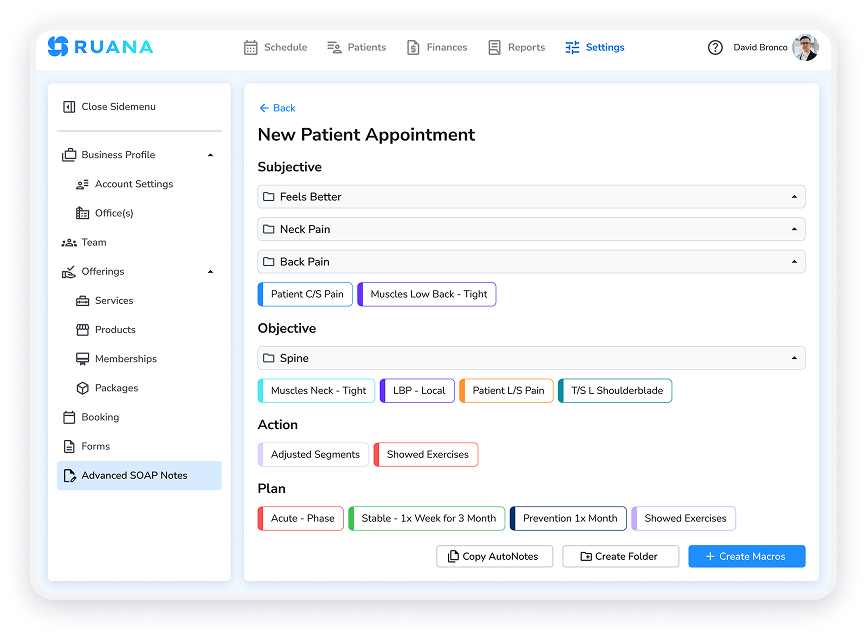
2. Use Smart Phrases or Automatic Notes for Repeated Findings
By repeating the same clinical language every day, you can start using automated notes for common findings and stuff you type for every patient.
Useful reusable phrases may include:
Treatment response: Patient tolerated treatment well with no adverse response reported.
Home care: Reviewed stretching, hydration, posture awareness, and activity modification.
Follow-up plan: Continue the current care plan and reassess symptoms at the next visit.
Massage therapy note: Soft tissue work performed to the cervical and upper trapezius region.
Chiropractic note: Adjustment performed to the lumbar region. Patient reported improved mobility after treatment.
💡Implementation Strategy
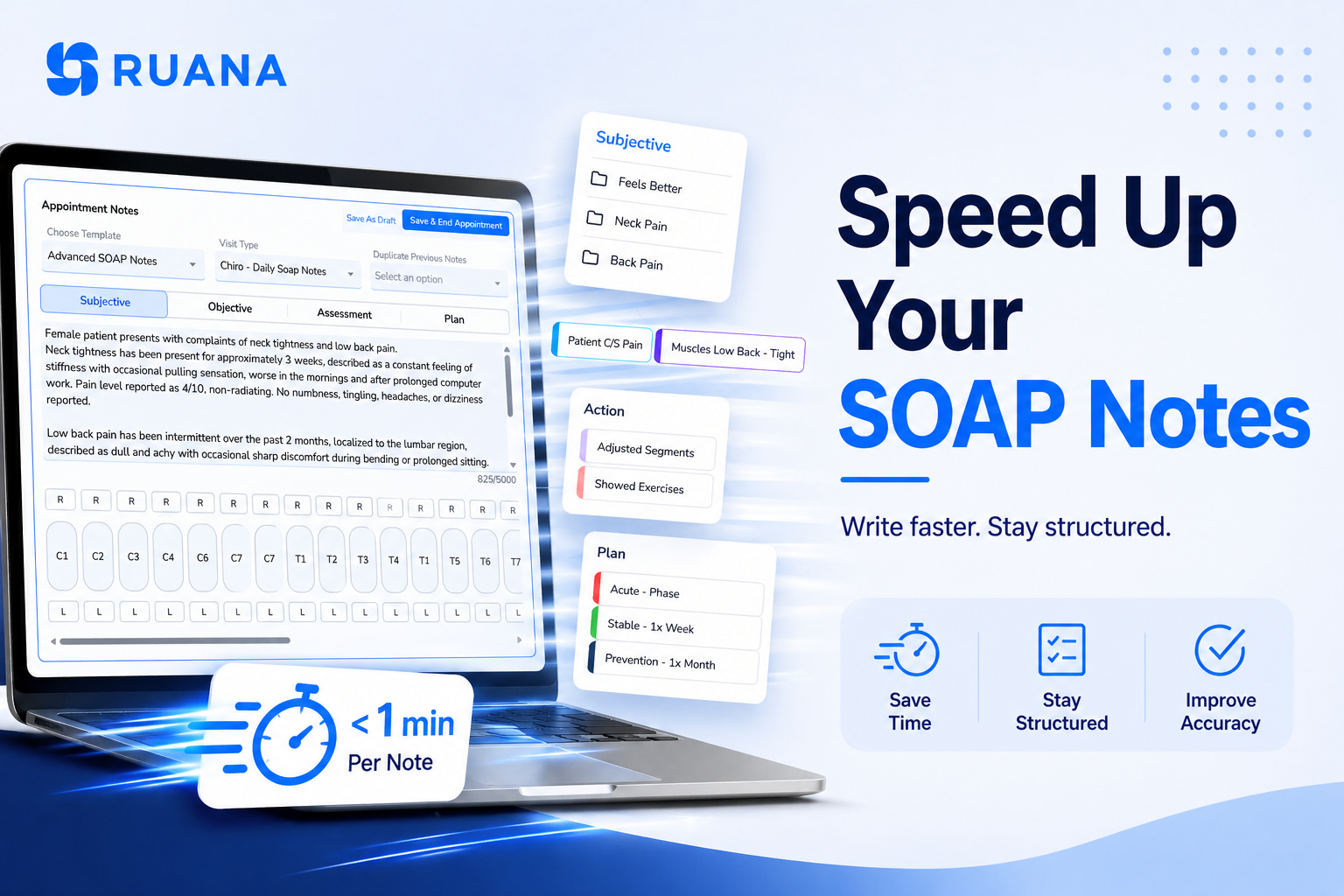
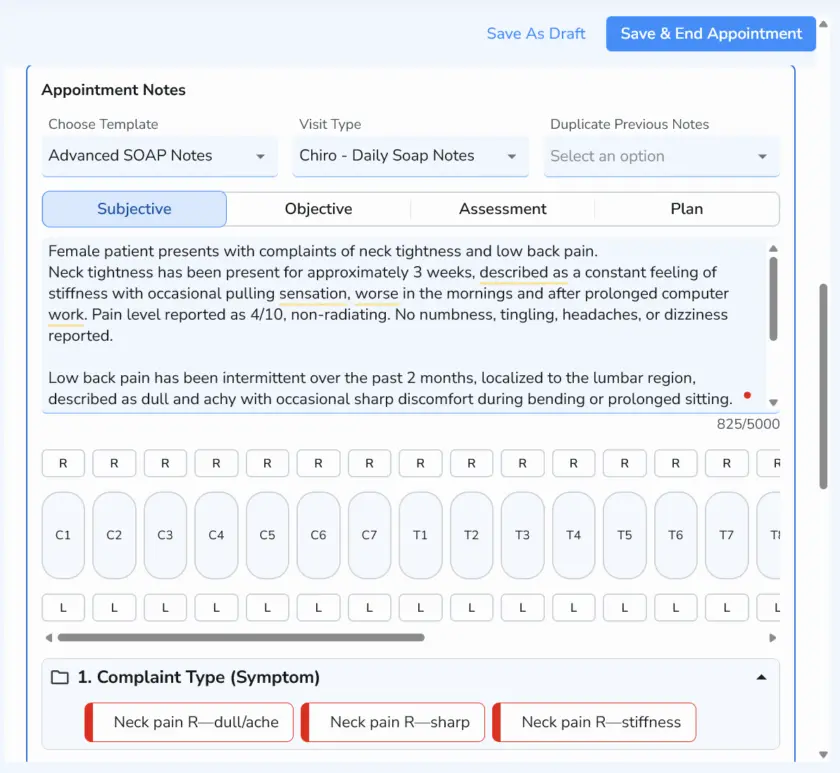
In Ruana, practitioners can use Automatic Notes to add frequently used findings, treatments, and plan details with a few clicks. This keeps SOAP notes consistent without forcing the practitioner to type the same wording after every appointment.
The best approach is to start small. Save the phrases you use most often, then expand the library as patterns become obvious. A short, well-organized set of note blocks is usually more useful than a long list nobody wants to scroll through.
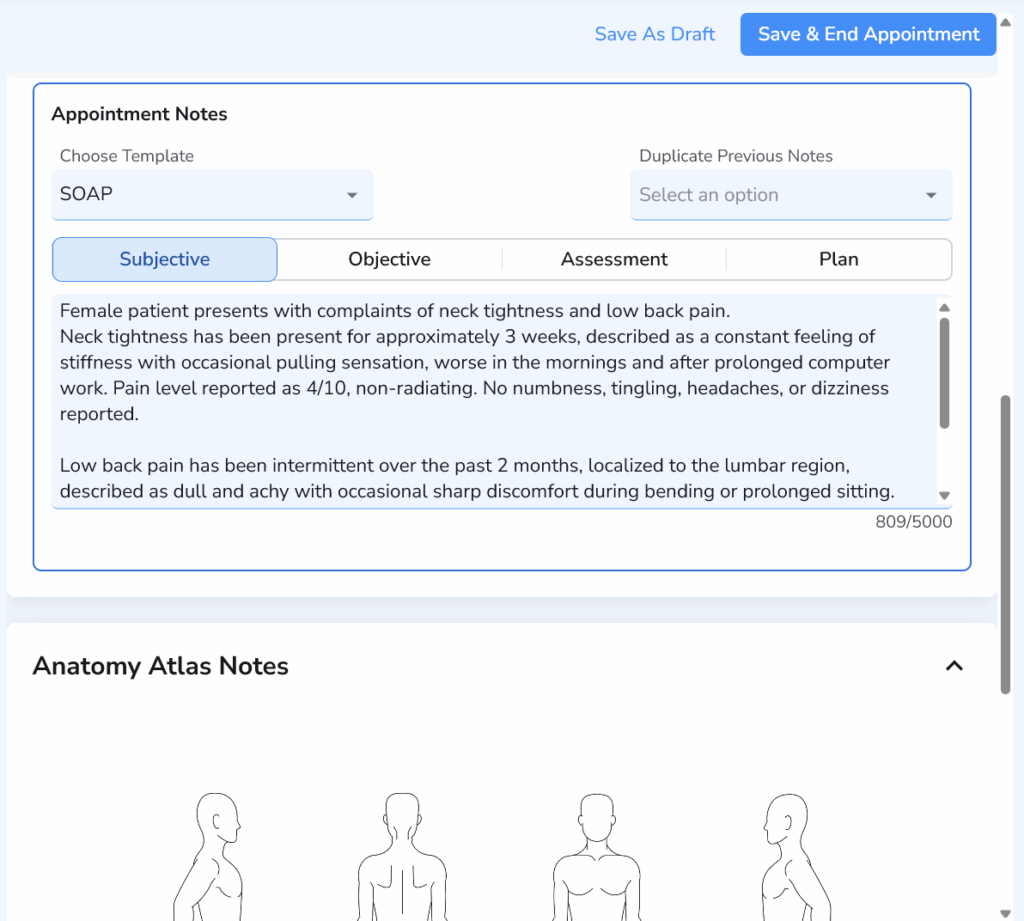
3. Duplicate Previous SOAP Notes Carefully
Duplicating a previous SOAP note can save a lot of time during follow-up or maintenance visits. It gives the practitioner a starting point with the patient’s history, prior findings, treatment plan, and care context already in place.
This works best when the visit is clinically similar to the last one. For example, a massage therapist may duplicate a note for recurring tension patterns, while a chiropractor may use the previous note for a stable adjustment visit or ongoing care plan.
💡Implementation Strategy
In Ruana, the one-click duplicate button can make these stable visits much faster to document. A SOAP note that takes 5-7 minutes to write from scratch may become a 2-3 minute update when the practitioner only needs to adjust symptoms, findings, treatment details, and the plan. For a practitioner seeing 8-10 maintenance care patients per day, that can save roughly 30-40 minutes daily.
Still, every duplicated note needs a quick review before saving. Update the date, symptoms, pain level, objective findings, treatment details, and plan. A copied note should never read like yesterday’s visit with a new timestamp.
Use duplication for:
Routine follow-ups
Maintenance care
Stable recurring complaints
Ongoing treatment plans
Avoid it when the patient has a new complaint, new injury, major symptom change, or a different treatment plan.
4. Capture Key Details During the Visit
As obvious as it sounds, SOAP note-taking becomes faster when the main details are captured while the visit is still happening. Waiting until the end of the day forces the practitioner to rebuild the session from memory.
This does not mean writing the full note during the appointment. A few short anchors are often enough.
The point is simple: document the details that are hardest to remember later. The full note becomes much easier to complete once those anchors are already in place.
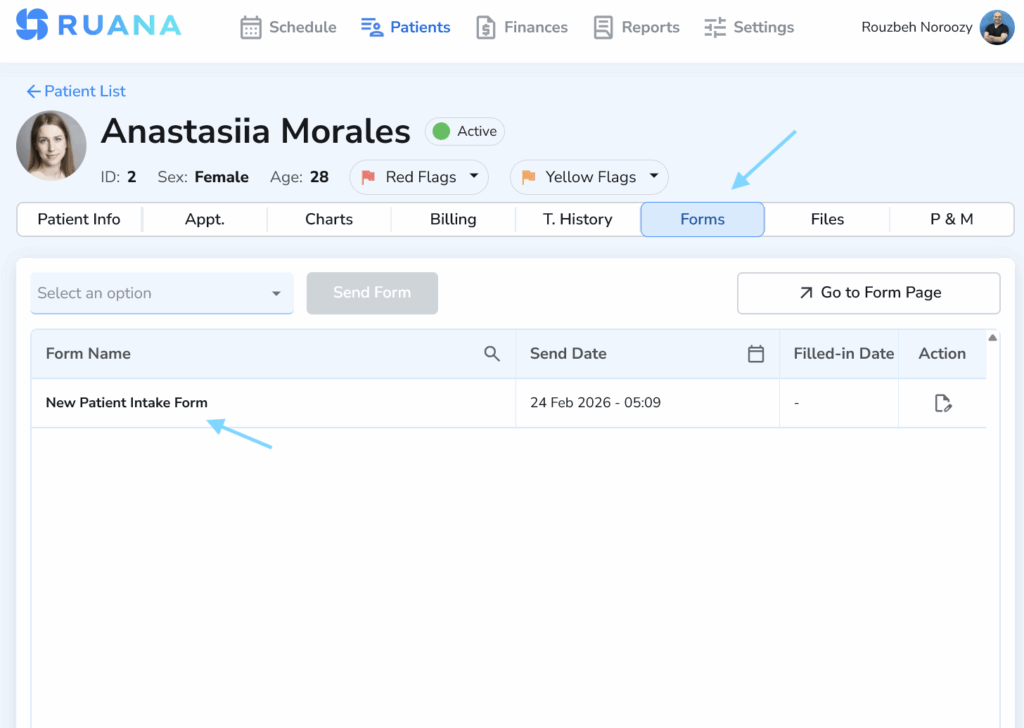
5. Use Intake Forms to Pre-Fill the Subjective Section
The Subjective section becomes much easier to write when the right information is collected before the visit.Digital intake forms can capture the patient’s main complaint, symptoms, goals, pain level, health history, contraindications, and changes since the last appointment.
For a massage therapist, that may include pain areas, pressure preference, past injuries, and treatment goals. For a chiropractor, it may include chief complaint, pain scale, aggravating factors, injury history, and daily activity limitations. For wellness providers, it may include current concerns, session goals, and relevant lifestyle details.
💡Implementation Strategy
Turn common questions into fields for pain level, main concern, symptom location, goals, contraindications, and recent changes.
Keep new patient forms more detailed and follow-up forms focused on updates, symptom changes, and treatment response.
Collect only the details that help practitioners write the Subjective section faster.
Intake data saves time when it is easy to access while writing the SOAP note.
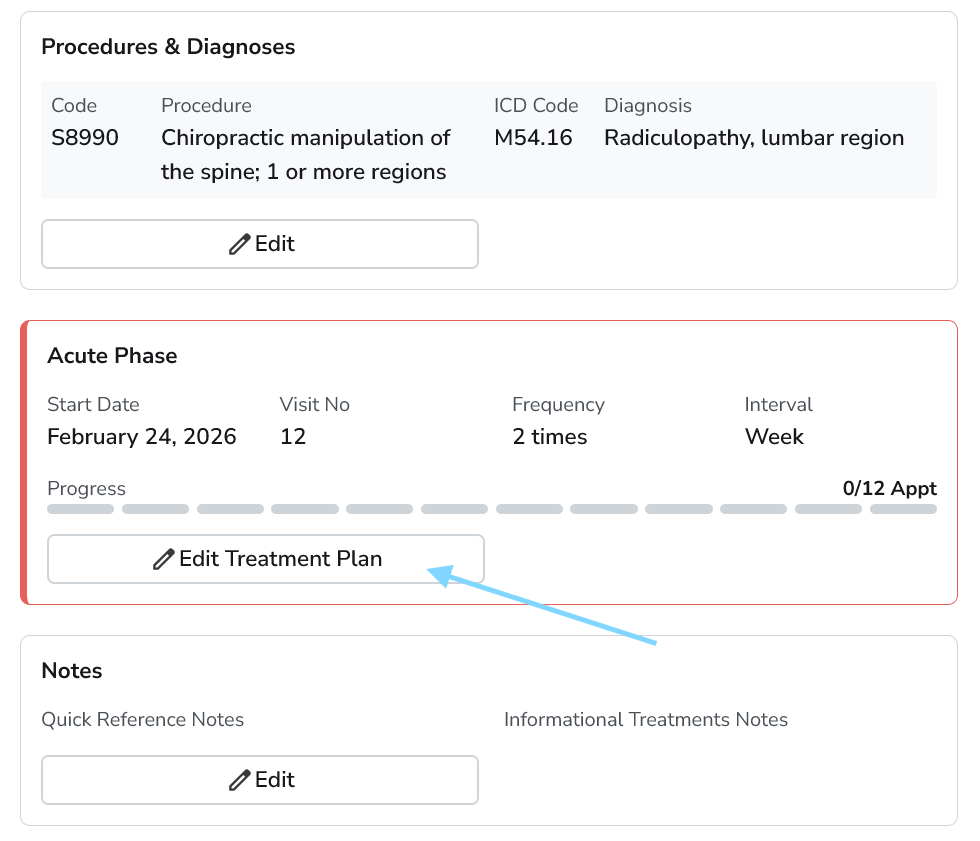
6. Create Treatment Plan Blocks for Common Care Paths
Many treatment plans follow familiar patterns. Acute pain visits, maintenance care, post-injury recovery, wellness sessions, and recurring massage treatment plans often use similar instructions, follow-up timing, and home-care recommendations.
Reusable treatment plan blocks help practitioners document those common care paths faster. Instead of rewriting the same plan language after every visit, they can insert a prepared block and adjust it to match the patient’s current response and progress.
💡Implementation Strategy
Start with acute pain, maintenance care, post-session massage care, mobility work, re-evaluation plans, or follow-up care.
Use wording that gives practitioners a strong starting point without requiring heavy cleanup.
Include the details you repeat most often.
Update sentences you keep rewriting.
7. Use Voice-to-Text for Narrative Sections
Voice-to-text can help practitioners capture longer notes faster, especially when the Assessment or Plan section needs more explanation. Speaking a short summary right after the visit is often easier than typing everything from memory later.
This works best for narrative parts of the note, such as clinical reasoning, treatment response, client progress, or next steps. The final note still needs a quick review for accuracy, clarity, and wording.
💡Implementation Strategy
Use voice-to-text right after the visit.
Keep dictation short and structured.
Review names, dates, symptoms, and treatment details.
Clean up wording before saving the note.
8. Batch Notes in Short Blocks
Trying to complete SOAP notes after each patient creates a constant workflow interruption and reduces overall efficiency. If you want to write SOAP notes faster, strategic batching – grouping similar documentation tasks allows you to work with greater focus and speed while maintaining accuracy.
For example, a massage therapist may finish notes after every 2-3 clients. A chiropractor with a faster patient flow may set short documentation blocks between busier appointment periods. The point is to prevent notes from piling up until everything starts blending.
💡Implementation Strategy
Finish notes after every 2–4 visits while details are still fresh.
Keep one short block before lunch to clear the morning.
Use the end of the day for review, not full catch-up.
Avoid carrying routine notes into the next day whenever possible.
9. Stop Over-Documenting Routine Details
Longer SOAP notes are not always better SOAP notes. Routine visits should focus on the details that support care, progress, clinical decisions, and future follow-up.
A useful SOAP note should clearly show what the patient reported, what the practitioner observed or measured, what changed, what treatment was provided, and what happens next. Extra detail can slow the practitioner down and make the record harder to review later.
💡Implementation Strategy
Keep routine notes focused on care, progress, and next steps.
Document changes, responses, and next steps after each visit.
Use templates to guide the right level of clinical detail.
10. Use One Connected System Instead of Separate Tools
SOAP notes take longer when patient records, intake forms, scheduling, billing details, and previous notes live in separate places. Every extra tab or manual search adds friction to the visit workflow. A connected practice management system keeps the main pieces of the appointment closer together. For practitioners, that means faster access to intake answers, previous SOAP notes, treatment history, and documentation tools during the same workflow.
💡Implementation Strategy
Keep intake, notes, and scheduling connected in one workflow.
Use previous notes as a clinical context during the visit.
Reduce manual copy-paste between tools whenever possible.
Choose a system that supports the full visit workflow from booking to documentation.
SOAP Notes Time Savings Calculator
Saving just a few minutes per note can turn into several hours back each month.
Use this formula to estimate how much time your practice could save:
Daily time saved = Current note time − Improved note time × Number of notes per day
Here is a simple example:
Practice Type
Notes Per Day
Current Time Per Note
Improved Time Per Note
Daily Time Saved
Solo massage therapist
8
8 min
4 min
32 min
Chiropractor
20
6 min
3 min
60 min
Small wellness clinic
35
7 min
4 min
105 min
These numbers are planning estimates, since documentation time depends on visit type, case complexity, practitioner habits, and clinic workflow. Still, the pattern is clear. Faster templates, reusable note blocks, intake forms, and connected records can turn SOAP notes from a daily bottleneck into a more manageable part of the appointment flow.
Conclusion
Knowing how to write SOAP notes faster starts with a better system around the visit. Templates reduce blank-page work, while intake forms bring patient-reported details into the workflow earlier.
The real win is a cleaner clinic rhythm. SOAP notes still need to be accurate, specific, and useful for future care. They should also fit into the workday without taking over the workday.
A connected practice management system like Ruana helps bring scheduling, intake forms, SOAP notes, treatment history, and billing-related details into one workflow, giving practitioners fewer places to search and fewer repeated steps to manage.
About the Authors
★★★★★4.9 · 329 Reviews
Rouzbeh NoroozyChiropractor & Co-Founder · Palmer West · UC Berkeley · 14 Years of ExperienceRouzbeh Noroozy is a chiropractor with 14 years of clinical experience and co-founder of Ruana practice management software. He completed his undergraduate studies at the University of California, Berkeley and graduated from the renowned Palmer College of Chiropractic West in California. As a practicing clinician and clinic owner, he understands firsthand the administrative challenges practices face — and which digital tools genuinely help streamline day-to-day operations.
Anastasiia NoroozyMedical Graduate & Co-Founder · 8 Years of ExperienceAnastasiia Noroozy is a medical graduate and co-founder of Ruana with 8 years of experience working directly with patients at the clinic in Cologne. She manages the day-to-day flow of the practice and knows every patient-facing process from the inside out — from intake and scheduling to follow-up care. Her hands-on clinical and operational experience directly shapes how Ruana is built to work in the real world.
Our team will review your inquiry and get back to you as soon as possible.
Privacy Settings
To provide the best experiences, we use technologies like cookies to store and/or access device information. Consenting to these technologies will allow us to process data such as browsing behavior or unique IDs on this site. Not consenting or withdrawing consent, may adversely affect certain features and functions.
Functional
Always active
The technical storage or access is strictly necessary for the legitimate purpose of enabling the use of a specific service explicitly requested by the subscriber or user, or for the sole purpose of carrying out the transmission of a communication over an electronic communications network.
Preferences
The technical storage or access is necessary for the legitimate purpose of storing preferences that are not requested by the subscriber or user.
Analytics
The technical storage or access that is used exclusively for statistical purposes.The technical storage or access that is used exclusively for anonymous statistical purposes. Without a subpoena, voluntary compliance on the part of your Internet Service Provider, or additional records from a third party, information stored or retrieved for this purpose alone cannot usually be used to identify you.
Marketing
The technical storage or access is required to create user profiles to send advertising, or to track the user on a website or across several websites for similar marketing purposes.
To provide the best experience for our practitioners, we use cookies to personalize content, analyze our traffic, and support our marketing efforts. By clicking 'Accept', you consent to our use of these technologies. You can manage your preferences at any time.
Functional
Always active
The technical storage or access is strictly necessary for the legitimate purpose of enabling the use of a specific service explicitly requested by the subscriber or user, or for the sole purpose of carrying out the transmission of a communication over an electronic communications network.
Preferences
The technical storage or access is necessary for the legitimate purpose of storing preferences that are not requested by the subscriber or user.
Analytics
The technical storage or access that is used exclusively for statistical purposes.The technical storage or access that is used exclusively for anonymous statistical purposes. Without a subpoena, voluntary compliance on the part of your Internet Service Provider, or additional records from a third party, information stored or retrieved for this purpose alone cannot usually be used to identify you.
Marketing
The technical storage or access is required to create user profiles to send advertising, or to track the user on a website or across several websites for similar marketing purposes.