Online Intake Forms vs Paper Forms: Which Is Better for Your Practice?
16.06.26
As healthcare and wellness practices continue to modernize their workflows, many are evaluating whether online intake forms can offer advantages over traditional paper-based processes.
Patient intake is one of the first interactions people have with your practice.
For years, that process meant arriving early, filling out paperwork by hand, and waiting for staff to manually enter information into patient records. Today, many clinics are replacing paper forms with online intake forms that patients can complete before their appointment.
But is making the switch worth it?
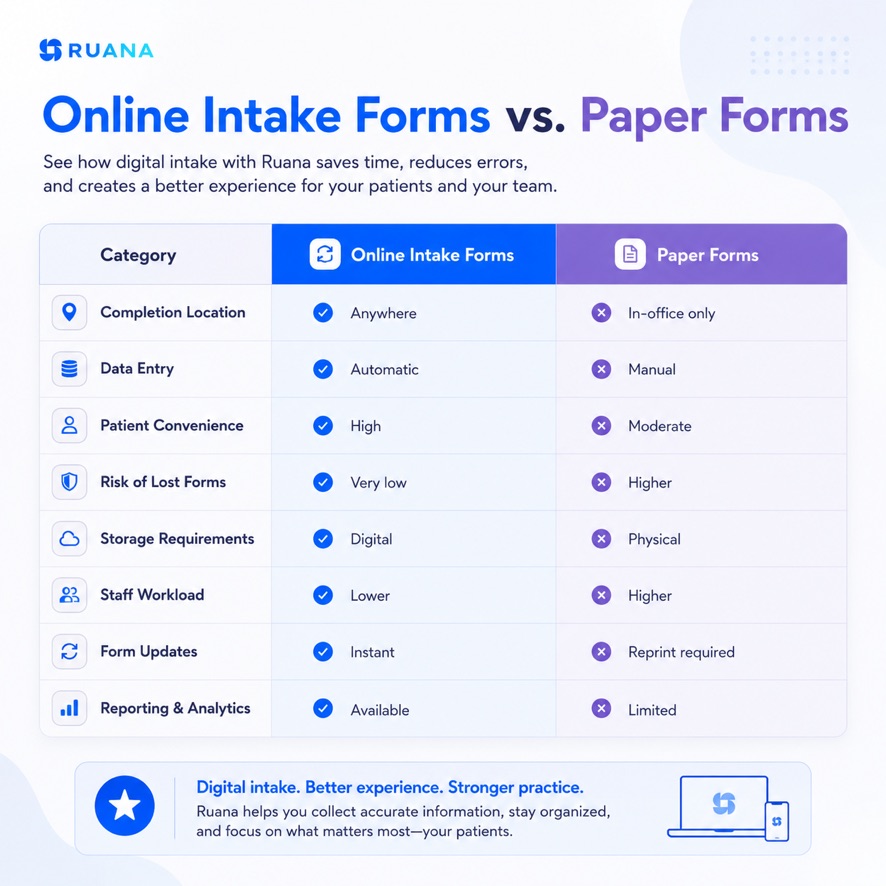
In this guide, we’ll compare online intake forms vs paper forms across efficiency, patient experience, accuracy, cost, and clinic workflow.
For most modern practices, online intake forms provide a faster and more efficient patient intake experience while reducing administrative work.
Patients can complete paperwork before arriving, allowing staff to spend less time collecting information and more time focusing on patient care. Online forms also help reduce manual data entry, minimize errors, and keep patient information organized in one place. As practices grow, practice management software can save up to 3-4 hours of administrative work per day while creating a smoother experience for both patients and staff.
What Are Online Intake Forms?
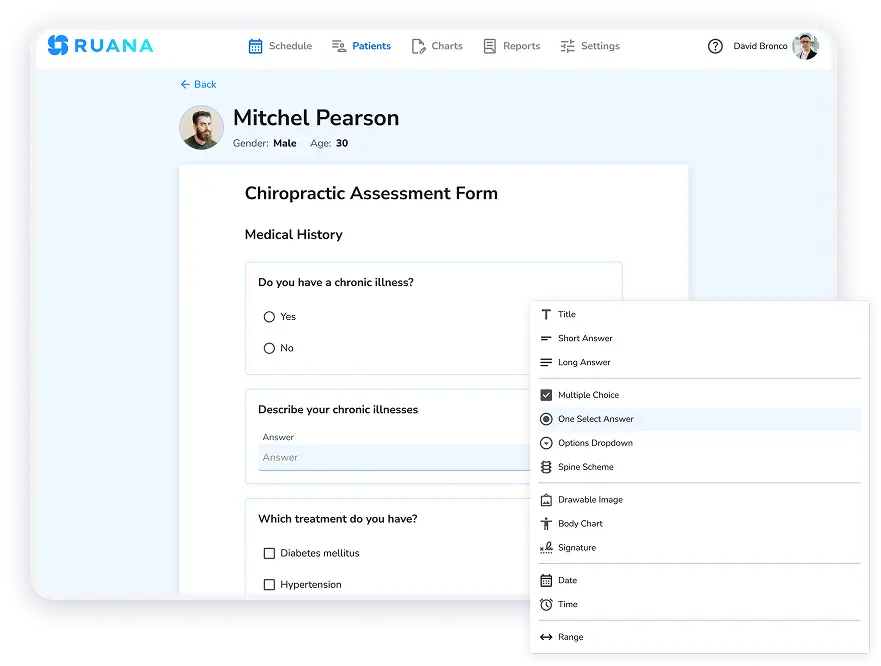
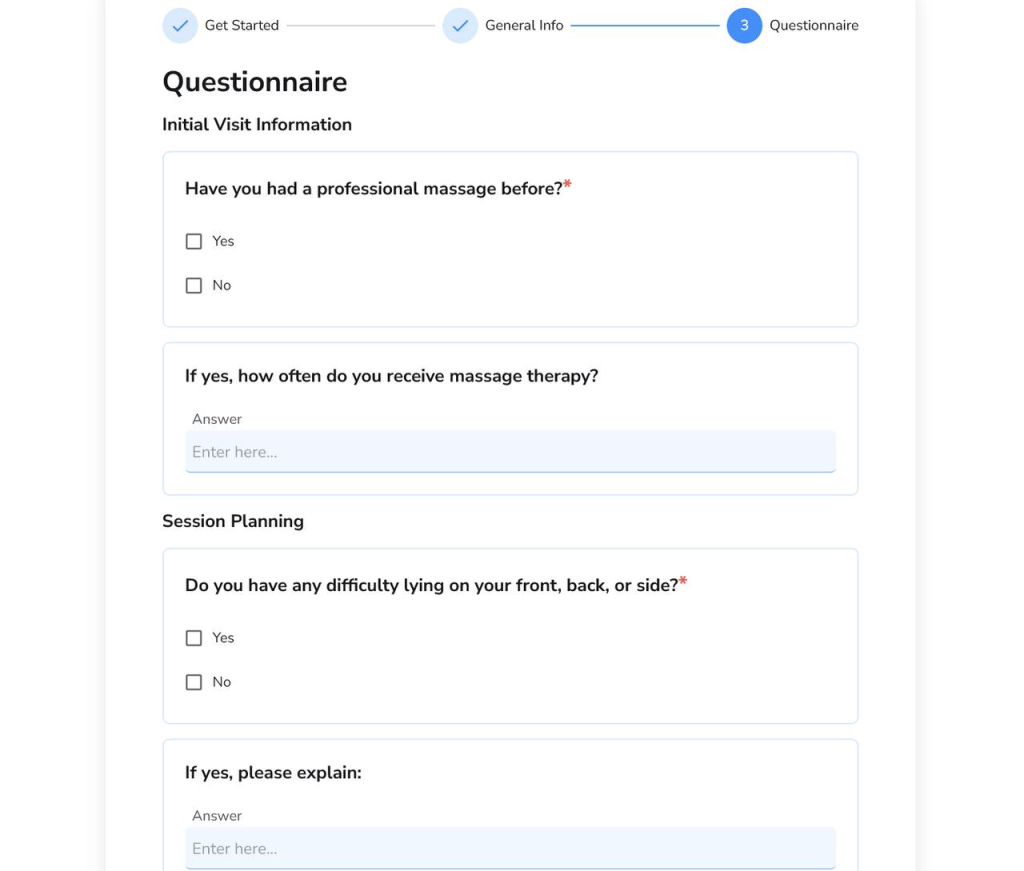
These are digital intake forms that patients complete electronically before their appointment. Instead of filling out paperwork in the waiting room, patients receive a secure link via email, text message, or through an online booking system and can submit their information from any device.
Common Information Collected Through Online Intake Forms
It’s almost the same as the paper forms.
Personal and contact information
Emergency contacts
Health history and medical conditions
Current medications
Insurance details
Consent and privacy agreements
Treatment goals and concerns
The only difference is convenience and a hassle-free workflow for both patients and care providers. Once submitted, the information is stored electronically and can be reviewed by staff before the patient arrives.
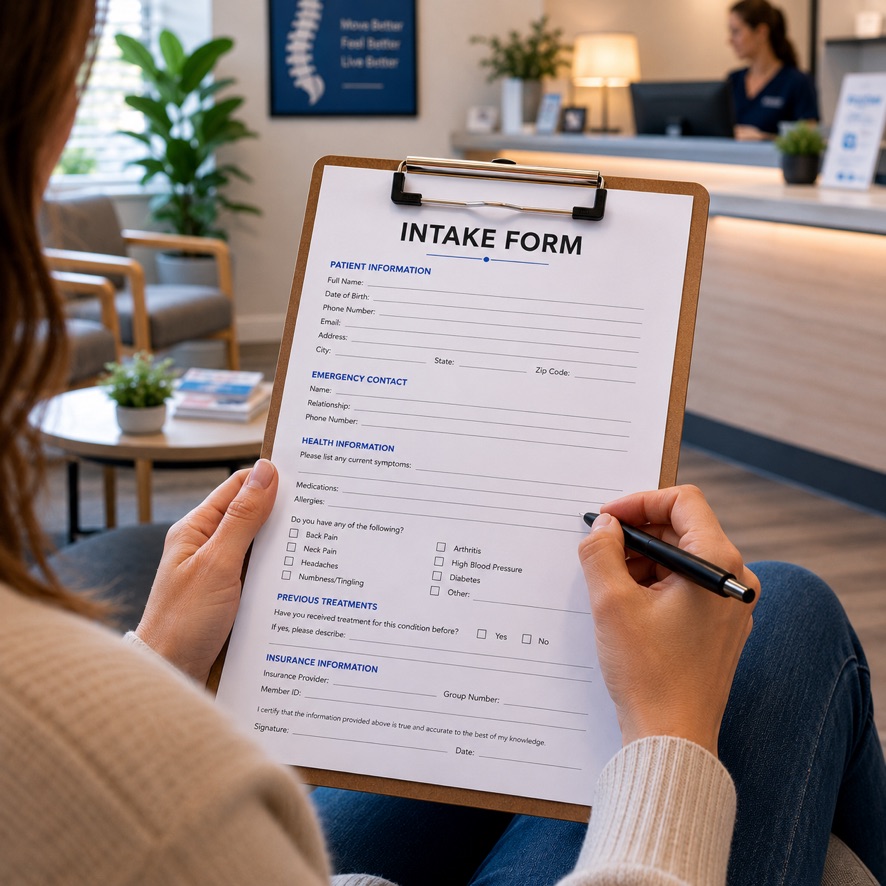
Paper intake forms are traditional documents that patients complete by hand, usually when they arrive for an appointment. After the forms are filled out, staff members typically review the information, manually enter it into patient records, and store the paperwork in filing cabinets or physical patient files.
Paper forms have been the standard procedure for many years. Some practices continue to use them because they require minimal technology and fit established workflows.
However, this method often creates additional administrative burden on the staff. They spend time on things like:
Deciphering handwriting
Correcting incomplete forms
Transferring information into digital systems
Locating documents when records need to be reviewed later
As patient volume grows, the paperwork also grows, resulting in a mess.
Patient Experience Comparison in Online Intake Forms vs Paper Forms
The intake process can influence a patient’s impression of your practice before they even meet the provider. While both methods serve the same purpose, the experience of completing them is quite different.
Convenience Before the Appointment
One of the biggest advantages of digital intake forms is that patients get a chance to prepare ahead of time. This is especially helpful for new patients, busy professionals, parents, and anyone who doesn’t want to spend extra time remembering and filling out information on the go. Instead of rushing to fill out paperwork in the waiting room, they can take their time reviewing questions and providing accurate information from the comfort of their home.
Accessibility and Mobile Completion
Often, patients expect the same convenience from healthcare providers that they receive from other online services. This means that some people may want to complete intake forms on a smartphone, tablet, or computer while commuting or during their spare time before the appointment. This flexibility can make the intake process feel less like paperwork and more like a seamless part of the appointment journey.
Administrative Efficiency Comparison
While patient convenience is important, the biggest difference between paper and online intake forms is often felt behind the scenes. Every additional step in the intake process creates additional work and pressure for the front desk staff, assistants, and practitioners.
Paper forms require information to move through multiple stages before it becomes useful. Here’s what you get with switching from traditional intake forms to digitized ones.
Less Manual Data Entry
Staff need to transfer information from handwritten documents to patient records, spreadsheets, and practice management software from every paper form. While entering data from a single can take a few minutes, imagine how those minutes multiply with 20 to 30 patients per day.
Online intake forms reduce or eliminate tasks such as:
Re-entering patient demographics
Updating contact information manually
Entering insurance details
Uploading scanned paperwork
Correcting handwriting-related mistakes
The result is less repetitive administrative work and more time for patient-facing responsibilities.
Fewer Missing Fields and Incomplete Forms
It’s totally understandable that anyone filling in a form during those 5-10 minutes before the appointment will most probably submit it with some missing details.
Common examples include:
Missing signatures
Incomplete medical history
Unanswered consent questions
Missing emergency contacts
Forgotten insurance information
While it may seem okay for a patient, front desk workers are forced to track down the patient, request additional information, and often delay the check-in process.
Online intake forms can help reduce these issues by guiding patients through required sections before submission. Instead of discovering missing information at the appointment, practices receive more complete records from the start.
Faster Patient Check-In
Not every patient comes early enough to go through the intake process.
Therefore, patient check-in often becomes one of the busiest moments of the day for front desk teams.
With paper forms, the process may involve:
Providing paperwork
Waiting for completion
Reviewing for missing information
Collecting signatures
Entering data into records
Filing the documents
With online intake forms, this workflow just includes confirming appointment details and keeping schedules running on time, rather than managing endless paperwork.
Easier Record Management
Paper records create challenges long after the intake process is complete.
Staff may need to:
Search through filing cabinets
Retrieve archived documents
Make physical copies
Organize storage space
Track down misplaced paperwork
As practices grow, these challenges often become more frequent.
Digital intake forms make information easier to access, update, and review when needed. Whether a practitioner needs to check a patient’s health history before an appointment or a front desk team needs to verify contact information, records can be located much faster.
This becomes especially important for practices with multiple providers, multiple locations, or a high volume of returning patients, where quick access to accurate information directly affects the quality and speed of care.
How Ruana Simplifies Patient Intake
Switching from paper forms to online intake forms is often the first step toward a more efficient practice. However, many clinics quickly discover that replacing paper alone does not solve every administrative challenge.
In some cases, patient information is collected digitally but still needs to be transferred between multiple systems for scheduling, documentation, billing, and patient management. This can create new bottlenecks even after the practice has chosen to go paperless.
Ruana was built by a chiropractor and a medical doctor who experienced these challenges firsthand while managing a busy practice. Instead of treating intake forms as a standalone feature, the team behind Ruana designed the software around the entire patient journey, from appointment booking to documentation and checkout.
The biggest advantage is that the intake information doesn’t exist in isolation. It becomes part of a connected workflow that supports:
Online appointment booking
Scheduling and calendar management
Digital intake forms
Patient records
SOAP notes and charting
Appointment reminders
Billing and superbills
Practice reporting and analytics
Because staff and practitioners can access the information they need from a single system, there is less time spent switching between tools, searching for records, or manually transferring information between workflows.
💡According to Ruana’s internal experience managing a high-volume wellness practice, optimizing these workflows can help save 3-4 hours of administrative work per day while improving organization and reducing operational friction across the clinic.
Data Accuracy and Security
Collecting information is only useful if the data is accurate, complete, and easy to access when needed. With paper forms, none of these points gets a 100% guarantee. While paper has been used for decades, it often introduces challenges that affect record quality.
This brings us to some of the most common problems associated with paper forms:
Illegible handwriting
Missing signatures or required fields
Lost or misplaced paperwork
Duplicate data entry
Outdated patient information
Filing and storage errors
Security can also become a concern with paper-based records. Physical documents can be viewed by unauthorized individuals, damaged, or accidentally discarded. As patient volumes grow, maintaining secure storage and controlling access to paper records often becomes more difficult than managing information within a dedicated digital system.
If your practice has a low patient volume yet, working with paper intake can somehow be justified. But as a practice grows, administrative processes often become more difficult to manage. If the intake process is creating delays, consuming staff resources, or making it harder to stay organized, it may be time to consider a digital alternative.
Use the checklist below to evaluate your current workflow.
✓ New patient paperwork regularly creates bottlenecks during busy hours
✓ Staff spend time scanning, filing, or organizing physical documents
✓ Patient files are stored in multiple locations or systems
✓ Providers do not always have access to patient information before appointments
✓ Updating forms or consent documents requires printing new copies
✓ Staff frequently answer questions about how to complete paperwork
✓ Storage space for records continues to grow each year
✓ Finding older patient information takes longer than it should
✓ Front desk staff feel overwhelmed during peak appointment times
✓ Your practice is planning to add providers, locations, or appointment volume
✓ You want a more consistent intake experience for every patient
✓ Administrative tasks are taking time away from patient care and business growth
If several of these statements sound familiar, the issue may not be the forms themselves but the workflow surrounding them. This means it’s time for you to give it a try to digital practice management software preferably with built-in intake tools.
Final Thoughts
Finally, when facing the online intake forms vs paper forms dilemma, the decision is often less about technology and more about efficiency. Paper forms can still get the job done, but they also create additional administrative work and can quickly become a reason for therapist burnout.
Going digital is how you maintain a healthy work environment and a pleasant patient experience. By reducing paperwork and simplifying administrative processes, online intake forms allow you to spend less time on routine tasks and more time focusing on patient care.
Whether you’re a solo practitioner or managing a growing wellness practice, moving away from paper forms can be a practical step toward a more organized and efficient workflow.
Ruana is dedicated to helping chiropractors, massage therapists, and wellness practices move beyond paper-based processes by combining online intake forms, scheduling, patient records, SOAP notes, and billing in a single system.
About the Authors
★★★★★4.9 · 329 Reviews
Rouzbeh NoroozyChiropractor & Co-Founder · Palmer West · UC Berkeley · 14 Years of ExperienceRouzbeh Noroozy is a chiropractor with 14 years of clinical experience and co-founder of Ruana practice management software. He completed his undergraduate studies at the University of California, Berkeley and graduated from the renowned Palmer College of Chiropractic West in California. As a practicing clinician and clinic owner, he understands firsthand the administrative challenges practices face — and which digital tools genuinely help streamline day-to-day operations.
Anastasiia NoroozyMedical Graduate & Co-Founder · 8 Years of ExperienceAnastasiia Noroozy is a medical graduate and co-founder of Ruana with 8 years of experience working directly with patients at the clinic in Cologne. She manages the day-to-day flow of the practice and knows every patient-facing process from the inside out — from intake and scheduling to follow-up care. Her hands-on clinical and operational experience directly shapes how Ruana is built to work in the real world.
Our team will review your inquiry and get back to you as soon as possible.
Privacy Settings
To provide the best experiences, we use technologies like cookies to store and/or access device information. Consenting to these technologies will allow us to process data such as browsing behavior or unique IDs on this site. Not consenting or withdrawing consent, may adversely affect certain features and functions.
Functional
Always active
The technical storage or access is strictly necessary for the legitimate purpose of enabling the use of a specific service explicitly requested by the subscriber or user, or for the sole purpose of carrying out the transmission of a communication over an electronic communications network.
Preferences
The technical storage or access is necessary for the legitimate purpose of storing preferences that are not requested by the subscriber or user.
Analytics
The technical storage or access that is used exclusively for statistical purposes.The technical storage or access that is used exclusively for anonymous statistical purposes. Without a subpoena, voluntary compliance on the part of your Internet Service Provider, or additional records from a third party, information stored or retrieved for this purpose alone cannot usually be used to identify you.
Marketing
The technical storage or access is required to create user profiles to send advertising, or to track the user on a website or across several websites for similar marketing purposes.
To provide the best experience for our practitioners, we use cookies to personalize content, analyze our traffic, and support our marketing efforts. By clicking 'Accept', you consent to our use of these technologies. You can manage your preferences at any time.
Functional
Always active
The technical storage or access is strictly necessary for the legitimate purpose of enabling the use of a specific service explicitly requested by the subscriber or user, or for the sole purpose of carrying out the transmission of a communication over an electronic communications network.
Preferences
The technical storage or access is necessary for the legitimate purpose of storing preferences that are not requested by the subscriber or user.
Analytics
The technical storage or access that is used exclusively for statistical purposes.The technical storage or access that is used exclusively for anonymous statistical purposes. Without a subpoena, voluntary compliance on the part of your Internet Service Provider, or additional records from a third party, information stored or retrieved for this purpose alone cannot usually be used to identify you.
Marketing
The technical storage or access is required to create user profiles to send advertising, or to track the user on a website or across several websites for similar marketing purposes.