How to Market Chiropractic Services: 11 Strategies to Attract More Patients
02.10.26
Marketing chiropractic services is not about being everywhere at once. The goal is to help the right local patients find your practice, trust what they see, and take the next step toward booking an appointment.
Most chiropractic marketing advice stops at the wrong finish line. It treats visibility as the goal, as though the job is done once someone has seen your name.
The job is five steps long. The right local patient has to find you, trust you, book, and then walk through the door. Every step leaks. A clinic can rank first in the map pack and still lose the patient at a booking form that asks for a password, or at a Tuesday no-show nobody reminded.
Running a practice ourselves, we’ve collected eleven things worth doing, and one thing that quietly undoes all of them.
Start With a Chiropractic Marketing Strategy, Not a List of Tactics
Tactics without a strategy produce a clinic that is busy on Instagram and empty on Thursday afternoons. Two questions need real answers first.
Define the patients you want to attract
“More patients” is not a target. A clinic built around post-surgical rehab runs a different schedule, charges differently, and needs a different website than one built around desk workers with neck pain and runners with IT band problems.
Write down the three or four patient types you want more of, and for each note where they live or work, what made them start searching, what they fear, and what they will pay. Someone in pain for two years who has already seen a physiotherapist needs different reassurance than someone who tweaked their back lifting a suitcase.
That list becomes your main filter.
Match your marketing to patient intent
People searching for chiropractic care sit at different distances from booking. Some are naming a symptom, while others have two clinics open in two tabs.
Where the patient is
What they search
What has to be there
What happens next
Something hurts, no diagnosis
“lower back pain when sitting”
A plain explanation and when to see someone
Reads now, may book weeks later
Has decided they want a chiropractor
“chiropractor near me”
Location, hours, price range, booking button
Books within the hour
Choosing between two clinics
“[clinic name] reviews”
Reviews, real photos, practitioner bios
Books or leaves for good
Has a specific problem in mind
“sciatica chiropractor [city]”
A page on that condition and how you treat it
Books or calls
Ready, but worried about cost
“does insurance cover chiropractic”
An honest payments and insurance page
Calls, then books
Read that table as a budget.
The bottom four rows are where revenue comes from, so they get the service pages, the profile work, and the ad spend.
Row one builds the audience that fills those rows next quarter, which earns attention but not priority.
How to Market Chiropractic Services: 11 Ways to Try
We’ve ordered this list roughly by return on effort for a single-location clinic.
Do the first four, and you are already ahead of most practices in your postcode.
1. Optimize Your Google Business Profile
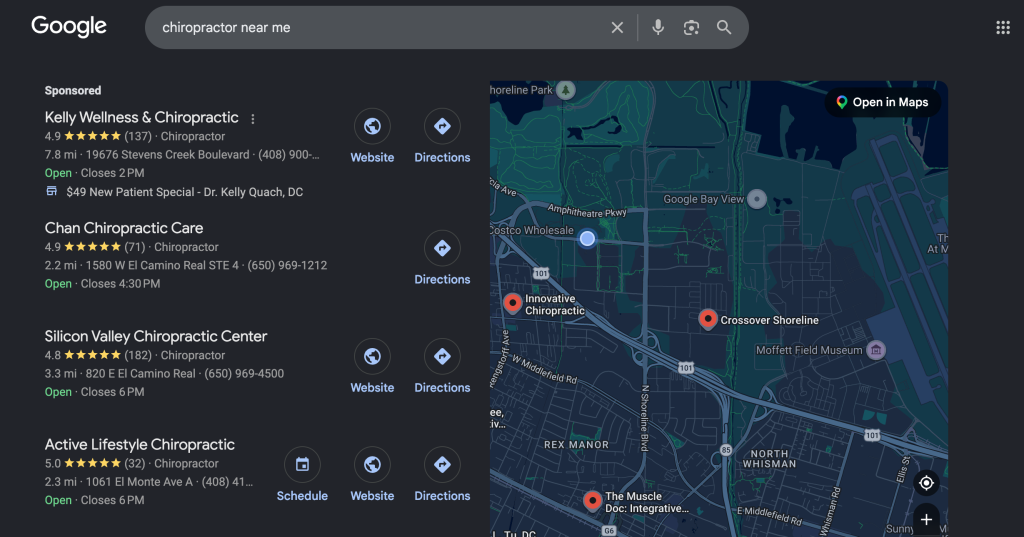
For a local clinic, the profile often gets seen more than the website. Google says local results are “mainly based on relevance, distance, and popularity,” and your profile is the main lever you hold over relevance.
Name, address, phone. Google requires your name to “reflect your business’s real-world name, as used consistently on your storefront, website, stationery.” Appending “Back Pain Relief Denver” is a documented suspension risk, not a clever trick.
Categories. Google’s test is to complete the sentence “This business IS a,” not “this business HAS a,” using as few as possible. Chiropractor is the obvious primary. Add others only if they describe what the business is.
Services. List what you treat in the words patients use, because Google surfaces these when someone searches for that offering.
Hours. Keep them current, and set special hours around holidays even when nothing changes.
Photos. Include real ones: treatment room, front desk, practitioners. Google’s guidance is that an image “should represent reality,” and a stock spine model fools nobody.
Questions and answers. Owners and managers can answer here. Answer what you field on the phone all day.
Updates. Post new services, schedule changes, and community events. Anything older than six months should get archived.
Booking link. Point it straight at your booking page. This one field turns a listing into an appointment.
One note: Google names relevance, distance, and prominence as ranking factors, and lists photos and review replies separately as general advice. Anyone promising that weekly posting lifts your map pack position has gone past what Google says.
Google cross-checks your details against the rest of the web, so the same name, address, and phone number must appear identically on your site, in directories, on insurer listings, and on association pages. Three other things move the needle: a page for each area you serve, genuine links from relevant sources, and LocalBusiness structured data on your contact page.
One trap worth naming. Marking up your own testimonials with reviews will not produce star ratings. Google is explicit that when “the entity that’s being reviewed controls the reviews about itself,” those pages “are ineligible for star review feature,” and that includes embedded Google review widgets.
3. Create Pages for the Chiropractic Services Patients Actually Search For
A service page exists to convert: what you do, for whom, at which address, at what price, with a booking button visible without scrolling. “Sciatica Treatment in [City]” is one. Name the condition, describe your approach in two paragraphs a patient can follow, say how many visits are typical, and end with a way to book. A blog post informs and earns trust rather than an appointment, which is where “why your sciatica gets worse at night” belongs.
Most clinics have a single services page listing eight treatments as bullets, and it competes for nothing. Split it into one page per condition you want to treat.
Optimize for AI search as well as traditional search
There is nothing separate to do. Google states that “there are no additional requirements to appear in AI Overviews or AI Mode, nor other special optimizations necessary,” and that no special markup or file is needed.
What helps is being worth quoting. Google distinguishes commodity content, “based on common knowledge, which could originate from anyone,” from content with a first-hand point of view. Describing what your adjustment feels like to a patient with a herniated disc is the second kind.
4. Make Your Chiropractic Website Easy to Trust and Easy to Book From
This is a conversion problem dressed as a design problem. Clinics redesign for aesthetics and wonder why bookings stay flat.
A patient landing on your homepage or a service page is silently asking six questions, and they leave if the answers are slow:
What do you treat?
Where exactly are you?
Who will actually be treating me?
What happens at my first appointment?
Do you take insurance, or is this cash-pay?
How do I book?
Answer all six above the fold or close to it.
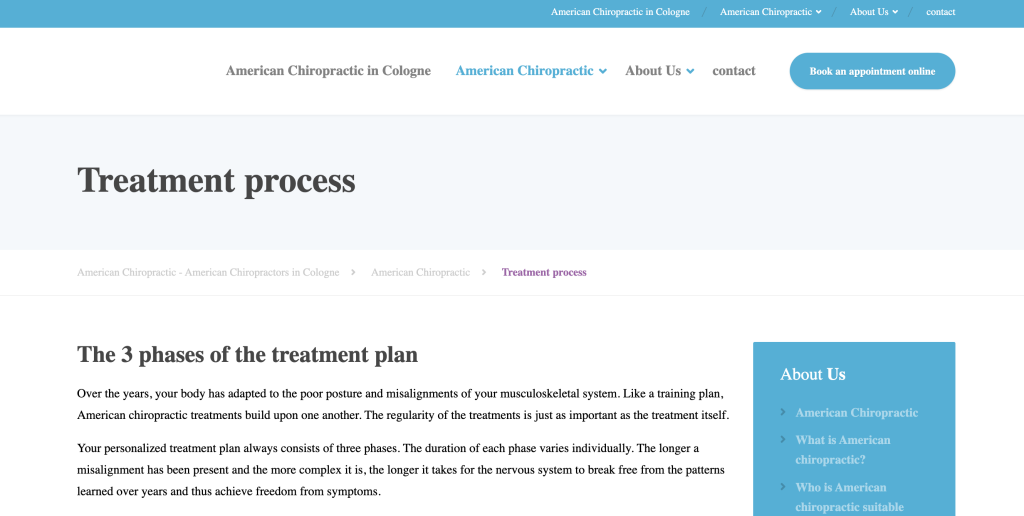
For instance, you may have a dedicated page explaining your treatment process as shown below.
Then check three things:
Load the site on your own phone on mobile data, because that is how most patients see it.
Keep the booking call to action one colour and one wording, repeated down the page.
Put practitioner credentials and photos where a nervous patient will find them. “Who will be touching my spine?” is the question behind most hesitation.
5. Make Online Booking Frictionless
Every field you add to a booking form loses people, and account creation loses the most.
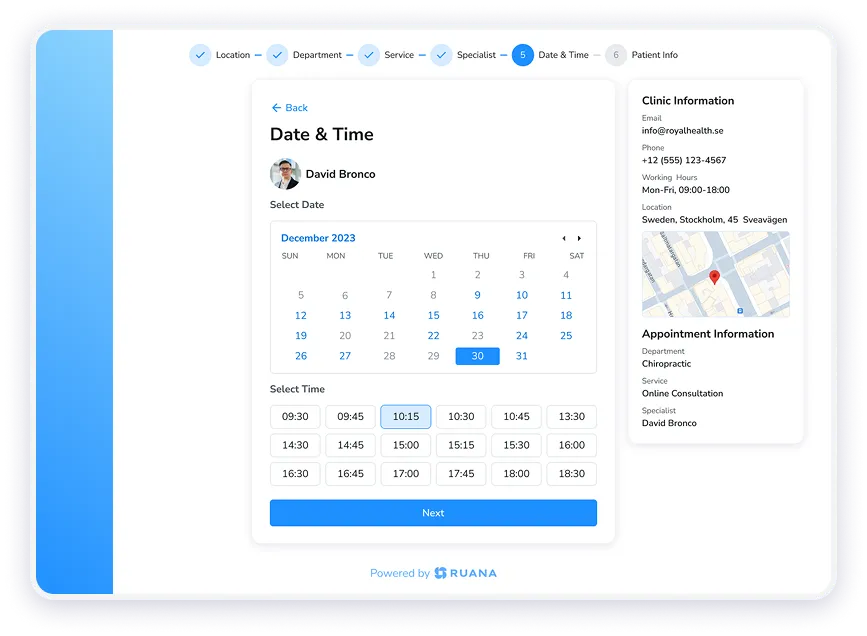
The version that works: a patient taps Book on your site or your Google profile, sees real availability, picks a slot, enters a name and contact details, and gets a confirmation. No password, no callback, no “we will be in touch.”
Practices that prefer to vet new patients keep control by accepting the request online and confirming afterwards.
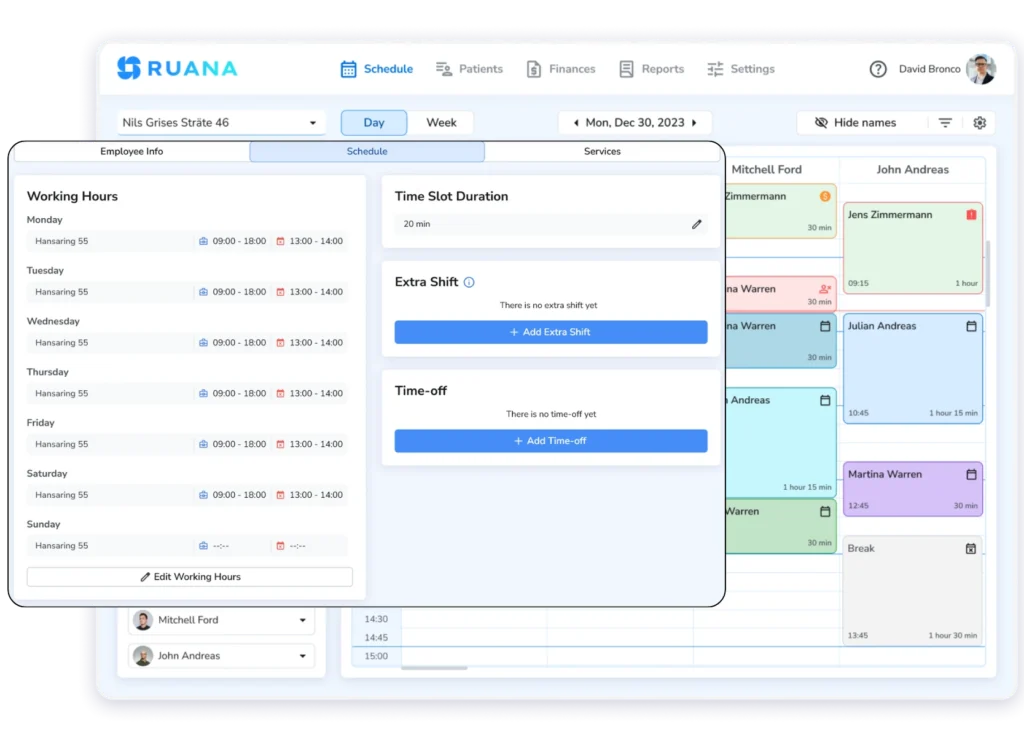
Ruana was built around this. Clients book as guests with no account, login or password, and can cancel or reschedule in one click from the confirmation email, which removes most of the calls your front desk fields. On the Professional plan, you can switch on appointment requests and approve each booking manually.
Reviews do double duty: they feed the prominence half of local ranking, and they are what a patient reads while choosing between you and the clinic two streets over.
You are allowed to ask. Google permits merchants to “solicit or encourage the posting of content that does represent a genuine experience.” The prohibitions are worth memorising, because well-meaning clinics break them constantly:
No incentives of any kind, including discounts or a free session.
No review gating. Google bars “selectively soliciting positive reviews” and discouraging negative ones, which makes the popular ask-the-happy-ones-only tactic a policy violation.
Nothing from staff, family or anyone with a conflict of interest.
No pressuring patients to review while they are still in the clinic.
The workable system is dull and effective: ask every patient at the same point in their care, send everyone the same link or QR code, reply to everything.
7. Use Google Ads for High-Intent Chiropractic Searches
Run Search campaigns. Google describes them as showing “ads to people actively searching online for your products and services,” which is the whole argument. Someone typing “emergency chiropractor open now” is not the person scrolling YouTube, and Display or Demand Gen will spend your budget on the second one.
Two settings decide whether local spend works. Location targeting defaults to “presence or interest,” which includes people who merely showed interest in your area, so switch it to Presence. Then add call assets, since many clinic enquiries arrive by phone. US clinics get an extra option: chiropractor is an eligible category for Local Services Ads, pay-per-lead placements carrying the Google Verified badge after licence and insurance checks.
The honest comparison: Google says SEO changes can “take effect in a few hours” or “could take several months,” and separately that “advertising with Google won’t have any effect on your site’s presence in our search results.” SEO builds an asset that keeps working. Ads rent visibility, and the rental ends the day you pause the campaign.
8. Publish Content Around the Questions Patients Ask Before Booking
“Just start a blog” is not the best advice you could get.
So, we’ve written down what our front desk answers every week to help come up with the first batch of blog articles.
What patients ask before booking
The page that answers it
Will the adjustment hurt?
What a first adjustment actually feels like
How much will this cost me?
Pricing, payment options and what insurance covers
How many visits will I need?
What a typical treatment plan looks like
Is this safe for me?
Chiropractic care during pregnancy, after 60, for children
Do I need a referral first?
How to book without a referral
How is this different from physio?
Chiropractor versus physical therapist
9. Use Social Media to Build Trust, Not Just Followers
Posting across four platforms is how clinics burn out without gaining a patient. Follower count is not the point; reducing the fear of a first appointment is. Content that does that job:
What actually happens during an adjustment, including the sound
A first-visit walkthrough, from the door to the invoice
Practitioner Q&As on the questions patients are too embarrassed to ask
Common misconceptions, answered without condescension
Two-minute mobility and desk ergonomics fixes
Behind the scenes, so the room stops being unfamiliar
Community involvement, which doubles as local visibility
Pick the one platform where your patient types already are, and do this properly there.
10. Reactivate Past Patients With Email and SMS
Your cheapest source of appointments is the list of people who already trusted you once, and most clinics never touch it.
Segment by last visit date and send something specific: a patient who finished a treatment plan eight months ago needs a different message from one who cancelled twice and vanished. Seasonal triggers work unusually well here, because gardening season, ski season, and the return to desk work produce predictable flare-ups.
This is straightforward when records, appointment history and communications sit in one system rather than three.
Offline still works, particularly for a business patients have to physically reach.
Workshops at local employers, workplace ergonomics sessions, sponsoring a running club or amateur sports team, partnering with gyms, and health fairs all put you in front of people whose bodies are already under load.
Keep it proportionate, though: search intent for chiropractic care is overwhelmingly digital.
Don’t Let the Patient Experience Undo Your Marketing
Your marketing does not end when the patient books a visit. It ends when they arrive, are treated well, and rebook. A patient you paid to acquire can still become a no-show at any of these points:
Vague first-visit instructions about parking, arrival time, or what to wear
Checkout that takes ten minutes and ends without the next appointment booked
Each is a small administrative failure, and together they cost more patients than any ranking problem.
That is why Ruana exists.
Booking, intake forms that go out automatically when a new client books, reminders, SOAP notes, invoicing, and rebooking sit in one place, so the patient your marketing worked to attract does not get lost between the website and the treatment room.
Bringing It Together
Two things decide whether chiropractic marketing works. Match what you publish to where the patient actually is, which puts most of your effort on the profile, the service pages, and the reviews people check while choosing. Then make sure nothing between the search result and the second appointment asks the patient to work.
Your message has been successfully sent.
Our team will review your inquiry and get back to you as soon as possible.
Privacy Settings
To provide the best experiences, we use technologies like cookies to store and/or access device information. Consenting to these technologies will allow us to process data such as browsing behavior or unique IDs on this site. Not consenting or withdrawing consent, may adversely affect certain features and functions.
Functional
Always active
The technical storage or access is strictly necessary for the legitimate purpose of enabling the use of a specific service explicitly requested by the subscriber or user, or for the sole purpose of carrying out the transmission of a communication over an electronic communications network.
Preferences
The technical storage or access is necessary for the legitimate purpose of storing preferences that are not requested by the subscriber or user.
Analytics
The technical storage or access that is used exclusively for statistical purposes.The technical storage or access that is used exclusively for anonymous statistical purposes. Without a subpoena, voluntary compliance on the part of your Internet Service Provider, or additional records from a third party, information stored or retrieved for this purpose alone cannot usually be used to identify you.
Marketing
The technical storage or access is required to create user profiles to send advertising, or to track the user on a website or across several websites for similar marketing purposes.
To provide the best experience for our practitioners, we use cookies to personalize content, analyze our traffic, and support our marketing efforts. By clicking 'Accept', you consent to our use of these technologies. You can manage your preferences at any time.
Functional
Always active
The technical storage or access is strictly necessary for the legitimate purpose of enabling the use of a specific service explicitly requested by the subscriber or user, or for the sole purpose of carrying out the transmission of a communication over an electronic communications network.
Preferences
The technical storage or access is necessary for the legitimate purpose of storing preferences that are not requested by the subscriber or user.
Analytics
The technical storage or access that is used exclusively for statistical purposes.The technical storage or access that is used exclusively for anonymous statistical purposes. Without a subpoena, voluntary compliance on the part of your Internet Service Provider, or additional records from a third party, information stored or retrieved for this purpose alone cannot usually be used to identify you.
Marketing
The technical storage or access is required to create user profiles to send advertising, or to track the user on a website or across several websites for similar marketing purposes.