


Reporting & Analytics Software for Chiropractors & Wellness Practices
See what is really happening across your practice and make decisions with the numbers in front of you. Ruana’s practice analytics software brings financial and appointment data into clear, easy-to-read reports built for chiropractors and wellness teams.

Built for practices that need clear reporting without compromising patient privacy.
Ruana supports HIPAA-compliant workflows, role-based access, and secure handling of patient and practice data, so your team can review financial and operational insights with confidence.



See How Reporting and Analytics Work in Ruana
Turn everyday practice activity into reports you can actually use. Choose what you want to review, narrow the data to the period or part of the practice that matters, and quickly see the numbers behind your operations.
Choose Your Report
Start with the area you want to understand, from revenue and transactions to appointments, packages, memberships, or other practice activity. Ruana keeps reporting organized so you can get to the relevant numbers without building spreadsheets from scratch.

Filter What Matters
Set a custom date range and narrow results by practitioner, service, location, or other available criteria. Focus on a specific week, compare periods, or look more closely at one part of the practice instead of sorting through unrelated data.

Review Practice Performance
See financial and appointment activity in clear reports that help turn raw numbers into useful context. Track revenue, sales, transactions, cancellations, no-shows, and other trends that can reveal where the practice is performing well or needs attention.
Export When Needed
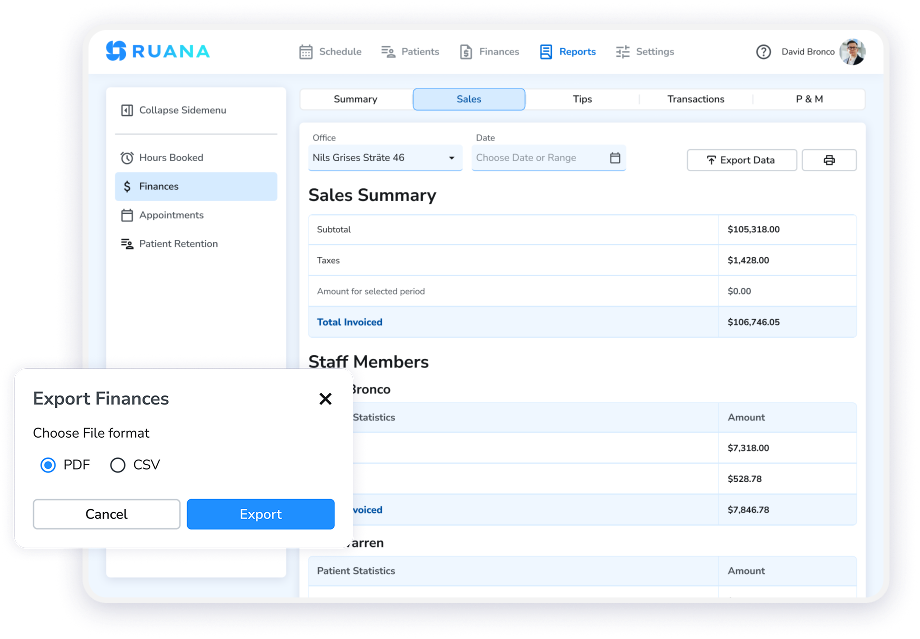
Take your reporting beyond the dashboard when necessary. Print or export reports to PDF for internal reviews, recordkeeping, accounting conversations, or a closer look at performance outside Ruana.
Reporting and Analytics Software That Makes Your Numbers Easier to Use
Ruana turns the activity already happening inside your practice into clearer financial and operational visibility. Instead of piecing together sales, transactions, appointment outcomes, and package activity from different places, you can review the numbers that matter from one reporting area.
See Where Revenue Comes From
Get a clearer picture of the money moving through your practice without rebuilding reports manually.
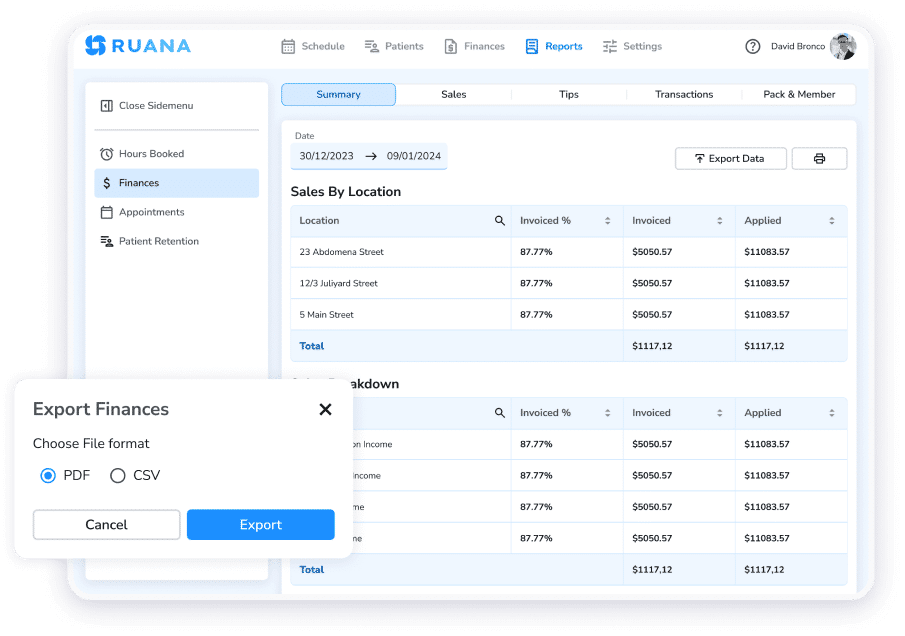
Review revenue by location, making it easier for multi-location practices to see how different parts of the business are contributing. The result is a more practical financial view for day-to-day management, internal reviews, and conversations with the people helping you run the practice.
Understand What Happens to Booked Time
Revenue tells only part of the story. Ruana’s appointment reporting helps you see how scheduled time actually turns out by showing Completed, No Show, and Cancelled appointment totals.
Filter appointment data by location, practitioner, patient, or service to look more closely at the part of the schedule you care about. See what actually happens once those appointments reach the day, instead of judging clinic activity by how full the calendar looks.
Keep Packages and Memberships Visible
Keep package and membership activity organized alongside the rest of your financial reporting instead of relying on separate spreadsheets or manual tracking.
Ruana gives these programs their own reporting view, helping your team keep important package and membership information easier to review. For chiropractic, massage therapy, and other recurring-care practices, this provides better visibility into an important part of the client relationship.

Give Practice Owners a Clearer View
Use the reports for regular owner check-ins, operational reviews, recordkeeping, or conversations with a business partner.
When you need the numbers outside Ruana, print the report or save it as a PDF. It is a simpler way to keep practice performance visible without turning reporting into another manual admin project.

Turn Practice Data Into Better Decisions
See the numbers that matter, spot what needs attention, and keep financial and appointment performance easier to interpret.
Start your free 14-day trial. No credit card. No commitment.
Reporting and Analytics Connected to the Full Ruana Workflow
Reporting is more useful when it reflects the full patient and practice journey. In Ruana, the data behind bookings, appointments, intake, documentation, billing, and reminders feeds into the same connected workflow, giving owners a clearer view of what is happening across the practice.
Instead of pulling numbers from separate tools, review performance at the end of a workflow that already lives in one system.

Reporting and Analytics Software Built for Different Wellness Practices
Different practices need different answers from their data. Ruana helps owners and teams use reporting in a way that matches how they operate, whether that means tracking appointment outcomes, reviewing revenue, or keeping a closer eye on recurring services and multiple locations.
Chiropractors
Use Ruana as a practice performance dashboard to understand how your clinic is performing beyond the treatment room. Review revenue, appointment outcomes, practitioner activity, and location-level performance to get a clearer picture of what is working and where attention is needed.

Massage Therapists
Keep a closer view of bookings, completed sessions, cancellations, no-shows, packages, memberships, and payment activity. Ruana helps massage practices connect day-to-day client activity with the financial side of the business without relying on separate spreadsheets.

Growing Wellness Practices
As your team, services, or locations expand, reporting gets harder to manage manually. Ruana helps growing practices filter appointment data by practitioner, service, patient, or location and review financial performance across the business from one reporting area.

Frequently Asked Questions About Ruana’s Reporting and Analytics Features
Have questions about reports, filters, or exports? Here is what you need to know about practice analytics in Ruana.
What reports are available in Ruana?
Ruana includes five dedicated financial report views: Summary, Sales, Tips, Transactions, and Packages & Memberships.
There is also a separate Appointments report that shows Completed, No Show, and Cancelled appointment totals, along with a detailed table containing information such as location, patient, date, service, practitioner, and status.
What financial information can I track in Ruana?
Ruana lets you review high-level revenue information, sales activity, tips, individual transactions, and package and membership data.
The Summary report also breaks revenue down by location, making it useful for practices that want a clearer view of where their income is coming from.
Can I track cancellations and no-shows?
Yes. Ruana’s Appointments report shows totals for Completed, No Show, and Cancelled appointments.
This gives practice owners a clearer picture of what happened to booked time during a selected period and can help identify whether missed or cancelled appointments deserve closer attention.
Can I filter reports by practitioner or service?
Yes. You can search and filter appointment data by location, patient, practitioner, or service.
This makes it easier to narrow a larger schedule down to the part of the practice you want to review instead of working through every appointment manually.
Does Ruana report on packages and memberships?
Yes. Ruana includes a dedicated Packages & Memberships report that helps practices review usage and outstanding balances related to recurring revenue products.
Can I export Ruana reports?
Yes. Ruana reports can be printed or saved as PDFs.
You can keep copies for your records, review numbers outside the platform, prepare for tax season, or share relevant reports with a business partner.
Stop Guessing and Start Running Your Practice by the Numbers
See where revenue is coming from, understand what is happening across your schedule, and keep the numbers behind your practice easier to review. Put your financial and appointment data to work with Ruana.