How to Start a Chiropractic Practice: 9 Essential Steps to Launch Your Clinic in 2026
10.03.26
Thinking about opening your own chiropractic clinic? This step-by-step guide walks you through 9 essential steps - from writing your business plan and getting licensed to setting up your scheduling software and filling your first week of appointments. Whether you're a new DC or finally making the leap to private practice, here's everything you need to launch with confidence in 2026.
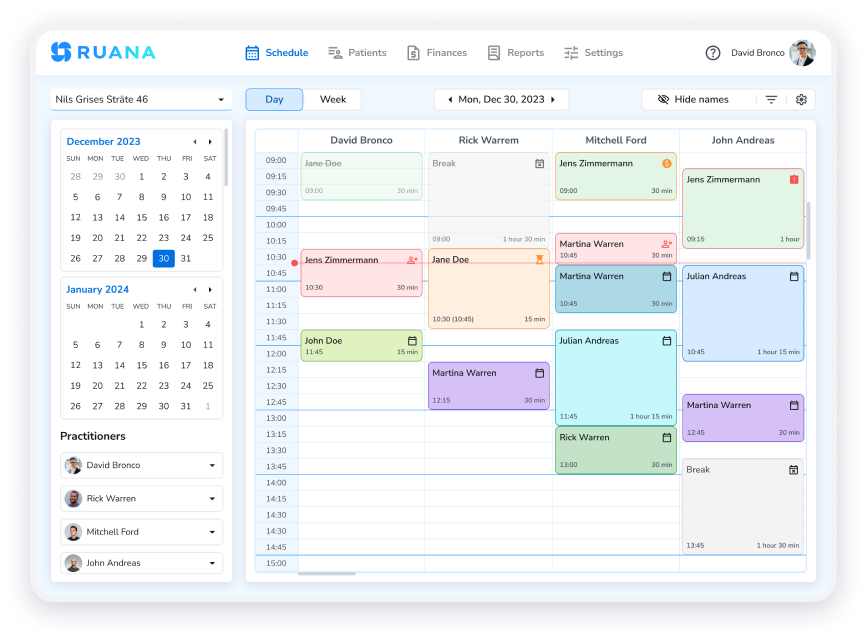
Ruana’s all-in-one dashboard gives chiropractic clinics a clear view of their schedule, patients, and practice performance.
If you’re planning on how to start a chiropractic practice, you’ve already made the most important decision – committing to building something that’s truly yours. You spent years mastering adjustments, studying biomechanics, and earning your Doctor of Chiropractic degree. Now, however, the challenge shifts from clinical skill to business execution. In fact, the difference between clinics that thrive and those that struggle often comes down to preparation — not technique.
This guide walks you through 9 essential steps to start a chiropractic practice, from your very first business plan to filling your first week of appointments. Along the way, you’ll also see exactly how purpose-built software like Ruana’s chiropractic practice management software removes the administrative burden – so you can focus on patient outcomes, not paperwork.
Quick tip: Practices that set up their operations systems – scheduling, intake, and billing – before opening day report far smoother launches. Don’t leave software for the last minute.
STEP 1
Step 1: Write a Business Plan Before You Start a Chiropractic Practice
Before signing a lease or ordering equipment, put your vision on paper. When you start a chiropractic practice, a solid business plan forces you to think through every aspect of your clinic – and it’s the document lenders, landlords, and potential business partners will ask to see. Furthermore, it keeps you accountable to your own financial goals.
Your plan should cover:
Practice vision and niche — sports chiropractic, family wellness, workers’ compensation, or a mix?
Target patient demographics — age range, insurance types, referral sources
Revenue projections — visit volume targets, average case value, break-even timeline
Competitive analysis — how many chiropractic clinics are within 10 miles? What do they charge?
Growth milestones — when will you hire an associate or front-desk staff?
Many new DCs underestimate startup costs. Common first-year expenses include: malpractice insurance ($1,500–$4,000/year), chiropractic tables ($2,000–$12,000), EHR/practice management software, marketing budget, and working capital for the first 90 days before reimbursements arrive.
Example: Dr. Maria opens a solo practice targeting active adults and weekend athletes. Her business plan projects 15 new patients per month in year one, growing to 35 by month 18. She budgets $1,200/year for practice management software – a small fixed cost that replaces a part-time front desk hire.
STEP 2
Step 2: Choose the Right Legal Structure for Your Chiropractic Practice
The legal structure you choose affects taxes, liability, and how you can bring in partners later. Most solo chiropractors launch as an LLC or Professional Corporation (PC), depending on their state’s rules for licensed healthcare providers.
Common structures for chiropractic clinics:
Sole Proprietorship — simplest, but offers no liability protection
LLC — separates personal and business assets; widely recommended for solo DCs
Professional Corporation (PC) — required in some states for licensed healthcare providers; consult your state chiropractic board
Partnership — when opening with a co-owner; requires a detailed operating agreement
After forming your entity:
Register with your state’s Secretary of State office
Obtain a Federal EIN (Employer Identification Number) from the IRS – free and takes minutes online
Open a dedicated business bank account to separate personal and practice finances
Choose and configure business accounting software before your first transaction
Consult a healthcare attorney or CPA who works with medical professionals. The hour of advice you pay for now can save you from costly mistakes in year two.
STEP 3
Step 3: Get Licensed and Insured – A Must Before Opening Your Chiropractic Clinic
You cannot legally see patients until your licensing and credentialing are in place. Moreover, this step takes longer than most new DCs expect when they start a chiropractic practice – so begin it early, ideally 3-6 months before your planned opening date.
Licensing checklist:
State chiropractic license (verify your CE requirements are met)
DEA registration if you plan to dispense any regulated products
National Provider Identifier (NPI) – register at nppes.cms.hhs.gov
Business license from your city or county
Certificate of Occupancy for your clinic space
Insurance you’ll need:
Malpractice / professional liability insurance
General liability insurance
Commercial property insurance
Workers’ compensation (once you hire staff)
Insurance credentialing (if accepting insurance):
Credentialing with insurance panels – Medicare, Medicaid, and private insurers – can take 60–120 days. Submit applications before you open, not after. Verify your NPI and taxonomy code are correct before submitting to any panel.
HIPAA note: Once you begin storing patient records, you are a HIPAA-covered entity. Your practice management software should support your HIPAA compliance obligations from day one. Ruana is built with security infrastructure that includes enterprise-grade encryption, automatic daily backups, and hosting on secure AWS servers – giving you a strong technical foundation for protecting patient data.
STEP 4
Step 4: Find and Set Up the Right Space for Your Chiropractic Practice
Location directly impacts patient volume when you start a chiropractic practice. You want visibility, parking, and proximity to your target demographic. For example, a sports chiropractic clinic belongs near gyms and athletic facilities, while a family wellness practice benefits from being close to schools and pediatric offices. Additionally, ground-floor access matters more in chiropractic than almost any other healthcare setting – injured patients should never need to climb stairs to reach you.
What to look for in a chiropractic space:
Ground-floor access (avoiding elevator barriers for injured patients)
Minimum 800–1,200 sq ft for a solo practice (waiting room, front desk, 2 treatment rooms, restroom)
ADA-compliant layout
Sufficient electrical for equipment (X-ray, ultrasound, e-stim)
Lease flexibility – look for 2–3 year initial terms with renewal options
Essential chiropractic equipment:
Chiropractic adjusting table (flexion-distraction, drop, or flat – depends on your technique)
Massage table for soft tissue work or therapeutic massage services
Reception desk, waiting room seating, signage
Budget for a professional buildout if the space needs partitioned treatment rooms. Get multiple contractor bids, and clarify what the landlord will contribute as a tenant improvement allowance.
See How Ruana Streamlines Chiropractic Clinics
Online booking, SOAP notes, automated reminders, invoicing, and more – built specifically for health and wellness practitioners. Explore Chiropractic Features →
STEP 5
Step 5: Set Up Chiropractic Practice Management Software Before Day One
This is the step most new chiropractors delay – and consequently the one that causes the most chaos at launch. Your chiropractic practice management software is the operational backbone of your clinic. It handles scheduling, patient intake, clinical documentation, and billing. Therefore, get it fully configured before your first patient walks in.
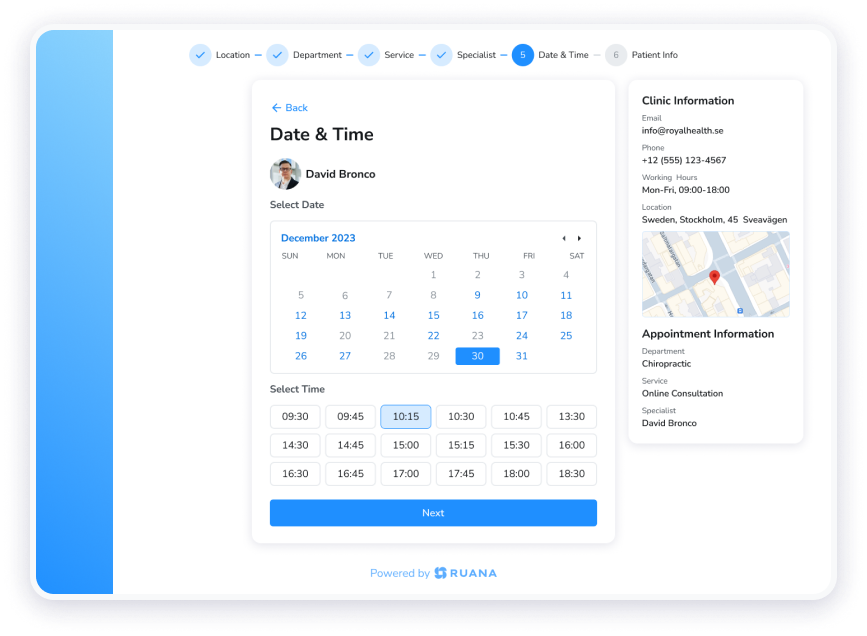
Ruana’s 24/7 online booking page lets new chiropractic patients schedule their own appointments — no phone tag required.
What to configure in your practice management software before opening:
Appointment types — new patient exam, chiropractic adjustment, physiotherapy, re-evaluation
Availability and hours — set your working hours and block personal time
Online booking page — Ruana gives patients a direct booking link they can access 24/7 from any device
Automated email and SMS reminders — automatically sent to reduce no-shows before you’re even in the office
Digital intake forms — build a custom new patient health history form so patients complete paperwork before arrival
SOAP note templates — set up your documentation workflow so notes take minutes, not a half-hour after hours
Invoicing templates — configure your fee schedule for billing patients and generating receipts
Ruana pricing for new chiropractic practices:
Solo Plan — $35.99/month: Unlimited appointments/month, online booking, email & SMS reminders, digital intake forms, basic SOAP notes, invoicing
Professional Plan — $55.99/month: Unlimited appointments, advanced SOAP notes with automatic note generation, full reporting and analytics, memberships & packages
Additional practitioners: $19.99/month each
Both plans include a 14-day free trial – no credit card required to start. Check the full feature breakdown at Ruana’s pricing page.
Pro tip: Ruana offers free data migration. If you’re switching from another platform or even a spreadsheet, your patient records can be imported at no extra cost.
STEP 6
Step 6: Build a Patient Intake and Documentation System for Your Chiropractic Practice
Great clinical outcomes depend on thorough documentation. As you start a chiropractic practice, new patient paperwork, consent forms, health histories, and ongoing SOAP notes become the legal and clinical record of every care decision you make. As a result, getting your documentation system right from the start protects both your patients and your license.
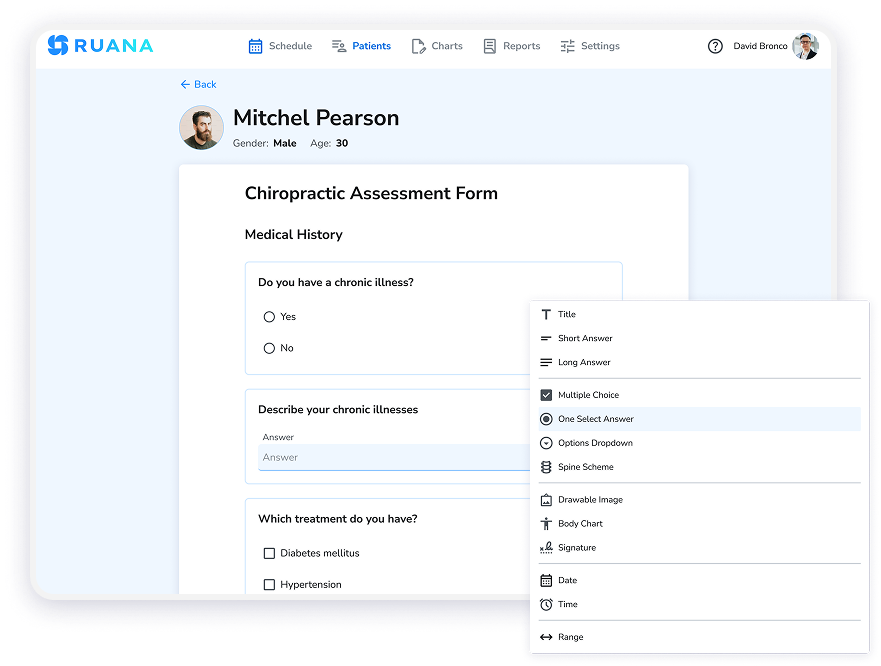
Ruana’s custom form builder lets you create paperless chiropractic intake forms that patients complete digitally before their first visit.
Forms every chiropractic practice needs:
New patient health history questionnaire
Informed consent for chiropractic treatment
Financial policy and assignment of benefits
HIPAA Notice of Privacy Practices (acknowledgment signature)
Outcome assessment tools (Oswestry, NDI, VAS pain scale)
With Ruana, you build all of these as custom digital forms that patients complete on their phone or computer before arriving. No clipboards, no scanning, and no filing. Instead, responses are stored directly in the patient record automatically.
SOAP notes: your daily documentation backbone
SOAP (Subjective, Objective, Assessment, Plan) notes are the standard for chiropractic clinical documentation. They support insurance billing, defend against audits, and demonstrate the medical necessity of care. Ruana’s Solo Plan includes standard SOAP note templates; the Professional Plan adds advanced SOAP notes with automatic note generation that dramatically reduces documentation time.
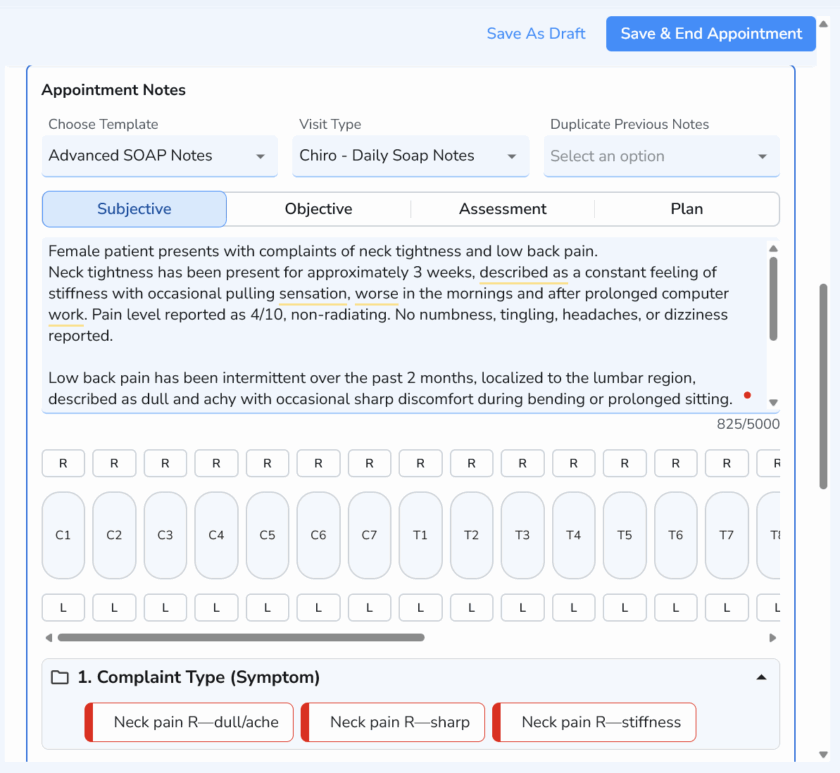
Document patient visits faster with structured Advanced SOAP Notes, including symptoms, spinal levels, and automated selections.
Ruana’s SOAP note system provides structured chiropractic documentation that supports insurance billing, audits, and continuity of care.
STEP 7
Step 7: Set Up Billing and Financial Reporting for Your Chiropractic Clinic
Cash flow makes or breaks a new chiropractic practice. Whether you’re cash-pay only, insurance-based, or a hybrid model, you therefore need a reliable system for issuing invoices, tracking revenue, and understanding your clinic’s financial health from day one.
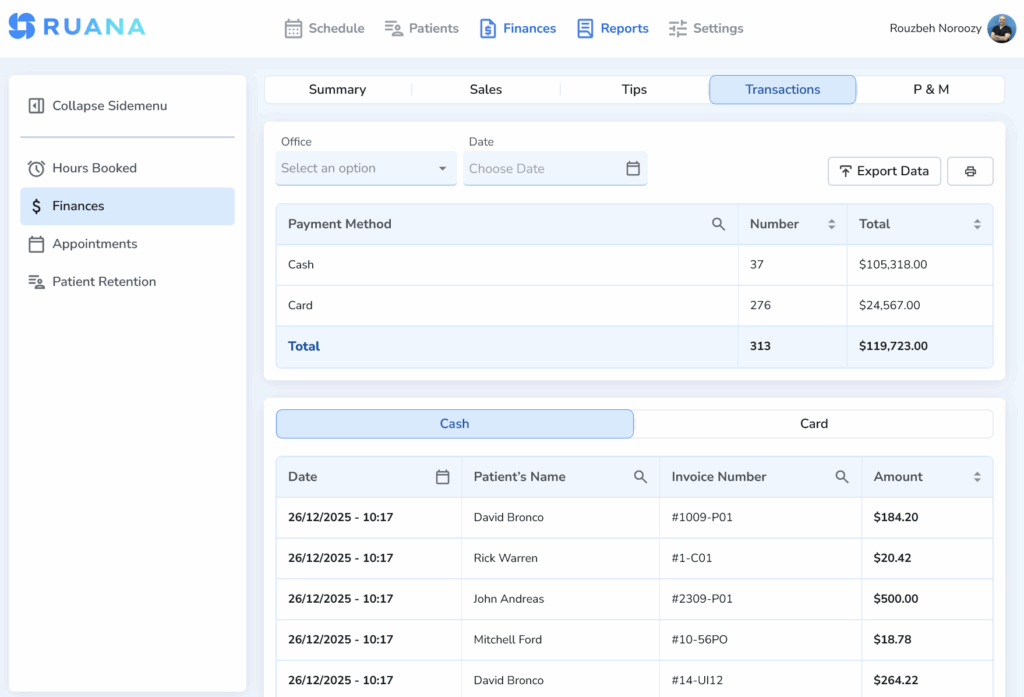
Ruana’s financial reporting dashboard gives chiropractors a clear breakdown of revenue by service, time period, and practitioner.
Billing essentials for new chiropractic practices:
Invoicing — generate professional invoices and receipts for every visit; Ruana automates this
Superbills — for patients who self-pay and submit to insurance themselves, provide superbills with CPT codes and diagnosis codes
Packages and memberships — offer prepaid care plans (e.g., “12-visit adjustment package”) that improve patient retention and smooth out your revenue
Revenue tracking — monitor income by service type, visit volume, and time period with Ruana’s analytics dashboard
Note on online payments: Ruana handles invoicing and billing records. Patients pay in the office and receive professional invoices and receipts. This keeps your front-desk workflow simple and compliant.
Ruana’s Professional Plan includes detailed financial reporting – revenue trends, appointment analytics, and downloadable reports – giving you the data to make smart decisions as your practice grows.
STEP 8
Step 8: Reduce No-Shows at Your Chiropractic Practice with Automated Reminders
No-shows are one of the most damaging problems when you start a chiropractic practice. An empty appointment slot represents both lost revenue and lost clinical progress that can’t be recovered. Furthermore, studies consistently show that automated appointment reminders reduce no-show rates by 30–50%.
Ruana automatically sends email and SMS appointment reminders to chiropractic patients – reducing no-shows without any manual effort.
Ruana’s dual-channel reminder system:
Email reminders — sent automatically with appointment time and details. No manual sending required. Every patient on your schedule gets a reminder without you or your staff lifting a finger.
SMS reminders — text messages have a 98% open rate compared to roughly 20% for email. Ruana’s SMS reminders reach patients who miss emails and give them a fast, frictionless way to confirm or cancel.
Together, email and SMS reminders create a safety net that keeps your schedule full and your patients showing up for the care they need. For a new practice where every appointment matters, this feature alone pays for the cost of the software.
Real-world impact: Shawn, who operates a health and wellness practice using Ruana, reports seeing 20–25 patients daily with significantly reduced no-shows after implementing Ruana’s automated reminder system.
STEP 9
Step 9: Market Your New Chiropractic Practice and Fill Your Schedule
Great systems and a beautiful clinic mean nothing without patients. Consequently, your marketing strategy for year one should focus on high-ROI activities: local SEO, Google Business Profile, referral networks, and getting your first 20 patients so enthusiastic they become ambassadors. In short, marketing is the final piece that transforms your chiropractic practice from a well-organized clinic into a thriving business.
High-impact marketing for new chiropractic clinics:
Google Business Profile — claim and fully optimize your free listing. This is how most local patients find chiropractors. Add photos, hours, services, and request reviews from day one.
Local SEO website — a simple, fast website with your city + “chiropractor” in the title tag, service pages, and a click-to-book button linked to your Ruana booking page.
Referral relationships — introduce yourself to primary care physicians, orthopedists, personal trainers, physical therapists, and yoga studios within 5 miles. Drop off cards, offer a free consultation.
New patient specials — a discounted exam and first adjustment, clearly priced on your website, lowers the barrier for patients comparing chiropractors.
Social proof early — ask every satisfied patient from weeks 1–4 to leave a Google review. Ten authentic 5-star reviews within your first month significantly boosts local search visibility.
Online booking as a marketing tool — link your Ruana booking page everywhere: Google Business Profile, Instagram bio, Facebook, website header. Patients who can book instantly convert at far higher rates than those who need to call during business hours.
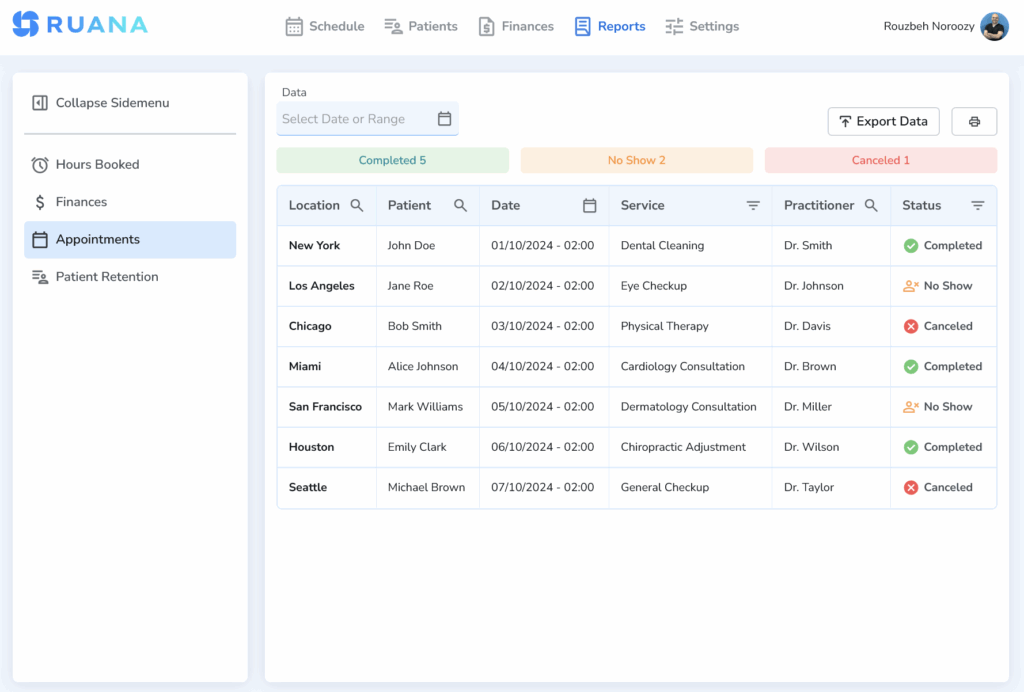
Track your practice growth in real time with Ruana’s appointment analytics and performance reporting dashboard.
Track what’s working
Ruana’s analytics dashboard shows you appointment volume, revenue trends, and your most popular service types — so you can double down on what’s driving growth and adjust what isn’t. For a new practice, this visibility is invaluable.
Google Business Profile, local SEO, referrals, online booking
Ruana booking page + Google
The Right Software Makes Every Other Step Easier
Opening a chiropractic practice involves hundreds of decisions. However, the one that affects your day-to-day more than almost any other is the practice management software you choose. Specifically, it touches every patient interaction: how they book, how they’re reminded, how you document their care, and how you bill for your services.
Ruana was built for exactly this – health and wellness practitioners who want a complete, intuitive system without enterprise complexity or enterprise pricing. Whether you’re a solo DC in your first year or an established clinic adding a second provider, Ruana scales with you.
For practitioners who also offer massage therapy or mental health services alongside chiropractic, Ruana supports massage therapy practices and mental health practitioners on the same platform – making it ideal for multi-disciplinary clinics.
✅ 24/7 online booking for chiropractic patients
✅ Automated email and SMS appointment reminders
✅ Digital paperless intake forms
✅ SOAP notes — standard and advanced with automatic generation
✅ Professional invoicing, superbills, and receipts
✅ Financial analytics and revenue reporting
✅ Memberships and care packages
✅ Enterprise-grade security with encryption, daily backups, and secure AWS server hosting
✅ Free data migration from your current system
✅ Solo Plan: $35.99/mo | Professional Plan: $55.99/mo | Additional providers: $19.99/mo
Ready to Launch Your Chiropractic Practice?
Start your 14-day free trial today – no credit card required. Set up your booking page, build your intake forms, and configure your reminders before your first patient walks in. Start Your Free 14-Day Trial →
Rouzbeh NoroozyChiropractor & Co-Founder · Palmer West · UC Berkeley · 14 Years of ExperienceRouzbeh Noroozy is a chiropractor with 14 years of clinical experience and co-founder of Ruana practice management software. He completed his undergraduate studies at the University of California, Berkeley and graduated from the renowned Palmer College of Chiropractic West in California. As a practicing clinician and clinic owner, he understands firsthand the administrative challenges practices face — and which digital tools genuinely help streamline day-to-day operations.
Anastasiia NoroozyMedical Graduate & Co-Founder · 8 Years of ExperienceAnastasiia Noroozy is a medical graduate and co-founder of Ruana with 8 years of experience working directly with patients at the clinic in Cologne. She manages the day-to-day flow of the practice and knows every patient-facing process from the inside out — from intake and scheduling to follow-up care. Her hands-on clinical and operational experience directly shapes how Ruana is built to work in the real world.
Our team will review your inquiry and get back to you as soon as possible.
Privacy Settings
To provide the best experiences, we use technologies like cookies to store and/or access device information. Consenting to these technologies will allow us to process data such as browsing behavior or unique IDs on this site. Not consenting or withdrawing consent, may adversely affect certain features and functions.
Functional
Always active
The technical storage or access is strictly necessary for the legitimate purpose of enabling the use of a specific service explicitly requested by the subscriber or user, or for the sole purpose of carrying out the transmission of a communication over an electronic communications network.
Preferences
The technical storage or access is necessary for the legitimate purpose of storing preferences that are not requested by the subscriber or user.
Analytics
The technical storage or access that is used exclusively for statistical purposes.The technical storage or access that is used exclusively for anonymous statistical purposes. Without a subpoena, voluntary compliance on the part of your Internet Service Provider, or additional records from a third party, information stored or retrieved for this purpose alone cannot usually be used to identify you.
Marketing
The technical storage or access is required to create user profiles to send advertising, or to track the user on a website or across several websites for similar marketing purposes.
To provide the best experience for our practitioners, we use cookies to personalize content, analyze our traffic, and support our marketing efforts. By clicking 'Accept', you consent to our use of these technologies. You can manage your preferences at any time.
Functional
Always active
The technical storage or access is strictly necessary for the legitimate purpose of enabling the use of a specific service explicitly requested by the subscriber or user, or for the sole purpose of carrying out the transmission of a communication over an electronic communications network.
Preferences
The technical storage or access is necessary for the legitimate purpose of storing preferences that are not requested by the subscriber or user.
Analytics
The technical storage or access that is used exclusively for statistical purposes.The technical storage or access that is used exclusively for anonymous statistical purposes. Without a subpoena, voluntary compliance on the part of your Internet Service Provider, or additional records from a third party, information stored or retrieved for this purpose alone cannot usually be used to identify you.
Marketing
The technical storage or access is required to create user profiles to send advertising, or to track the user on a website or across several websites for similar marketing purposes.