8 Things to Check Before Choosing Practice Management Software | Ruana
24.02.26
Choosing the wrong practice management software costs you time, money, and patients. Here are 8 essential things every health and wellness practitioner should check before committing — and how Ruana stacks up against each one.
Choosing the right practice management software is one of the most consequential decisions you’ll make for your clinic. The right platform quietly handles the administrative side of your practice so you can focus entirely on patient care. The wrong one becomes a daily source of friction – and eventually, an expensive switch you wished you’d avoided.
This guide gives you 8 essential things to check before you commit to any platform. Whether you’re a solo chiropractor, a multi-therapist massage practice, a mental health professional, or any other health and wellness practitioner, these checks apply directly to your decision.
Who this is for: Solo practitioners and clinic owners in chiropractic, massage therapy, mental health, osteopathy, acupuncture, nutrition, and other health and wellness fields who are evaluating or switching practice management platforms.
1 Check the Real Cost of Your Current System
Before you evaluate any software, take an honest look at what your current situation is actually costing you. Most practitioners underestimate this number significantly because the costs are hidden in time, not invoices.
Think about how long it takes each week to handle appointment bookings over the phone or by email. Add up the time spent manually writing or typing session notes, chasing down intake paperwork, creating invoices by hand, and following up with patients who missed appointments. For most solo practitioners, this adds up to six to ten hours per week — time that could be spent on patient care or simply not working overtime.
The real question isn’t “how much does the software cost?” It’s “how much is my current system costing me in unbillable hours?”
When you approach software selection with this frame, a platform like Ruana – starting at just $35.99/month – starts to look very different from a monthly expense. It looks like a return on investment from day one.
2 Check That the Software Fits Your Specialty
Generic software built for “any business” rarely serves healthcare practitioners well. A booking tool designed for hair salons won’t understand the nuance of a chiropractic intake process. A billing module built for retail won’t produce proper clinical invoices or superbills.
Look for platforms built specifically for health and wellness practitioners. Features like SOAP notes, treatment plans, paperless clinical intake forms, and healthcare-appropriate billing are not nice-to-haves — they are core to how your practice functions.
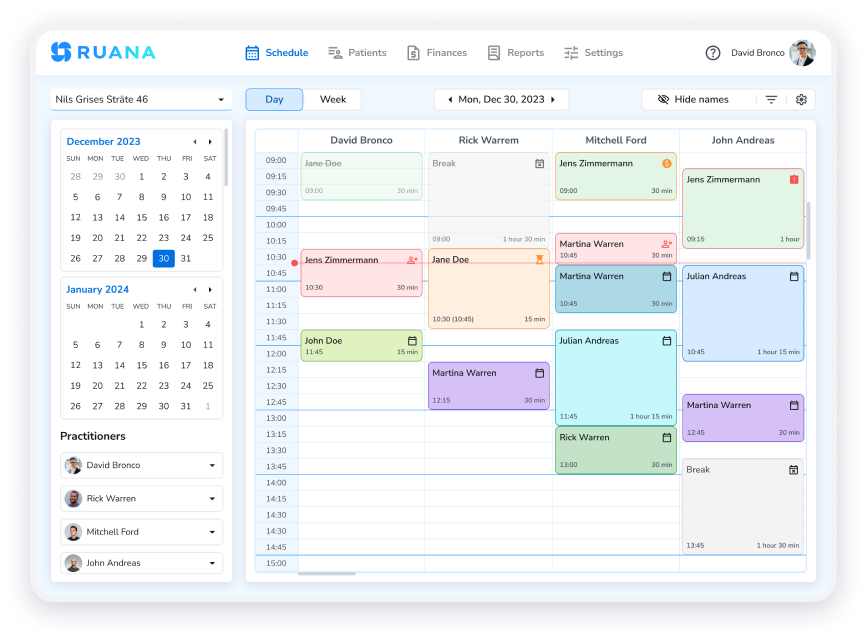
Caption: Ruana’s practice dashboard is purpose-built for health and wellness professionals — not a generic business tool adapted for clinics.
For example, if you run a chiropractic practice, your software should support chiropractic-specific SOAP note templates and multi-practitioner scheduling out of the box. If you’re a massage therapist, it should handle session types, intake forms, and client records in a way that reflects how massage practices actually work. Ruana is built for exactly this range of practitioners – from chiropractors and massage therapists to mental health professionals.
Ask vendors directly: “Was this platform designed for healthcare practitioners, or adapted from another industry?” The answer will tell you a lot about whether the features you need are genuinely built-in or just bolted on as an afterthought.
Built for Your Specialty — Ready in Minutes
Ruana is designed specifically for health and wellness practitioners. Try every feature free for 14 days. Start Your Free 14-Day Trial →
3 Check the Scheduling and Appointment Reminder Capabilities
Online booking and automated reminders are the two features that deliver the fastest, most measurable impact on any clinic. They reduce no-shows, eliminate phone tag, and give patients a modern experience that reflects well on your practice.
When evaluating scheduling, look beyond simply “does it have online booking?” and ask more specific questions. Can patients book 24/7 without calling your office? Does it prevent double bookings automatically? Can you set up multiple appointment types with different durations?
On the reminder side, email reminders are standard – but SMS reminders are where the real improvement in show rates happens. Text messages have a 98% open rate compared to roughly 20% for email. A platform that sends both email and SMS reminders automatically is significantly more effective at keeping your schedule full than one that relies on email alone.
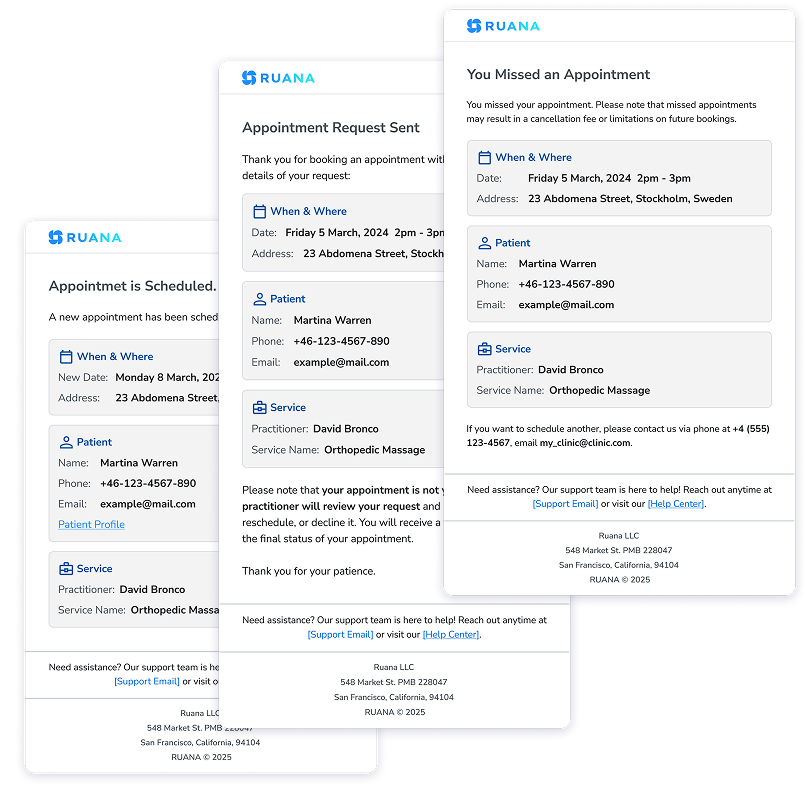
Patient email reminders for booking confirmation, reschedule requests, and cancellations.
Ruana’s online booking system runs 24/7 and automatically syncs with your calendar. Patients can request appointments at any hour, and both email and SMS reminders go out automatically – no staff involvement required. For busy practitioners, this alone often justifies the cost of the platform.
4 Check for Paperless Patient Records and Clinical Documentation
If your practice still relies on paper intake forms or manual session notes, you already know the problems: misplaced paperwork, illegible handwriting, time spent scanning documents, and the awkward clipboard routine at the start of every new patient visit. Good clinic management software eliminates all of this.
Paperless intake forms that patients can complete before their appointment mean your first session can start immediately. Digital patient records that are searchable and secure mean you spend less time hunting for information and more time with patients. And clinical documentation tools like SOAP notes built directly into the platform mean your notes are always where they belong – attached to the right patient, accessible in seconds.
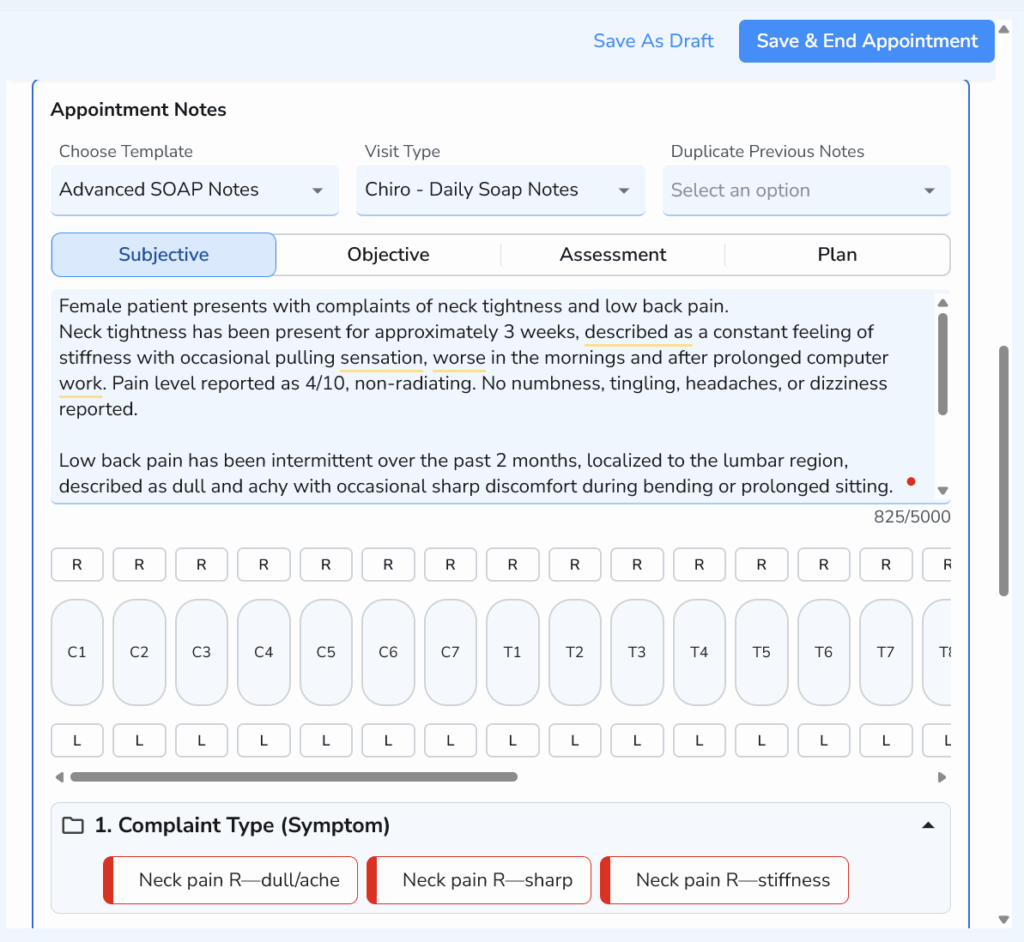
Document patient visits faster with structured Advanced SOAP Notes, including symptoms, spinal levels, and automated selections.
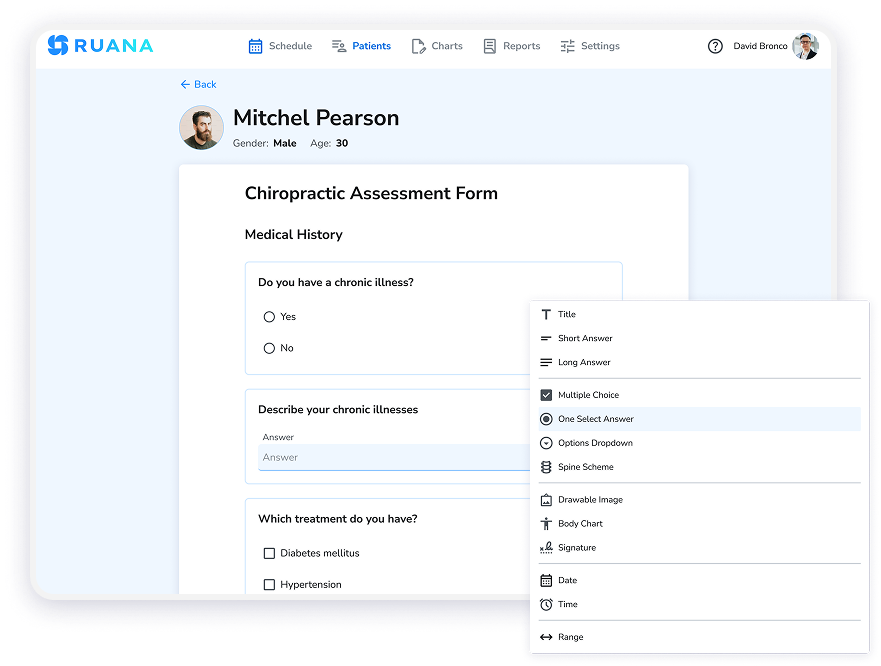
Ruana includes a flexible form builder that lets you create custom digital intake forms, consent forms, and health questionnaires without any technical skills. SOAP notes are built directly into the patient record – Basic SOAP Notes on the Solo Plan, and Advanced SOAP Notes with automatic note functionality on the Professional Plan.
Easily create and customize digital forms for patients and practitioners.
For practitioners evaluating platforms, a quick test during your trial period is to build one of your actual intake forms inside the software. A learning curve is completely normal – give yourself a few sessions before judging. What you’re actually looking for is whether the software has a clear logic to it. If tasks feel unnecessarily complicated even once you understand the system, that’s the real red flag.
5 Check How Billing and Invoicing Actually Work
Billing is where many clinic management platforms fall short – not because the feature is missing, but because it’s been designed for a generic business context rather than healthcare. The difference matters more than it might seem at first.
Healthcare practitioners need invoices that reflect the clinical nature of services, the ability to generate superbills for patients who need to submit to insurance independently, and clean financial reporting that shows revenue trends over time. These are not features you want to piece together from separate tools.
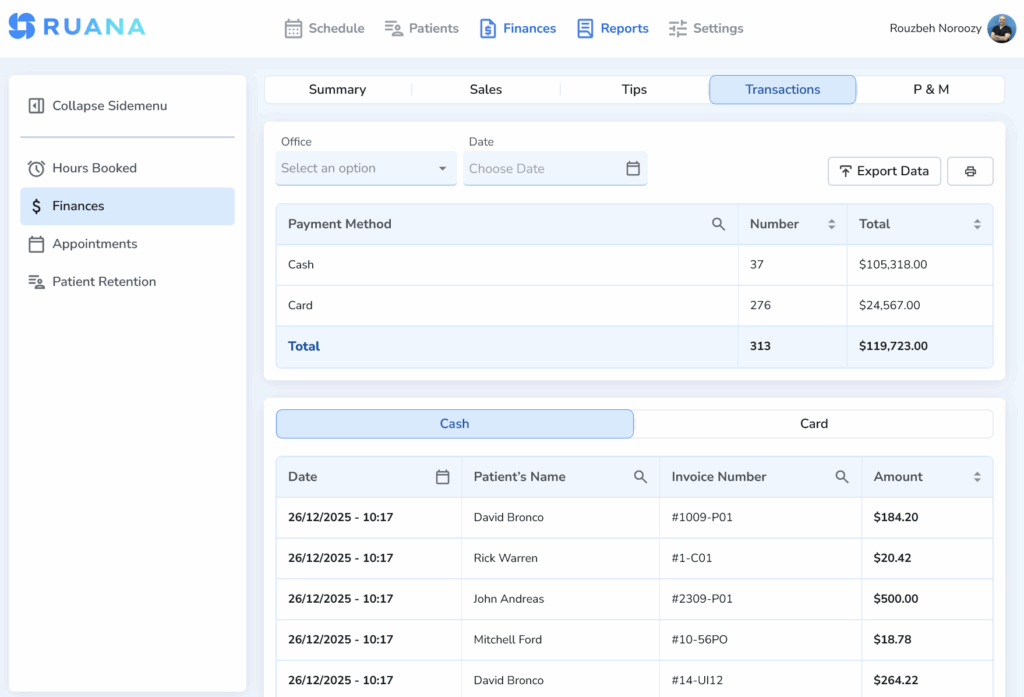
View payment totals and drill down into individual transactions by payment method.
With Ruana, invoicing is built directly into the patient workflow. After a session, you can generate and send a professional invoice or superbill in a few clicks. Financial reports give you a real-time view of your practice’s revenue, and all of it lives in the same platform as your scheduling and clinical documentation – no jumping between systems.
When comparing platforms, ask specifically: “Can I generate superbills? Can I track revenue by practitioner? Does billing connect directly to patient records?” If the answer to any of these is unclear or requires an add-on, look more carefully before committing. See full pricing and billing features at Ruana’s pricing page.
6 Check Data Security and Compliance Credentials
Patient health information is among the most sensitive data that exists. A security breach doesn’t just put your patients at risk – it can expose your practice to serious legal liability and permanently damage the trust you’ve worked hard to build.
When evaluating any clinic management platform, ask these questions directly and expect clear answers:
Is the platform HIPAA compliant (for US practitioners) and GDPR compliant (for EU/EEA practitioners), with a signed Business Associate Agreement and Data Processing Agreement available?
Where is patient data physically hosted? Is it stored in servers located in your region?
Is data encrypted both in storage and in transit?
Are backups automatic, and how frequently do they occur?
Who has access to your patient data, and are access controls in place?
Ruana uses enterprise-grade encryption across all data, performs automatic daily backups, and hosts patient data on secure AWS servers. The platform supports HIPAA compliance for US practitioners and GDPR compliance for EU practitioners, with a signed Business Associate Agreement available for US practitioners and a full Data Processing Agreement including Standard Contractual Clauses for EU practitioners.
Vague answers to security questions from any vendor should be treated as a serious warning sign. This is not an area to take shortcuts on.
7 Check It Yourself — With Your Real Workflows
Every software platform looks good in a marketing video. The only way to know whether it will actually work for your practice is to use it with real workflows during a free trial.
Don’t just click around during your trial period. Run actual scenarios that reflect your day-to-day practice. Book a test appointment as a patient would. Complete a mock intake form. Write a SOAP note after a session. Generate an invoice. Run a financial report. If any of these tasks feels unintuitive, confusing, or slower than your current process, that experience is data.
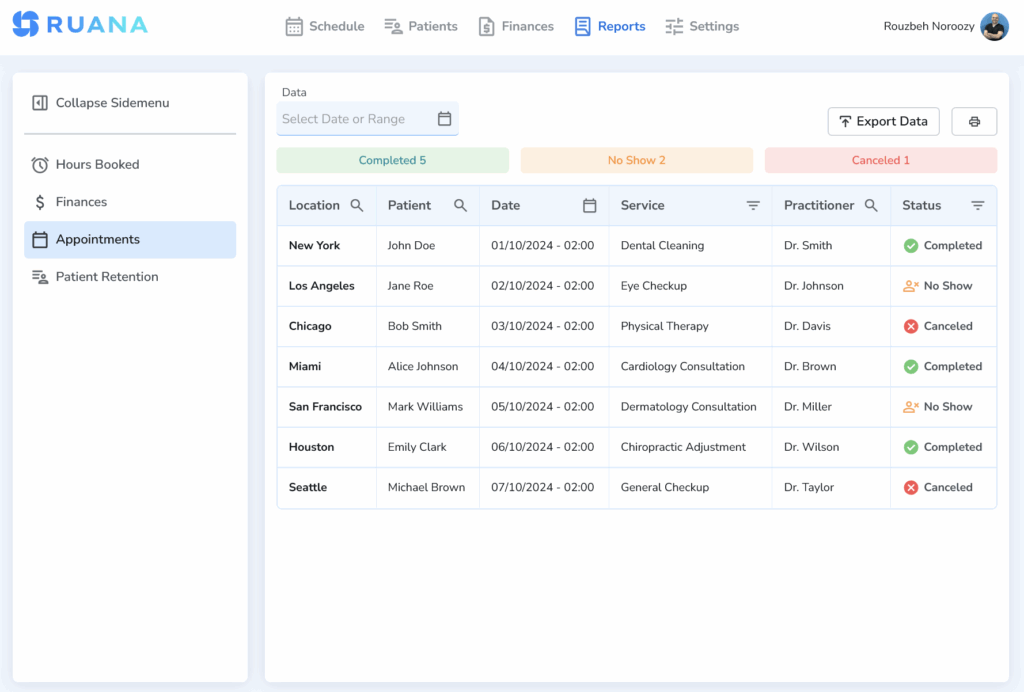
Track completed appointments, no-shows, and cancellations with detailed, filterable reports.
Ruana offers a 14-day free trial with no credit card required – enough time to work through each part of the platform using your own patient scenarios. And when you do decide to switch, Ruana offers free data migration so your existing patient records transfer over without the usual headache.
Also involve your front desk or administrative staff in testing if you have them. The people who use the software most intensively every day will notice friction that you might miss during a quick evaluation. Their input before you sign up is much more valuable than their complaints after.
Try Ruana Free for 14 Days
No credit card. No commitment. Just full access to every feature so you can test it against your real workflow.Start Free Trial — No Card Required →
8 Check Whether It Can Grow With Your Practice
One of the most common and costly mistakes practitioners make when choosing clinic management software is selecting a platform that fits perfectly right now but has no room to grow. A year later, they’re switching platforms again – which means migrating data, retraining staff, and losing weeks of productivity.
As you evaluate options, think about where your practice might be in two to three years. Will you add another practitioner? Open a second location? Offer new service types? Grow your patient volume significantly? Your software should be able to accommodate all of this without requiring a platform change.
Ruana’s pricing structure is designed with exactly this in mind. The Solo Plan at $35.99/month covers a single practitioner with unlimited appointments per month – ideal for practitioners just starting out or those with a focused, manageable caseload. When you’re ready to grow, the Professional Plan at $55.99/month unlocks unlimited appointments, Advanced SOAP Notes with automatic notes, memberships and packages, and online appointment requests. Additional practitioners can be added at just $19.99/month each.
This tiered approach means you start with what you need and scale naturally, without paying for features you’re not using or hitting a ceiling that forces you to switch platforms. You can explore the full feature breakdown at Ruana’s pricing and features page.
What Practitioners Get Wrong When Switching Software
Even practitioners who research carefully can fall into a few predictable traps. These are the ones worth knowing about before you make your final call:
Choosing based on price alone. The cheapest option often costs the most in the long run through missing features, poor support, or the time cost of working around its limitations. Factor in what your time is worth.
Skipping the trial. No amount of demo videos or sales calls can substitute for actually using the software in your own workflow. Always insist on a free trial before committing.
Not asking about data security specifics. “We’re HIPAA compliant” is not a complete answer. Ask where your data is hosted, how it’s backed up, and who has access.
Ignoring how clinical and billing workflows connect. When documentation and invoicing are in separate systems that don’t communicate, errors and double-entry become inevitable. Look for platforms where these workflows live together.
Choosing for now, not for later. Switching platforms is expensive and disruptive. Think about the next two to three years, not just the next quarter.
Forgetting about the patient experience. Your software affects how patients book, receive reminders, and complete intake paperwork. A clunky patient-facing experience creates friction before you’ve even met someone.
Making the Right Choice for Your Practice
Choosing clinic management software doesn’t have to be overwhelming. With a clear set of criteria and enough time to test your options properly, you can find a platform that genuinely fits your practice — one that reduces administrative work, improves the patient experience, and supports your growth over time.
The eight strategies in this guide give you a framework to cut through the marketing noise and evaluate platforms on what actually matters: does it work for your specialty, does it handle your core workflows well, is your patient data secure, and can it grow with your practice?
Ruana was built to answer yes to all of those questions – for chiropractors, massage therapists, mental health practitioners, and a wide range of other health and wellness professionals. It brings scheduling, clinical documentation, billing, reminders, and analytics into a single platform – designed specifically for the way health practices work.
The best way to know if it’s right for you is to try it. Start your free 14-day trial – no credit card required – and run it through the strategies in this guide with your own workflows.
Ready to Find the Right Clinic Software?
Join health and wellness practitioners using Ruana to run their practices more efficiently. Plans start at $35.99/month. Try everything free for 14 days.Start Your Free Trial Today →
No credit card required · Free data migration · Cancel anytime
About the Authors
★★★★★4.9 · 329 Reviews
Rouzbeh NoroozyChiropractor & Co-Founder · Palmer West · UC Berkeley · 14 Years of ExperienceRouzbeh Noroozy is a chiropractor with 14 years of clinical experience and co-founder of Ruana practice management software. He completed his undergraduate studies at the University of California, Berkeley and graduated from the renowned Palmer College of Chiropractic West in California. As a practicing clinician and clinic owner, he understands firsthand the administrative challenges practices face — and which digital tools genuinely help streamline day-to-day operations.
Anastasiia NoroozyMedical Graduate & Co-Founder · 8 Years of ExperienceAnastasiia Noroozy is a medical graduate and co-founder of Ruana with 8 years of experience working directly with patients at the clinic in Cologne. She manages the day-to-day flow of the practice and knows every patient-facing process from the inside out — from intake and scheduling to follow-up care. Her hands-on clinical and operational experience directly shapes how Ruana is built to work in the real world.
Our team will review your inquiry and get back to you as soon as possible.
Privacy Settings
To provide the best experiences, we use technologies like cookies to store and/or access device information. Consenting to these technologies will allow us to process data such as browsing behavior or unique IDs on this site. Not consenting or withdrawing consent, may adversely affect certain features and functions.
Functional
Always active
The technical storage or access is strictly necessary for the legitimate purpose of enabling the use of a specific service explicitly requested by the subscriber or user, or for the sole purpose of carrying out the transmission of a communication over an electronic communications network.
Preferences
The technical storage or access is necessary for the legitimate purpose of storing preferences that are not requested by the subscriber or user.
Analytics
The technical storage or access that is used exclusively for statistical purposes.The technical storage or access that is used exclusively for anonymous statistical purposes. Without a subpoena, voluntary compliance on the part of your Internet Service Provider, or additional records from a third party, information stored or retrieved for this purpose alone cannot usually be used to identify you.
Marketing
The technical storage or access is required to create user profiles to send advertising, or to track the user on a website or across several websites for similar marketing purposes.
To provide the best experience for our practitioners, we use cookies to personalize content, analyze our traffic, and support our marketing efforts. By clicking 'Accept', you consent to our use of these technologies. You can manage your preferences at any time.
Functional
Always active
The technical storage or access is strictly necessary for the legitimate purpose of enabling the use of a specific service explicitly requested by the subscriber or user, or for the sole purpose of carrying out the transmission of a communication over an electronic communications network.
Preferences
The technical storage or access is necessary for the legitimate purpose of storing preferences that are not requested by the subscriber or user.
Analytics
The technical storage or access that is used exclusively for statistical purposes.The technical storage or access that is used exclusively for anonymous statistical purposes. Without a subpoena, voluntary compliance on the part of your Internet Service Provider, or additional records from a third party, information stored or retrieved for this purpose alone cannot usually be used to identify you.
Marketing
The technical storage or access is required to create user profiles to send advertising, or to track the user on a website or across several websites for similar marketing purposes.