


Table of Contents
5 Steps to Set Up Online Booking for Your Healthcare Practice
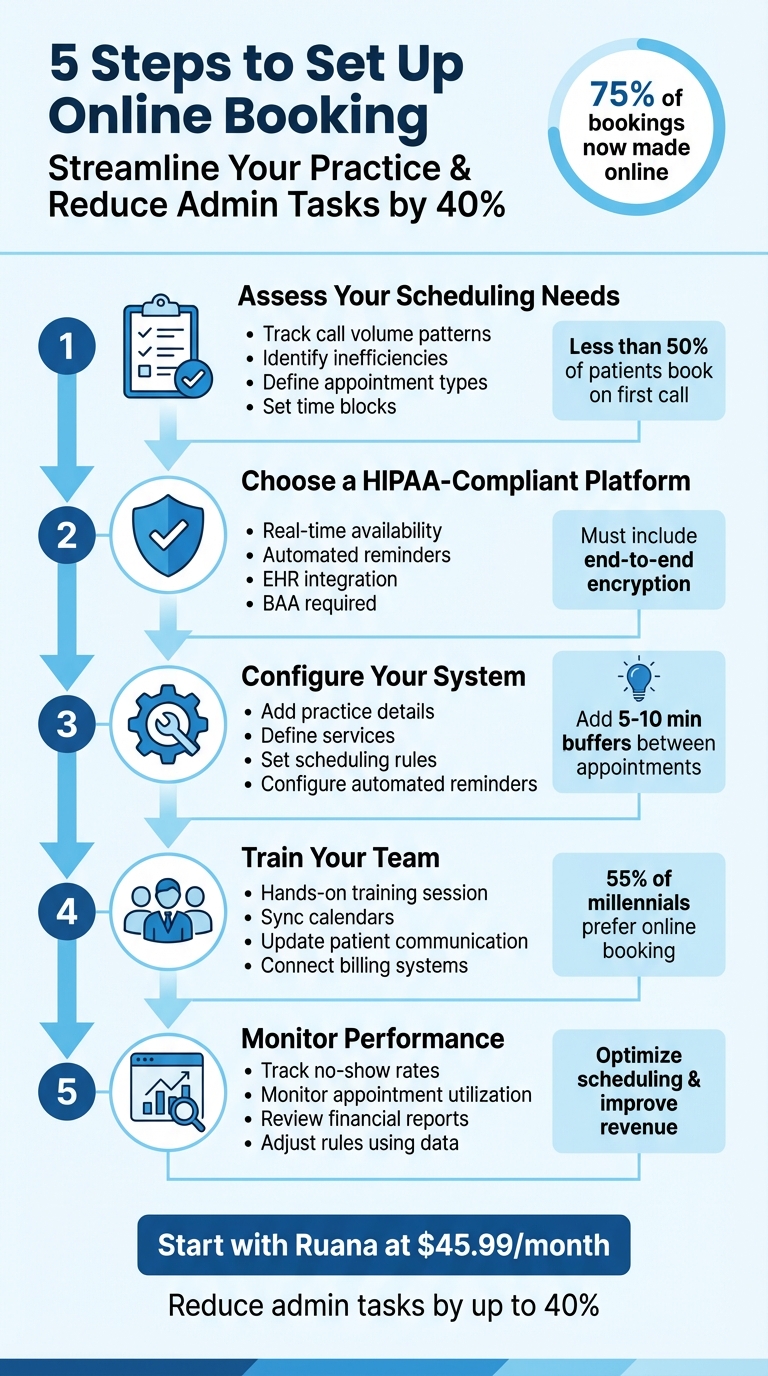
Online booking simplifies appointment scheduling for healthcare practices, offering patients the flexibility to book 24/7 while reducing administrative workload. With over 75% of bookings now made online, adopting a HIPAA-compliant system is a smart move for practices looking to improve efficiency and patient satisfaction.
Key Benefits of Online Booking
- Patients can book, reschedule, or cancel appointments anytime
- Automated SMS and email reminders reduce no-shows
- Practices report up to 40% reduction in admin tasks
- 24/7 availability captures bookings outside office hours
Why It Matters: Patients expect convenience, and an online booking system meets that demand while freeing your team to focus on providing care. Platforms like Ruana offer tailored solutions starting at $45.99/month, designed to streamline your workflow and improve patient experience.
Step 1: Review Your Practice’s Scheduling Requirements
Review Your Current Scheduling Process
Start by examining how your current scheduling process operates. Track call volume patterns throughout the week to identify when your phone lines are busiest and when your staff struggles to manage the load. Did you know that fewer than half of patients successfully book an appointment on their first call? That highlights inefficiencies in call handling that could be costing you business.
Take a close look at how much time your staff spends on scheduling tasks. This includes sorting through availability, handling rescheduling requests, and managing cancellations. Look for recurring issues like double-bookings or fragmented data caused by using separate calendars or spreadsheets. These problem areas will help guide how you set up your system, ensuring you don’t replicate the same headaches in a digital format.
Set Up Visit Types and Time Blocks
Once you’ve pinpointed the issues, organize your appointment categories and time blocks. Break your services into distinct visit types based on the needs of your patients and the complexity of the care required. For instance, you might have categories like new patient consultations, follow-ups, annual physicals, or specific procedures like flu shots. Each type should have a set duration – new patient visits might take 45 minutes, while a simple follow-up could be done in 15.
Decide which appointment types should be open to new patients and which should be reserved for existing ones. For example, services requiring medical history or lab results shouldn’t be available for self-scheduling by new patients. Make sure the names of these visits, as seen by patients, match your internal procedure codes to keep billing and records accurate.
To streamline operations, group similar appointments together. For example, schedule all complex procedures in the morning or block off afternoons for follow-up visits. This minimizes context switching and helps providers stay focused throughout their day.
List Your Scheduling Rules and Limits
Now, it’s time to formalize the rules that will govern your scheduling system. Start by documenting your policies. Set minimum notice requirements – for instance, requiring appointments to be booked at least 24 to 48 hours in advance will help avoid last-minute surprises and ensure adequate preparation. Clearly define your cancellation policy, such as a 24-hour notice window, to protect your revenue and reduce no-shows.
Add buffer times between appointments to avoid back-to-back scheduling. Even a 10- to 15-minute gap between sessions can give providers time to update charts, clean rooms, or simply catch their breath. Reserve blocks of time for non-clinical tasks like insurance follow-ups or administrative work, so automated bookings don’t take over your entire day.
“Giving providers input into something that heavily affects their day-to-day workflow will build trust and provide reassurance that they still have control over their own schedules.” – Kyruus Health
Finally, set daily or weekly caps on high-intensity appointment types to prevent burnout. For instance, if complex procedures are particularly draining, limit them to two or three per day and fill the remaining slots with less demanding visits. These rules will directly shape the configuration of your online booking system, creating a smoother experience for both patients and staff.
Step 2: Select Your Online Booking System
Features to Look For in Practice Management
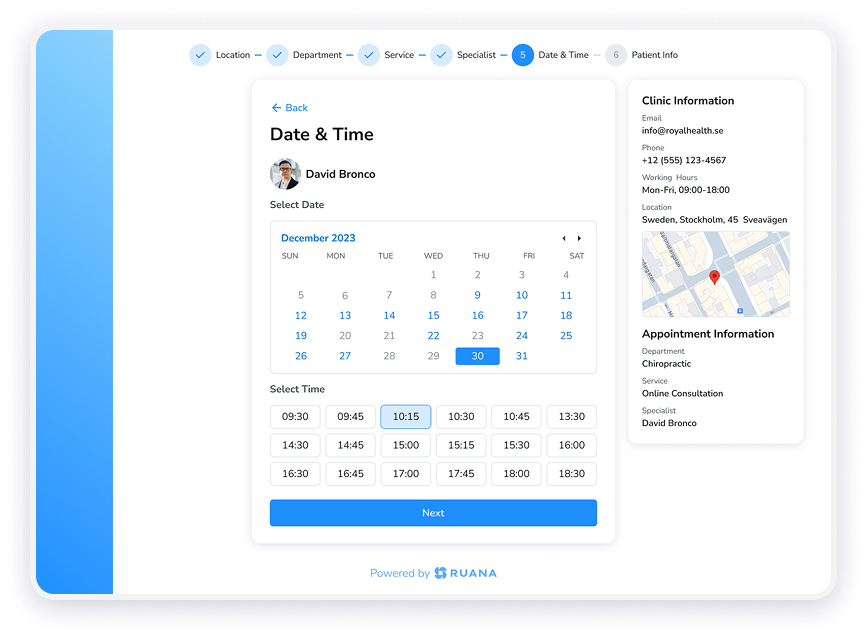
When choosing an online booking system, make sure it offers real-time availability, automated SMS and email reminders, and seamless integration capabilities. Since a significant portion of bookings happens outside regular office hours, your system must operate 24/7. The ability to sync with your existing calendar system is crucial to keeping patient data updated without the hassle of manual entry.
Administrative tools are equally important. Look for features like buffer times between appointments, minimum notice settings for last-minute bookings, and the option to block off time for non-clinical tasks. A mobile-friendly design is essential, as many patients prefer booking through their smartphones. Self-service options for rescheduling can also ease the workload on your office staff.
Finally, ensure the system complies with HIPAA standards to safeguard sensitive patient information.
Important Note: Avoid systems that promise features like telehealth integration, advanced AI capabilities, or external calendar sync (Google Calendar, Outlook) as these may not be available in all practice management platforms. Focus on core booking, reminder, and HIPAA compliance features.
How Ruana Can Help Your Practice
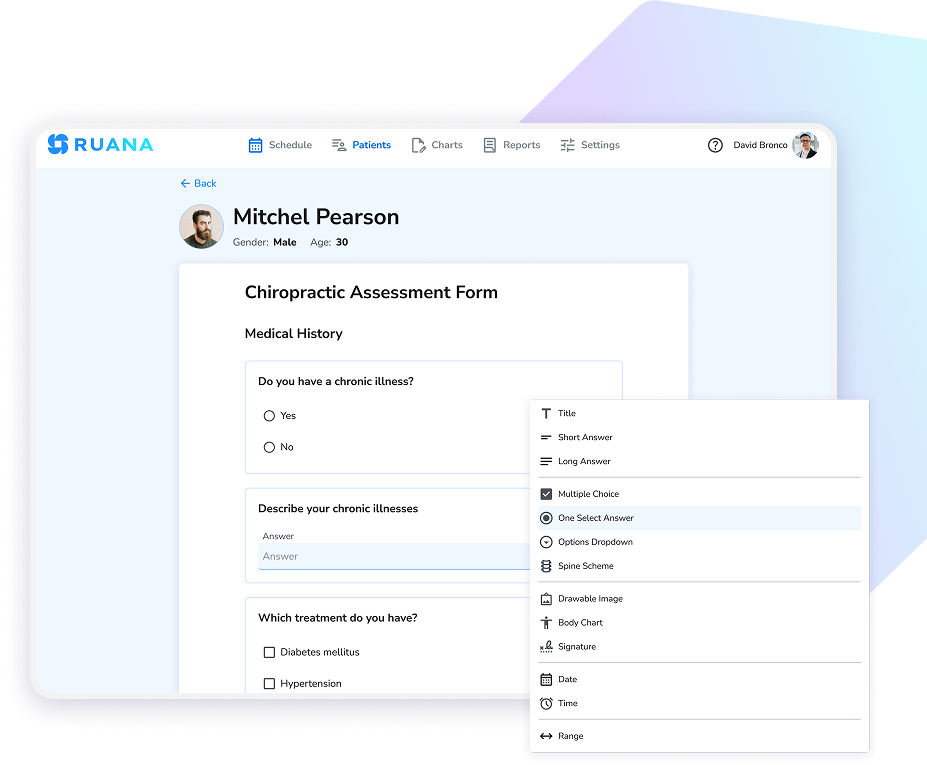
Ruana is designed to meet the technical and compliance needs of health and wellness practices. Built with security and regulatory compliance at its core — including HIPAA support for US-based practitioners and GDPR compliance for EU practitioners — it simplifies patient booking with features like real-time availability, automated SMS and email reminders, and paperless intake forms that gather health history and consent before a patient arrives, cutting down on waiting room delays.
Ruana also offers tools to track no-shows, cancellations, and revenue trends, helping you make informed scheduling decisions. Its secure payment processing allows you to collect deposits or process payments online, reducing last-minute cancellations. With features like customizable SOAP notes, automated invoicing, and comprehensive billing, Ruana consolidates all your practice management needs into one HIPAA-compliant platform tailored for healthcare providers.
Step 3: Configure Your Online Booking System
Once you’ve chosen your booking system, it’s time to set it up specifically for your practice.
Add Your Practice Information
Head to the Settings or Business Profile section of your system. Here, you’ll need to input essential details like your practice name, physical address (formatted as street, city, state, ZIP code), phone number, and time zone. If you operate more than one location, create separate profiles for each, ensuring unique addresses and contact details. This helps patients book appointments at the correct office and receive the right location-specific information.
Don’t forget to enter your NPI under the provider settings – this is crucial for billing integrations. Also, update your Display Name to something patient-friendly, as the backend system name might be formatted for internal use only.
Define Services and Scheduling Rules
Set up clear appointment types for the services you offer, such as “Initial Consultation”, “Follow-up Visit”, or “Wellness Check.” Each service should have a straightforward name, a short description, and a specific duration. You can also add a 5–10 minute buffer between appointments for tasks like sanitization or charting.
Assign services to the providers qualified to perform them, and define booking windows to control how far in advance patients can schedule. For example, requiring at least 24 hours’ notice can help you avoid last-minute disruptions. Use slot intervals – like 15, 30, or 60 minutes – to determine how often time slots appear on your calendar. Specify whether a service is open to new patients, existing patients, or both, ensuring the intake process runs smoothly.
Configure Automated Reminders
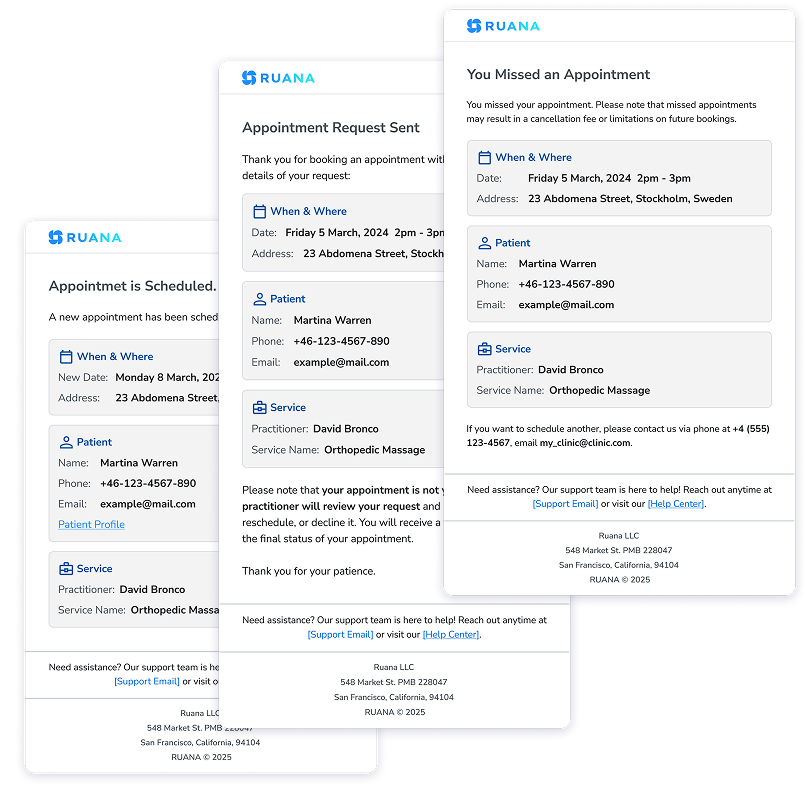
Activate automatic email and SMS reminders for key moments, like when a patient books, reschedules, or has an upcoming appointment. You can schedule reminders to go out anywhere from one hour to three days before the appointment, and confirmations can be sent from two hours to a week in advance. Stick to the 12-hour AM/PM format (e.g., “2:30 PM”) to avoid confusion.
Your reminder messages should include the essentials: your practice name, the appointment date and time, and any special instructions. For example, you might include notes like “Please arrive 15 minutes early to complete paperwork” or “Bring your insurance card and photo ID.” Enable two-way communication so patients can reply to confirm or reschedule, with updates automatically reflected in your calendar. Once everything is configured, the system handles reminders automatically, saving you time and effort.
Ruana Reminder Features: Email reminders are sent automatically once with appointment time and basic details. SMS reminders provide immediate delivery with 98% open rates, dramatically reducing no-shows compared to phone calls.
Step 4: Add Online Booking to Your Daily Workflow
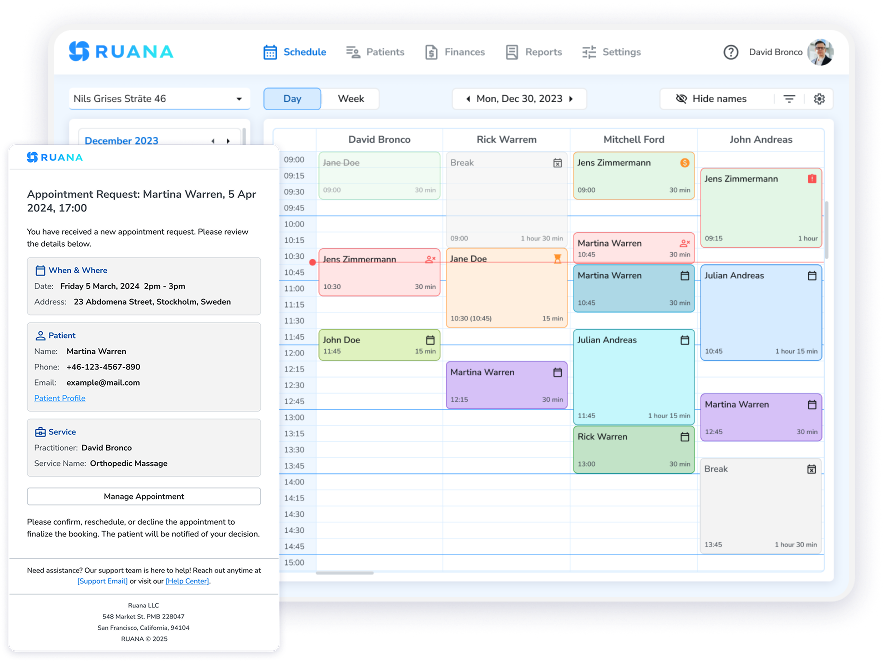
Once your online booking system is set up, it’s time to integrate it into your daily operations. Start by assigning role-based permissions to ensure staff members only access the features they need. Train your team to handle the real-time booking queue effectively to avoid overbooking and maintain appropriate scheduling for patient care.
Train Your Staff on the System
Organize a hands-on training session where your team can practice managing bookings, cancellations, and rescheduling in real time. Show front-desk staff how to use the mobile-friendly interface for instant notifications, and teach providers how to set daily or weekly limits and block off holidays. Make sure everyone understands how the system operates. The more familiar your team is with the system, the smoother your daily workflow will be.
Update Patient Communication Methods
Help patients embrace the convenience of online booking by updating how your practice communicates. Provide staff with simple scripts to guide patients toward using the system. Add a “Book Appointment” button to email signatures, and update your social media profiles with a “Book Now” call-to-action. Don’t forget to include your booking link on your Google My Business profile to capture potential patients searching for care nearby.
It’s worth noting that more than 40% of healthcare consumers – and 55% of millennials – prefer booking appointments online. By making your booking link easy to find, you’re meeting patients where they already are and improving their overall experience.
Connect Booking with Billing and Payments
Streamline your operations further by integrating your payment processing with the booking system. Enable prepayment or deposits for high-value services to minimize no-shows. Ruana’s built-in Stripe integration allows you to securely process payments and store payment information to handle missed appointment fees.
You can also boost revenue by offering add-ons during the booking process, like wellness packages or follow-up appointments. Payments can be collected in USD or EUR at the time of scheduling, making the process efficient for both your practice and your patients. By weaving these features into your workflow, you’ll maximize the benefits of your online booking system.
Step 5: Track and Improve Scheduling Performance
Use daily booking data to identify what’s working and where tweaks are needed. Keep an eye on metrics like no-show rates, appointment utilization, and the ratio of online to phone bookings. These numbers reveal whether your system is reducing admin work and making scheduling more efficient. Also, track where booking requests come from – Google, your website, or social media – to see which marketing efforts are driving results.
Monitor Key Scheduling Metrics
Start by looking at how many appointments each provider books weekly. This can highlight providers with extra capacity or those who may need more availability to meet demand. Check your conversion rate – the percentage of website visitors who actually book appointments – and compare new patient bookings to returning ones to measure growth.
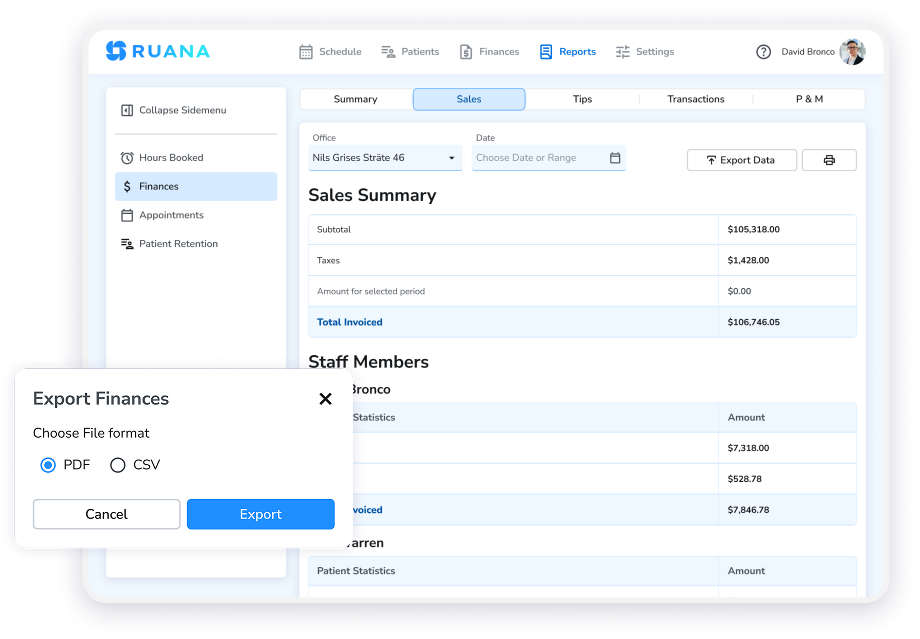
Pay attention to patterns in cancellations and no-shows, which might suggest issues like poorly timed reminders or the need for deposits. These metrics help ensure your system is meeting patient demand 24/7 and identifying opportunities for improvement.
Review Financial Reports for Practice Growth
Ruana’s reporting tools let you track revenue trends and appointment patterns in USD and EUR. Weekly reports can show you which services drive revenue and where time slots are going unused. This data helps you adjust your offerings and availability to boost income.
For example, tracking the financial impact of upsells like wellness packages or follow-up appointments can reveal new growth opportunities. Regularly reviewing these reports ensures you’re not just filling your schedule but also increasing profitability. Use these insights to fine-tune your scheduling approach for better results.
Adjust Scheduling Rules Using Data
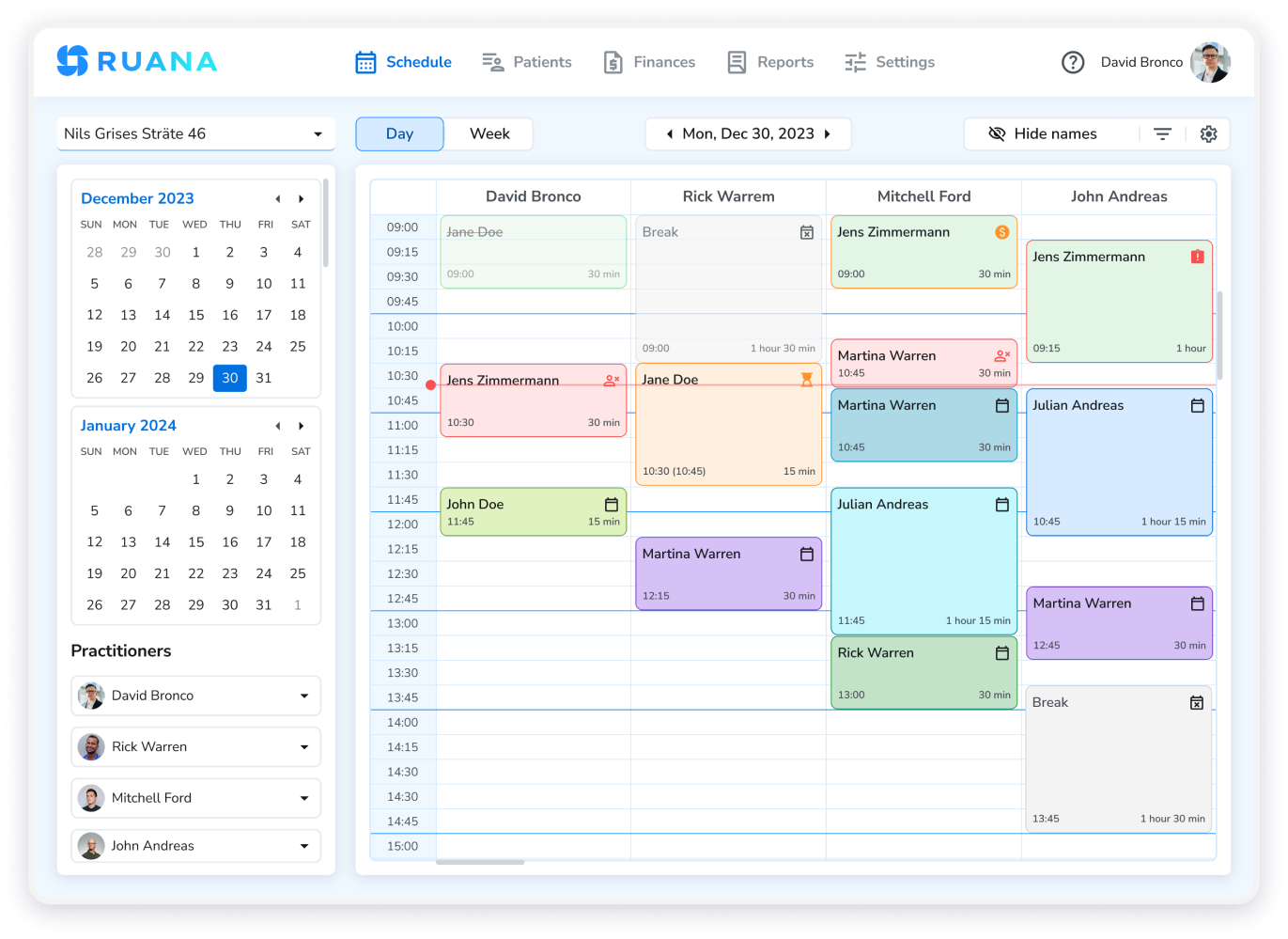
Let your performance data guide adjustments to your system. If you notice persistent 15-minute gaps between appointments, consider adjusting your time slot intervals to consolidate openings. If staff are consistently running behind, add automated buffers between appointments to improve workflow.
Update appointment durations to reflect actual office time, including prep and cleanup, while showing accurate durations to patients. And if certain reminder timing leads to fewer no-shows, tweak your automated reminders accordingly. These small, data-driven changes can significantly improve how your practice operates over time.
Start Using Ruana Today
Ready to modernize your practice? Choose the plan that works best for you. The Solo Plan at $45.99/month is perfect for individual practitioners. For larger teams, the Professional Plan starts at $65.99/month, with an additional $19.99 per practitioner for advanced features.
Both options include online booking, paperless intake forms, SOAP notes, and billing tools – everything you need to streamline your workflow. Start your 14-day free trial today.
Get Started with RuanaConclusion: Transform Your Practice with Smart Scheduling
Now that you’ve walked through the steps to set up online booking, you’re ready to experience the benefits firsthand. Setting up a system like this doesn’t have to feel overwhelming. You’ve learned how to assess your scheduling needs, configure a platform that supports HIPAA compliance, train your staff, and use data to refine your processes.
Ruana takes care of the heavy lifting — encryption, regulatory compliance support, and automated reminders — so you can focus on providing quality care. Patients gain the convenience of booking appointments anytime, right from their phones, while your staff gets a break from the constant back-and-forth of phone calls and manual scheduling. Plus, online booking ensures you don’t miss out on appointments during evenings or weekends when phone lines are typically silent.
By automating time-consuming administrative tasks, Ruana frees up your team to see more patients without increasing staff hours. Real-time scheduling keeps your calendar conflict-free, ensuring smoother operations across your practice. With these steps in place, your practice is set to run more efficiently while keeping patients happy.
Patients expect digital convenience, and Ruana delivers just that with secure, efficient scheduling. Choose your plan today and take the next step toward a modern, hassle-free practice.
Frequently Asked Questions
To ensure your online booking system meets HIPAA requirements, focus on protecting patient information while adhering to federal regulations. Only collect the minimum information needed for scheduling — like a patient’s name, contact details, and appointment type. Choose a platform that offers enterprise-grade encryption, automatic daily backups, and a signed Business Associate Agreement. Train your staff regularly on HIPAA compliance and secure data handling practices. Platforms like Ruana are built to support HIPAA compliance, helping your practice stay protected.
Focus on features that make life easier for both your patients and staff. Essential elements include 24/7 scheduling access, real-time availability, automated SMS and email reminders, and mobile-friendly design. Look for systems that offer customizable appointment types, buffer time settings, and minimum notice requirements. Payment processing capabilities and comprehensive reporting tools are also valuable for tracking performance and revenue. Most importantly, ensure the platform is HIPAA-compliant and designed specifically for healthcare practices.
Automated reminders significantly reduce no-shows by keeping appointments top-of-mind for patients. SMS reminders have a 98% open rate and provide immediate delivery, while email reminders offer detailed appointment information. The combination of both methods ensures maximum patient engagement. Studies show that practices using automated reminder systems can reduce no-show rates by up to 40%. Learn more strategies to reduce no-shows in your wellness practice.
Yes, modern online booking systems allow patients to reschedule or cancel appointments through the same platform they used to book. This self-service capability reduces phone calls to your office and gives patients the flexibility to manage their appointments 24/7. When patients make changes online, your calendar updates automatically, preventing scheduling conflicts. You can also set policies for how far in advance changes can be made and whether cancellation fees apply.
Costs vary depending on the features and size of your practice. Basic online booking systems start around $45-65 per month for solo practitioners. For larger practices, expect to pay additional fees per practitioner (typically $15-25 monthly). Ruana offers transparent pricing starting at $45.99/month for the Solo Plan and $65.99/month for the Professional Plan, with $19.99/month for each additional practitioner. Most platforms offer free trials to test the system before committing.