How to ask for patient reviews is one of the most Googled questions among health and wellness practitioners – and for good reason. Whether you’re a chiropractor, massage therapist, mental health professional, acupuncturist, or dietitian, online reviews directly affect how many new patients or clients walk through your door. Yet most practitioners avoid asking for them entirely, simply because it feels uncomfortable.
This guide gives you a practical, word-for-word framework to ask for reviews naturally – without feeling pushy, unprofessional, or like you’re begging. We’ll cover when to ask, what to say, how to follow up, and how to make the process simple enough that it actually happens consistently.
Table of Contents
- Why Reviews Matter More Than You Think
- Why Asking Feels Awkward – and Why That’s Normal
- When to Ask: The Best Moments in the Patient Journey
- How to Ask In Person
- How to Ask by Email or SMS
- What Not to Say (and Why It Backfires)
- Make It Easy: Lowering the Friction
- How to Respond to Reviews You Receive
- Building a Consistent Review System
- How the Right Software Supports Your Review Strategy
- FAQ
1. Why Reviews Matter More Than You Think
Before we get into the how, it’s worth pausing on the why. Most practitioners know reviews are good for business. However, many underestimate just how powerful they are at every stage of practice growth.
Research consistently shows that the majority of people read online reviews before choosing a healthcare or wellness provider. For health and wellness practices, Google reviews function as a form of social proof – they answer the unspoken question every prospective patient or client has: “Can I trust this person with my health?”
Furthermore, reviews directly affect your local search ranking. Google’s local algorithm takes review quantity, recency, and average rating into account when deciding which practices appear in the local map pack. A practice with 80 recent, genuine reviews will almost always outrank one with 12 reviews from three years ago — even if the older practice has better clinical credentials.
Additionally, reviews help convert hesitant prospects. Someone who finds your website through a Google search is already interested. A strong review profile – especially recent reviews from people with relatable concerns – can be the deciding factor that turns a visitor into a booked appointment.
The bottom line: if you are not actively asking for reviews, you are leaving practice growth on the table every single week.
2. Why Asking Feels Awkward – and Why That’s Normal
Most health practitioners went into their field to help people – not to market themselves. There’s an unwritten belief in many clinical settings that good work should speak for itself. Asking for a review can feel like bragging, or worse, like you’re using your patients or clients for commercial gain.
However, this belief, while understandable, actually works against the people you’re trying to help. Here’s why: a practitioner with no online reviews isn’t perceived as “humble” by prospective patients – they’re perceived as unknown or potentially unreliable. In contrast, a practitioner with dozens of warm, genuine reviews is seen as established, trustworthy, and in-demand.
The reframe that works for most practitioners is this: asking for a review is not asking for a favor – it’s giving a satisfied patient or client an easy way to pay it forward. The person who gets great care from you, but says nothing publicly, has no way of helping others find you. A brief, genuine review changes that.
Once you see the ask as a service to your community rather than a self-promotional act, it becomes significantly easier.
3. When to Ask: The Best Moments in the Patient Journey
Timing is everything when asking for reviews. Ask too early, and the patient or client hasn’t yet experienced enough of your care to say something meaningful. Ask too late, and the emotional high of a great session has faded.
The Post-Appointment Window
The single best time to ask is immediately after a positive session – ideally within 24 hours. This is when the experience is fresh, feelings are positive, and motivation is high. In person at checkout, or via an automated email or SMS reminder shortly after the visit, are both highly effective.
After a Milestone or Transformation
For practitioners with ongoing care plans – chiropractors treating a chronic condition, therapists working toward a mental health goal, or dietitians supporting a body composition change – a meaningful milestone is a powerful ask moment. When a patient says “I’ve been sleeping so much better” or “I can finally carry my kids again,” that’s your cue.
For example: a massage therapist might say, “That’s wonderful to hear. If you ever felt like sharing that experience online, a quick Google review would mean the world to us and help other people find us.”
At Re-booking
When a patient or client books their next appointment – either in person or through your online booking system — they are signaling high satisfaction. This is a natural, low-pressure ask moment.
After a Referral
If a patient refers a friend or family member, they already trust you enough to recommend you verbally. A gentle nudge to leave a Google review is a natural extension of that trust.
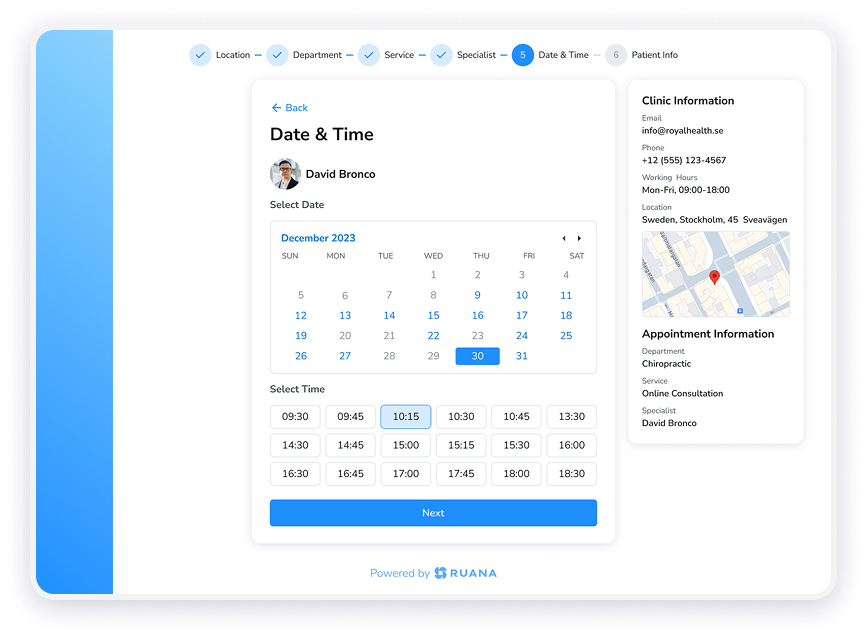
Caption: When clients re-book through your online scheduling system, it’s one of the best natural moments to ask for a review – they’re already engaged and signaling satisfaction.
4. How to Ask In Person
In-person requests convert better than almost any other method – but they require a bit of practice to feel natural. The key is to keep it brief, personal, and low-pressure.
The Three-Second Rule
Keep your ask to three sentences or fewer. Long explanations create pressure. Short, warm, and direct feels natural.
Script for checkout or end of session:
“I’m really glad today went well for you. If you have a moment at some point, a quick Google review would genuinely help us reach more people like you. No pressure at all – but it means a lot.”
That’s it. You don’t need to explain what to write. You don’t need to give them your Google link in person (though a business card with the link is helpful). The goal is simply to plant the idea and give them permission to act on it.
For Front Desk Staff
If you have a receptionist or office manager handling checkout, train them to use a consistent script. Role-play it once. The script should be brief and warm – not robotic or salesy. You can also display a small sign near the checkout area with a QR code that links directly to your Google review page. This removes the friction entirely and lets patients decide without feeling put on the spot.
Personalizing the Ask
The most effective in-person asks are slightly personal. If you know what brought someone in – say, they came to you for post-surgery recovery or pre-natal massage – you can reference that without getting clinical:
“I know you came in dealing with a lot after your surgery – if you feel your experience here has been helpful, sharing that on Google helps other people in similar situations find us.”
This approach shows care, not salesmanship. As a result, patients are far more likely to follow through.
5. How to Ask by Email or SMS
Digital review requests – sent via email or SMS – scale in a way that in-person asks never can. Even if you consistently ask in person, a well-timed follow-up message can significantly increase the number of reviews you actually receive.
Email Review Request
Email review requests work best when they are short, personal in tone, and sent within 24–48 hours of an appointment. Keep the subject line simple and low-pressure.
Sample email subject: “A quick note from [Practice Name]”
Sample email body:
“Hi [First Name],
Thanks so much for coming in today. I hope you’re feeling great.
If you have a couple of minutes, leaving us a short Google review would genuinely help us grow and help others in our community find the care they need. No need to write an essay – even a sentence or two makes a big difference.
[Link to your Google review page]
Thank you – it means a lot.
[Your name]”
Keep the call to action clear and the link prominent. Additionally, avoid asking multiple questions or including other business content in the same message – it dilutes the ask.
SMS Review Request
SMS is arguably the most effective channel for review requests. Open rates for SMS messages run around 98%, compared to 20–30% for email. A short, friendly text sent shortly after a visit can outperform a lengthy email campaign.
Sample SMS:
“Hi [First Name], thanks for visiting [Practice Name] today! If you have 60 seconds, a Google review would really help us: [short link]. No pressure – appreciate you!”
Keep SMS messages under 160 characters where possible. Use the patient’s first name. Include a shortened or direct Google review link. That’s all you need.
6. What Not to Say – and Why It Backfires
Some common approaches to asking for reviews actively hurt your results. Here are the most frequent mistakes and how to avoid them.
Don’t Say: “Only leave a review if it’s positive”
This is against Google’s terms of service and is widely considered unethical review gating. Even if well-intentioned, it signals that you only want selective feedback – which undermines trust. Ask everyone consistently, and let the quality of your care do the talking.
Don’t Say: “We’d really appreciate a five-star review”
Asking for a specific star rating is also a violation of Google’s policies. Furthermore, it puts people in an uncomfortable position – especially if their experience was good but not perfect. Ask for “an honest review” instead.
Don’t Offer Incentives
Offering discounts, free services, or any other incentive in exchange for a review violates Google’s policies and can result in reviews being removed – or worse, your listing being penalized. Genuine reviews earned naturally will always serve you better in the long run.
Don’t Ask Too Many Times
Following up once is fine. Following up three or four times feels like pressure and can damage the patient-practitioner relationship. A single in-person ask plus one follow-up message is the right balance for most practices.
7. Make It Easy: Lowering the Friction
The single biggest reason people don’t leave reviews – even when they intend to – is friction. They have to remember to do it, find your Google listing, figure out how to leave a review, and then write something. Each step loses people.
Your job is to remove as many of those steps as possible.
Create a Direct Review Link
Google provides a direct review link for every Google Business Profile. When someone clicks this link, they land directly on the review popup – no searching required. You can find this link in your Google Business Profile dashboard under “Ask for reviews.” Shorten it using a URL shortener and use that link in all your communications.
Add a QR Code to Your Practice
Print a small card or sign with a QR code that links directly to your Google review page. Place it at the checkout desk, in your waiting room, or on printed aftercare materials. People can scan it on their phones while they’re still in the right mindset – right after their visit.
Add the Link to Your Email Signature
A line in your email signature like “Enjoyed your visit? Leave us a Google review here” works passively without any active effort. Over weeks and months, this generates a steady trickle of reviews from people who see your emails.
Keep the Message Short
When you ask, be clear that a short review is perfectly fine. Many people hesitate because they feel like they need to write something substantial. “Even one or two sentences would be incredibly helpful” removes that barrier.
8. How to Respond to Reviews You Receive
Responding to reviews – both positive and negative – is a critical part of your online reputation strategy. It signals to both Google and prospective patients that you are engaged, professional, and care about feedback.
Responding to Positive Reviews
Keep responses warm, brief, and personal. Avoid generic copy-paste replies – they look robotic and actually undermine trust. Reference something general about the person’s experience if you can do so without revealing any private health information.
Sample positive review response:
“Thank you so much for taking the time to share this – it really means a lot to us. We’re so glad you’re feeling better and look forward to seeing you at your next visit!”
Note: always be cautious about privacy. Do not confirm any details about a patient’s health condition, treatment, or the fact that they are your patient. A warm but general response is always the safer approach from a HIPAA perspective.
Responding to Negative Reviews
Negative reviews feel personal – but how you respond matters far more than the review itself. Prospective patients reading a negative review will also read your response. A calm, professional, non-defensive reply can actually increase trust.
Sample negative review response:
“Thank you for sharing your experience. We take all feedback seriously and we’re sorry to hear your visit didn’t meet your expectations. We’d welcome the chance to understand what happened – please feel free to reach out to us directly.”
Never argue, never get defensive, and never reveal anything about the patient’s care. Invite them to contact you offline. This shows professionalism to everyone who reads it – including potential new patients or clients.
9. Building a Consistent Review System
The practices that accumulate strong Google profiles don’t have a secret – they have a system. They ask consistently, make it easy, and don’t rely on memory or willpower. Here’s how to build yours.
Step 1: Set Up Your Google Business Profile
If you haven’t already, claim and verify your Google Business Profile at business.google.com. Complete every field: address, phone, website, hours, services, and photos. A complete profile ranks better and converts more visitors.
Step 2: Get Your Direct Review Link
From your Google Business Profile dashboard, navigate to “Ask for reviews” and copy your unique review link. Shorten it. Save it somewhere you can easily access it.
Step 3: Decide on Your Ask Method(s)
Choose one or two methods that fit your practice culture. For most practices, a combination of in-person ask at checkout plus a follow-up email or SMS within 24 hours works best. For solo practitioners with small appointment volumes, in-person asking alone may be sufficient. For larger practices or clinics, a consistent digital follow-up system is essential for scale.
Step 4: Train Your Team
If you have staff, train them on your script and review process. Make it part of the checkout routine. Role-play it once so it feels natural. Consistency across all team members is what builds your review profile over time.
Step 5: Monitor and Respond Weekly
Set aside 10–15 minutes per week to check for new reviews and respond to them. New reviews with prompt, professional responses perform better in local search than old reviews with no engagement. Additionally, responding to every review – positive and negative – demonstrates that your practice is active and cares about its reputation.
Step 6: Track What’s Working
After implementing a review strategy, monitor your Google Business Profile impressions and new patient inquiries over the following 60–90 days. If you see an uptick in calls, form submissions, or new bookings, your review strategy is working. Therefore, keep refining and expanding it.
Ready to streamline your practice and spend less time on admin?
Ruana helps health and wellness practitioners manage scheduling, reminders, patient records, and billing – all in one place. Try Ruana Free for 14 Days →
No credit card required.
10. How the Right Software Supports Your Review Strategy
Asking for reviews is only one piece of practice growth. However, the foundation that makes a strong reputation possible is delivering a consistently excellent experience – and that gets much harder when your practice runs on scattered spreadsheets, phone tag, and paper forms.
Practitioners who use Ruana can offer 24/7 online booking, so new patients can schedule at any hour without having to call. Automated email and SMS reminders reduce no-shows – industry data suggests practices can see reductions of up to 70% with consistent reminder systems – meaning more people actually show up, experience your care, and have reason to leave a great review.
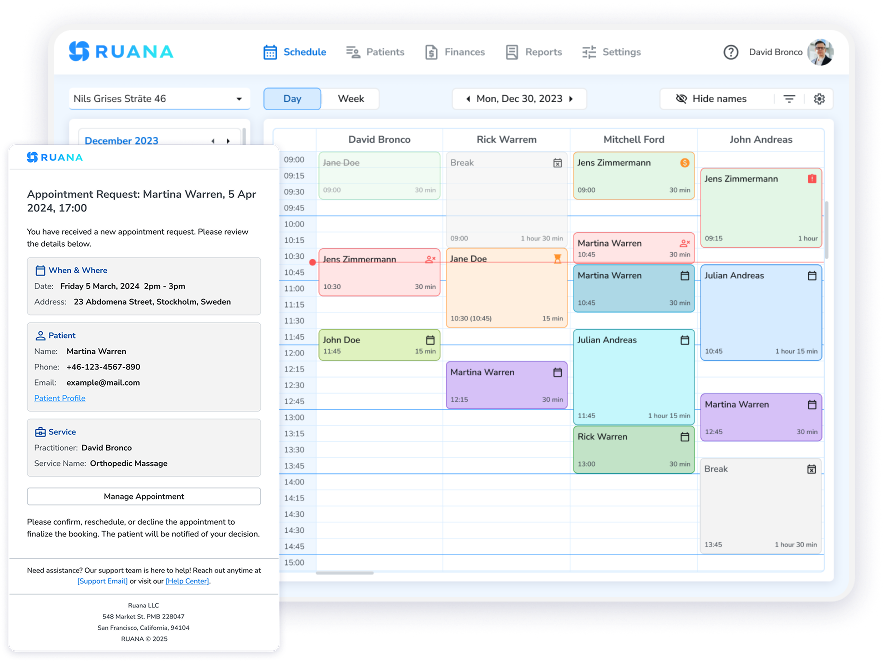
Caption: Ruana’s appointment request system keeps your schedule organized and your patients engaged – a smooth booking experience is the first step toward a great review.
Digital intake forms mean first-time patients can complete their paperwork before they arrive – reducing wait times and starting the experience on a professional note. SOAP notes and customizable documentation tools free up time after sessions that practitioners can spend with patients rather than buried in paperwork. For practices managing billing, Ruana handles invoicing, superbills, and financial reporting in one place.
The net result is a practice that runs smoothly enough that the clinical care – the thing people actually review – takes center stage.
For chiropractic practices, Ruana helps manage multi-practitioner schedules and complex care plans. For massage therapy practices, it handles packages, memberships, and flexible appointment types. For mental health practitioners, it provides secure, HIPAA-conscious documentation and session management. And for all practitioners, the straightforward pricing — starting at $45.99/month – makes it accessible whether you’re a solo practitioner or growing clinic.
Managing your practice review strategy becomes easier when the rest of your operations are running smoothly. Ruana helps health and wellness practitioners handle scheduling, reminders, patient records, and billing in one place – so you spend less time on admin and more time delivering the kind of care that earns five-star reviews. Try it free for 14 days – no credit card required.
FAQ: Asking for Patient and Client Reviews
Is it legal to ask patients for Google reviews?
Yes – asking patients or clients for honest reviews is entirely legal and common practice. Never offer incentives or filter for only positive reviews, as these practices can violate Google’s terms of service and, in some jurisdictions, consumer protection regulations. Always ensure you do not reveal any protected health information (PHI) in your response to reviews.
How many Google reviews does a health practice need?
There’s no magic number, but practices with 25 or more reviews tend to appear more credible to prospective patients than those with fewer than 10. More importantly, recency matters – a practice with 15 reviews from the past six months will often perform better in local search than one with 50 reviews from three years ago. Aim for a steady, ongoing trickle of fresh reviews rather than a one-time burst.
What’s the best time to send a review request?
Within 24 hours of a positive appointment is ideal. For email, mid-morning (around 10 AM) and early afternoon tend to see the highest open rates. For SMS, early afternoon on weekdays typically works well. Avoid sending review requests on weekend evenings or late at night.
Can I ask all patients for reviews, or just happy ones?
Best practice – and Google policy – is to ask consistently, not selectively. Selectively asking only happy patients (known as “review gating”) is against Google’s terms of service. In practice, the vast majority of people are satisfied with their care, so consistent asking will naturally result in a positive review profile.
What should I do if I get a bad review?
Respond calmly, professionally, and without revealing any patient-specific information. Thank the reviewer for their feedback, acknowledge their experience, and invite them to contact you directly to resolve the issue. Never argue online. A professional, non-defensive response to a negative review can actually increase trust with everyone reading your profile.
Should I ask for reviews on platforms other than Google?
Google is the highest priority for most health practices because it directly affects local search visibility and new patient discovery. Build a strong, consistent base there first. Once your Google review strategy is running on autopilot, you can evaluate whether other platforms make sense for your specific specialty and market — but for most practices, Google alone delivers the greatest return on effort.
What practice management software helps with appointment reminders that support review strategies?
Software like Ruana provides automated email and SMS reminders that keep patients engaged before and after appointments. A smooth, professional appointment experience – from online booking to automated reminders to clean invoicing – creates the conditions that naturally lead to positive reviews. Ruana’s plans start at $45.99/month with a 14-day free trial and no credit card required.
Give your practice the tools to grow.
Online booking, automated reminders, patient records, and billing all in one place with Ruana. Start Your Free 14-Day Trial →
No credit card required. Set up in 1–2 hours.
Note: No-show reduction statistics referenced in this article are based on general industry estimates and individual results will vary. This article is intended as general practice marketing guidance and does not constitute legal or regulatory advice. Practitioners should consult appropriate professionals regarding compliance obligations specific to their region and specialty.