Therapist Burnout Prevention: Weekly Scheduling Tips for Small Practices
07.04.26
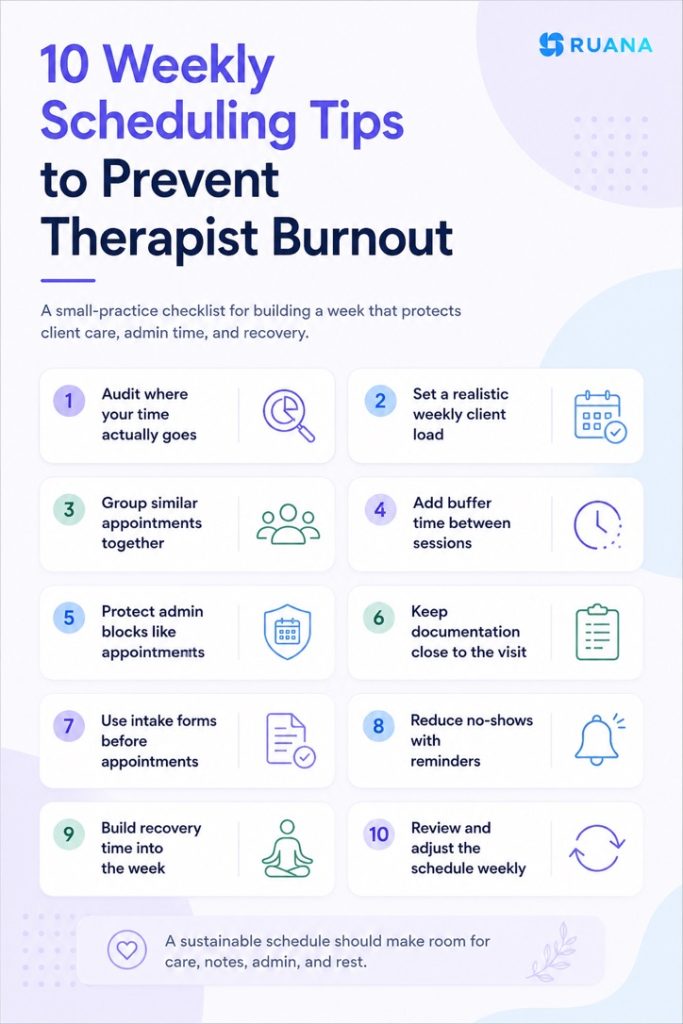
Burnout isn't a personal failure - it's often a scheduling problem. This guide shows chiropractors, massage therapists, mental health therapists, and more how to build a sustainable weekly schedule that protects your energy, reduces no-shows, and keeps admin from taking over your life.
A full calendar can look like a healthy practice from the outside. For many therapists, it is also where burnout starts.
Client sessions are only one part of the week. There are notes to finish, intake forms to review, appointments to manage, payments to handle, messages to answer, and follow-ups that all somehow land at the end of the day. When everything gets squeezed between back-to-back sessions, the schedule stops supporting the practice and starts draining it.
Therapist burnout prevention often begins with the weekly calendar. For small practices, the issue is rarely one busy day. It is the repeated pattern of skipped breaks, late documentation, scattered admin work, and no clear point where the workday ends.
We have worked through this problem in practice, not only in theory. A busy calendar can look productive until it starts wearing down the people behind it. These weekly scheduling tips are meant to help therapists protect their energy, reduce admin pressure, and build a workweek the practice can actually sustain.
Therapist burnout rarely comes from client care alone. In small practices, the bigger issue is often everything that surrounds the appointment: scheduling, intake, notes, payments, follow-ups, cancellations, and the quiet pressure to keep the calendar full.
You may technically have “open time” between the sessions, but if that time is filled with late documentation, billing questions, room resets, and admin fixes, it never functions as recovery time.
The most common causes usually come from a few patterns:
Back-to-back sessions with no transition time: There is no space to finish notes, reset the room, review the next client, or simply breathe before the next appointment.
Admin work pushed into personal time: Intake forms, SOAP notes, invoices, booking changes, and payment follow-ups get handled after hours because the schedule never protected time for them.
Unpredictable no-shows and cancellations: Empty slots may look like a break, but they often create financial stress and disrupt the rhythm of the day.
Too many appointment types in one flow: New clients, follow-ups, longer sessions, and emotionally or physically demanding cases all require different levels of preparation and recovery.
No real review of capacity: Many small practices keep adding appointments gradually, then only notice the problem when evenings and weekends are already carrying the overflow.
No clear endpoint to the workday: When notes, messages, and admin tasks stay open, the practice follows the therapist home.
💡The encouraging part is that these are workflow problems, not personal weaknesses. A therapist does not always need a smaller practice to prevent burnout. In many cases, they need a better-structured week, one that gives client care, admin work, documentation, and recovery time its own place in the schedule.
Warning Signs Your Schedule Is Burning You Out
Before you rebuild your week, it helps to notice where the current schedule is already creating pressure. These signs of therapist burnout are not personal failures. They are usually signals that the structure of the week is asking too much from one person.
Common warning signs include:
Feeling dread on Sunday evening when looking at Monday’s schedule
Regularly skipping lunch or eating quickly between clients
Finishing notes late in the evening several times a week
Having not taken a full day off in more than two weeks
Unexpected cancellations feel like relief, not inconvenience
Feeling less present with clients later in the day
Answers to client questions have become shorter or more automatic
You keep moving admin work to “later,” then later becomes evening or weekend
When several of these feel familiar, the schedule needs adjustment. The answer is rarely more willpower. It is usually a better weekly structure with protected time for client care, documentation, admin work, and recovery.
Weekly Scheduling Tips to Prevent Therapist Burnout
Once you know where the schedule is creating pressure, the next step is to rebuild the week around real capacity, not ideal capacity. These tips focus on the parts of practice life that usually cause the most strain: client load, admin work, documentation, cancellations, and recovery time.
1. Audit Where Your Time Actually Goes
Most therapists know how many client appointments they have in a week, yet fewer know how much time the rest of the practice takes. Notes, intake review, scheduling changes, payment questions, room resets, messages, and follow-ups can quietly add several extra hours to the calendar.
Start by tracking one full week as it actually happens. Do not only count booked sessions. Count the small tasks around them, too. This gives you a clearer picture of where the schedule is overloaded, where time is leaking, and which parts of the week need better structure.
A few things that work well:
Track client time, documentation time, admin work, breaks, and after-hours tasks separately.
Look for repeated patterns, such as notes piling up after the last appointment or intake forms being reviewed too close to the session.
Compare your scheduled workday with your real workday, especially the tasks that happen before opening, after closing, or during lunch.
Review the week on Friday while the details are still fresh, then adjust the next week before the same problems repeat.
2. Set a Realistic Weekly Client Load
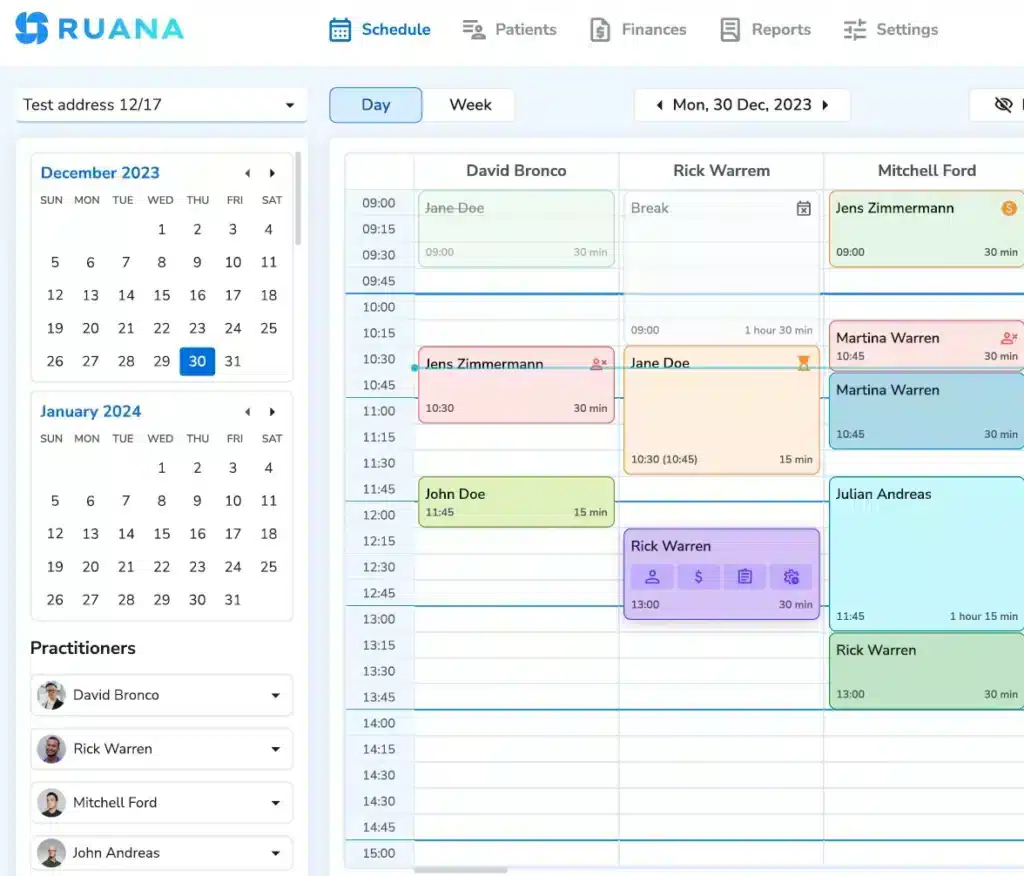
Clinical clarity at scale: Navigating the modern, intuitive master schedule within the Ruana platform.
A sustainable client load is not only about how many appointments fit on the calendar. It also depends on how much time each appointment creates around it. A new client may need an intake review, extra documentation, treatment planning, payment setup, and follow-up. A returning client may need less preparation, but still requires notes, scheduling, and checkout.
For small practices, the mistake is often counting only face-to-face time. The week may look manageable with 25 booked sessions, then become exhausting once documentation, admin work, cancellations, and client communication are added back in. As shown in the previous tip, a realistic load should leave room for the full workflow, not only the session itself.
A few things that work well:
Set a weekly client limit based on total workload, not only available appointment slots.
Separate new clients from returning clients when planning capacity, since they usually require different levels of prep and documentation.
Leave lighter blocks after physically or emotionally demanding sessions instead of stacking them back-to-back.
Review your actual client load every few weeks and adjust before the schedule starts spilling into evenings or weekends.
3. Group Similar Appointments Together
A first visit, a regular follow-up, a longer bodywork session, and a quick check-in do not use the same amount of preparation, focus, or recovery time. With different appointments scattered randomly across the week or within a day, the schedule becomes busier than it looks.
Grouping helps the day move with less friction. It gives you a clearer rhythm, makes documentation easier, and reduces the mental reset required between very different types of sessions.
Here are a couple of tips that have helped us survive a busy week.
Place new clients in specific blocks so intake review, first-session notes, and follow-up tasks are easier to manage.
Group shorter follow-ups together when the workflow is predictable and does not require heavy preparation between sessions.
Avoid placing the most demanding sessions at the very end of the day, when focus and energy are already lower.
Keep similar appointment lengths close together to reduce awkward gaps and make the schedule easier to control.
4. Add Buffer Time Between Sessions
As minor as it seems, a 10 to 15-minute gap between appointments can help you complete quick notes, reset the room, or simply step away for a moment to recharge.
Many therapists avoid buffer time because it can feel like lost revenue. Yet, in practice, working without a rest creates an unnecessary hassle, with clients feeling it and afternoons beginning to carry the pressure.
Here’s what we do to have things work well at our clinic:
Add 10 to 15 minutes between sessions, especially after longer, physically demanding, or emotionally heavy appointments.
Use the buffer to finish brief notes while the session is still fresh instead of saving everything for the end of the day.
Set appointment durations in a way that protects the gap automatically, so the buffer does not depend on memory or willpower.
Use different durations for different appointment types, such as consultations, follow-ups, assessments, massage sessions, or chiropractic visits.
💡For small practices, this is where scheduling settings can make a real difference. When appointment types, session lengths, and booking rules are set up properly, the calendar can protect buffer time by default instead of leaving therapists to fight for it between clients.
5. Protect Admin Blocks Like Real Appointments
Admin time should not be the first thing removed when the day gets busy.
You may be willing to keep a client appointment, while sacrificing your own admin blocks for that. The result is often predictable: notes pile up, invoices wait, appointment requests sit unanswered, and the workday stretches into the evening.
The fix is to treat admin blocks as part of the clinical schedule, not as leftover time. Even short blocks can make the week feel more controlled when they are protected consistently.
Here’s what works for our practice:
Use a short morning block to review the day’s appointments, check intake forms, and spot any schedule gaps before clients arrive.
Add a mid-day admin block for notes, invoices, booking changes, and appointment requests from the first half of the day.
Keep a short end-of-day closeout for final documentation, tomorrow’s calendar, and any tasks that should not follow you home.
Mark admin blocks as unavailable in the calendar, so they are not accidentally filled with last-minute appointments.
💡Having a connected practice management system allows keeping the schedule, client records, SOAP notes, invoices, and appointment requests in the same workflow. That’s how the admin blocks become easier to complete. You spend less time jumping between tools and more time closing the loop before the day ends.
6. Keep Documentation Time Close to the Visit
This is one of the fastest paths to therapist burnout, especially for small practices. As a rule, notes start as a few unfinished items, then become an evening task, then turn into a weekend catch-up habit. Keeping documentation close to the visit helps protect both clinical accuracy and personal time.
To make things easier, consider:
Using buffer time after sessions to complete at least the core note while the details are still fresh.
Creating SOAP note templates for common appointment types, so you are refining the note instead of starting from a blank screen.
Keeping documentation short enough to be useful, but complete enough to support care, progress tracking, and billing when needed.
Using practice software with structured notes, templates, and client records in one place, so documentation does not become a separate workflow from the rest of the visit.
7. Use Intake Forms Before the Appointment
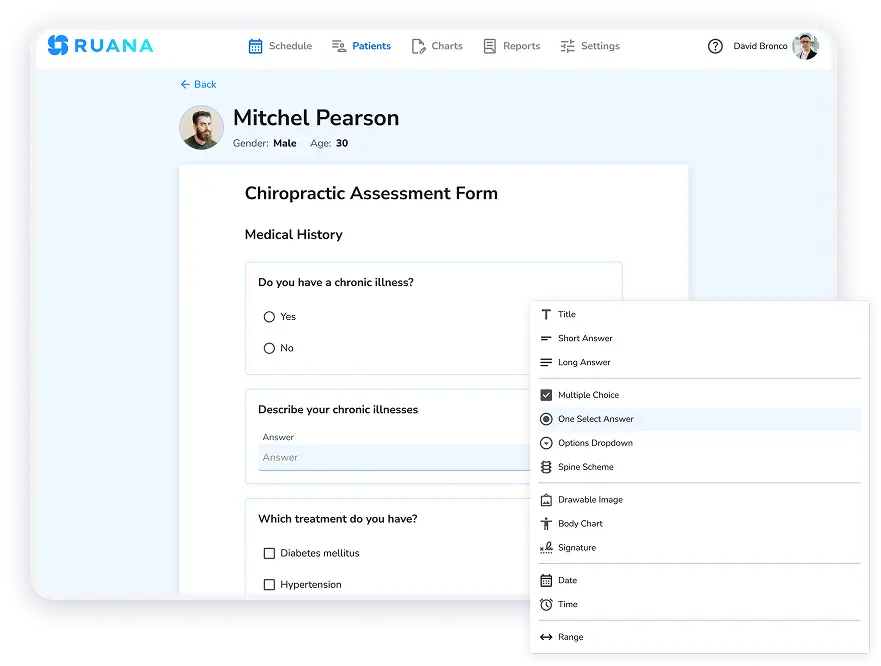
Easily create and customize digital forms for patients and practitioners.
A strong intake process can take pressure off both the therapist and the schedule. This matters especially for new clients. First visits often require more context, more questions, more documentation, and more follow-up. If intake information arrives late, incomplete, or on paper, the appointment can start with admin work instead of client care. That pressure usually spreads into the rest of the day.
Here’s what you can do:
Send intake forms before the visit, ideally as part of the booking or confirmation workflow.
Keep forms focused on the information you actually need for that appointment type.
Review intake forms during a protected morning or pre-session block, not two minutes before the client arrives.
💡The best results come from digital intake forms that connect to client records, so the information does not need to be copied, scanned, or manually filed later.
8. Reduce No-Shows With Reminders and Booking Rules
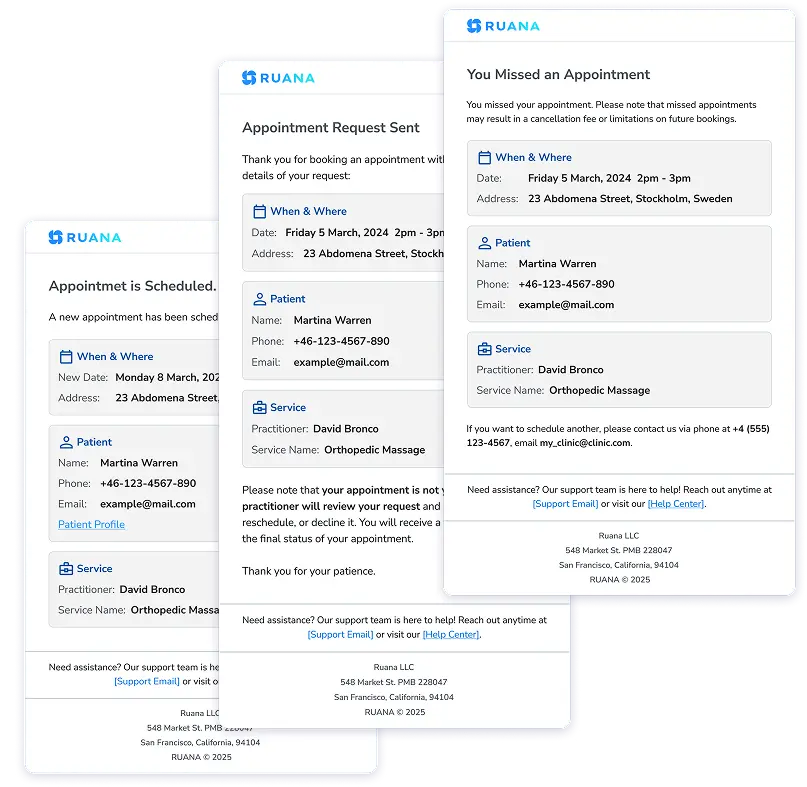
Patient email reminders for booking confirmation, reschedule requests, and cancellations.
Apart from leaving an empty space in the calendar, no-shows break the rhythm of the day by creating revenue pressure and making it harder to trust the schedule you built. Frequent no-shows can push small practices toward overbooking, which only adds more stress when everyone does show up.
The better approach is to reduce uncertainty before the appointment. Clear booking rules, simple cancellation expectations, and automated reminders help clients remember, confirm, cancel, or reschedule before the slot is lost.
Here’s what you can do:
Send automatic reminders before each appointment, using the timing that works best for your clients and appointment type.
Make cancellation and rescheduling rules clear during booking, especially for new clients.
Use confirmation messages to include the appointment time, location, required forms, and any preparation notes.
Track repeat no-shows or last-minute cancellations, then adjust booking rules when a pattern becomes clear.
9. Review the Schedule Every Friday
Don’t treat the schedule as fixed once it is created. Small practices change quickly. New clients require more prep, certain appointment types take longer than expected, documentation may pile up in one part of the week, and no-shows may appear in patterns you only notice after a few weeks.
Short Friday reviews allow you to catch those problems before they become the normal way the practice runs.
A few things that can work well include:
Reviewing which days felt overloaded, rushed, or too fragmented.
Checking when documentation, intake review, billing, or messages spilled outside working hours.
Looking at no-shows, cancellations, and late arrivals to see whether certain days or times need stricter booking rules.
Using scheduling and practice reports to spot patterns instead of relying only on memory.
Sample Weekly Schedule for a Small Therapy Practice
A sustainable schedule should show more than client appointments. It should also protect time for notes, intake review, payments, appointment requests, and weekly planning.
We’ve built the example below for a small therapy practice that wants steady client flow without pushing admin work into evenings.
No routine appointments, no catch-up admin unless truly necessary
💡You can adjust it based on your practice size, appointment length, and specialty, be that chiropractic, massage therapy, mental health practice, etc. The main idea is to keep client care, documentation, admin work, and recovery visible on the calendar. If the schedule only shows appointments, the practice will keep underestimating the real workload.
How Practice Management Software Supports Therapist Burnout Prevention
You still need clear boundaries, realistic client capacities, and a weekly workflow that can actually be maintained.
What software can do is make that workflow easier to protect. When scheduling, client records, intake forms, SOAP notes, reminders, invoices, and reports are connected, fewer tasks fall through the cracks or get pushed into the evening. The work still exists, but it becomes easier to see, complete, and control.
A connected system helps make those pressure points more visible. When therapists can see what is scheduled, what is unfinished, what needs follow-up, and where time is being lost, it becomes easier to adjust the workflow before the week starts running on stress.
About the Authors
★★★★★4.9 · 329 Reviews
Rouzbeh NoroozyChiropractor & Co-Founder · Palmer West · UC Berkeley · 14 Years of ExperienceRouzbeh Noroozy is a chiropractor with 14 years of clinical experience and co-founder of Ruana practice management software. He completed his undergraduate studies at the University of California, Berkeley and graduated from the renowned Palmer College of Chiropractic West in California. As a practicing clinician and clinic owner, he understands firsthand the administrative challenges practices face — and which digital tools genuinely help streamline day-to-day operations.
Anastasiia NoroozyMedical Graduate & Co-Founder · 8 Years of ExperienceAnastasiia Noroozy is a medical graduate and co-founder of Ruana with 8 years of experience working directly with patients at the clinic in Cologne. She manages the day-to-day flow of the practice and knows every patient-facing process from the inside out — from intake and scheduling to follow-up care. Her hands-on clinical and operational experience directly shapes how Ruana is built to work in the real world.
Our team will review your inquiry and get back to you as soon as possible.
Privacy Settings
To provide the best experiences, we use technologies like cookies to store and/or access device information. Consenting to these technologies will allow us to process data such as browsing behavior or unique IDs on this site. Not consenting or withdrawing consent, may adversely affect certain features and functions.
Functional
Always active
The technical storage or access is strictly necessary for the legitimate purpose of enabling the use of a specific service explicitly requested by the subscriber or user, or for the sole purpose of carrying out the transmission of a communication over an electronic communications network.
Preferences
The technical storage or access is necessary for the legitimate purpose of storing preferences that are not requested by the subscriber or user.
Analytics
The technical storage or access that is used exclusively for statistical purposes.The technical storage or access that is used exclusively for anonymous statistical purposes. Without a subpoena, voluntary compliance on the part of your Internet Service Provider, or additional records from a third party, information stored or retrieved for this purpose alone cannot usually be used to identify you.
Marketing
The technical storage or access is required to create user profiles to send advertising, or to track the user on a website or across several websites for similar marketing purposes.
To provide the best experience for our practitioners, we use cookies to personalize content, analyze our traffic, and support our marketing efforts. By clicking 'Accept', you consent to our use of these technologies. You can manage your preferences at any time.
Functional
Always active
The technical storage or access is strictly necessary for the legitimate purpose of enabling the use of a specific service explicitly requested by the subscriber or user, or for the sole purpose of carrying out the transmission of a communication over an electronic communications network.
Preferences
The technical storage or access is necessary for the legitimate purpose of storing preferences that are not requested by the subscriber or user.
Analytics
The technical storage or access that is used exclusively for statistical purposes.The technical storage or access that is used exclusively for anonymous statistical purposes. Without a subpoena, voluntary compliance on the part of your Internet Service Provider, or additional records from a third party, information stored or retrieved for this purpose alone cannot usually be used to identify you.
Marketing
The technical storage or access is required to create user profiles to send advertising, or to track the user on a website or across several websites for similar marketing purposes.