How to Manage Scheduling in a Multi-Practitioner Chiropractic Clinic
03.11.26
Managing several chiropractors in one office? Learn practical ways to coordinate practitioner schedules, organize new-patient and follow-up visits, reduce booking conflicts, and keep your front desk running smoothly.
Managing appointments for one chiropractor takes coordination. Add two or three practitioners, different working hours, new-patient examinations, routine follow-ups, and last-minute changes, and the calendar quickly becomes one of the clinic’s busiest parts. Multi-practitioner scheduling becomes particularly challenging when receptionists must coordinate these differences while keeping appointments organized.
The challenge isn’t simply finding an empty time slot. It’s making sure the right patient is booked with the right practitioner, for the right service, and at the right time. A consistent scheduling process helps receptionists manage daily changes, gives chiropractors a clearer view of their appointments, and makes booking more convenient for patients.
In this guide, we’ll explore seven practical ways to improve multi-practitioner scheduling, from organizing individual working hours to managing online booking and creating a smoother front desk workflow.
TL;DR: To manage multi-practitioner chiropractic scheduling effectively, configure individual practitioner working hours, standardize appointment durations (such as 30-minute new-patient exams vs. 15–20 minute routine adjustments), and run your entire clinic from one color-coded shared calendar. Pair deliberate online booking rules with automated email and SMS reminders to eliminate front-desk bottlenecks and reduce missed appointments.
Why Scheduling Gets Complicated in Multi-Practitioner Clinics
A clinic with three chiropractors isn’t simply a solo practice with three times as many appointments. One practitioner might start at 9:00 AM, another may only see new patients during certain hours, and a third might take a different lunch break. At the same time, reception must accommodate patient preferences, appointment durations, and unexpected changes throughout the day.
Consider a familiar situation: a follow-up patient calls to move tomorrow’s appointment, a chiropractor is running behind, and another practitioner has an unexpected opening. The receptionist needs to know whether the opening matches the required service, whether that practitioner is available, and whether the patient is comfortable seeing someone else.
Without clear scheduling rules, these everyday decisions can create unnecessary interruptions. A reliable multi-practitioner scheduling process makes availability, appointment types, and team responsibilities easier to understand.
1. Set Individual Practitioner Working Hours
Effective multi-practitioner scheduling starts with each chiropractor’s actual working hours, not the clinic’s general opening hours. Your office may be open from 9:00 AM to 7:00 PM, but individual practitioners could work different shifts, have separate lunch breaks, or reserve certain times for documentation and other responsibilities.
Recording these differences in one system helps prevent appointments from being offered when a practitioner is unavailable. It also allows receptionists to provide accurate booking information without repeatedly checking with the clinical team.
Separate Office Hours From Practitioner Availability
Office hours describe when the clinic operates, while practitioner hours determine when an individual chiropractor can see patients. Create a schedule for every team member that includes regular working days, start and finish times, recurring breaks, and any planned absences.
For Ruana users, the team setup guide explains how to configure practitioner working hours and booking intervals. Working hours, appointment duration, and online booking intervals are separate settings. Each affects how appointments are organized and displayed.
Before activating online booking, verify that every chiropractor has the correct working hours, offered services, and booking intervals configured. This helps ensure patients see appropriate appointment options.
2. Create Clear Appointment Types and Durations
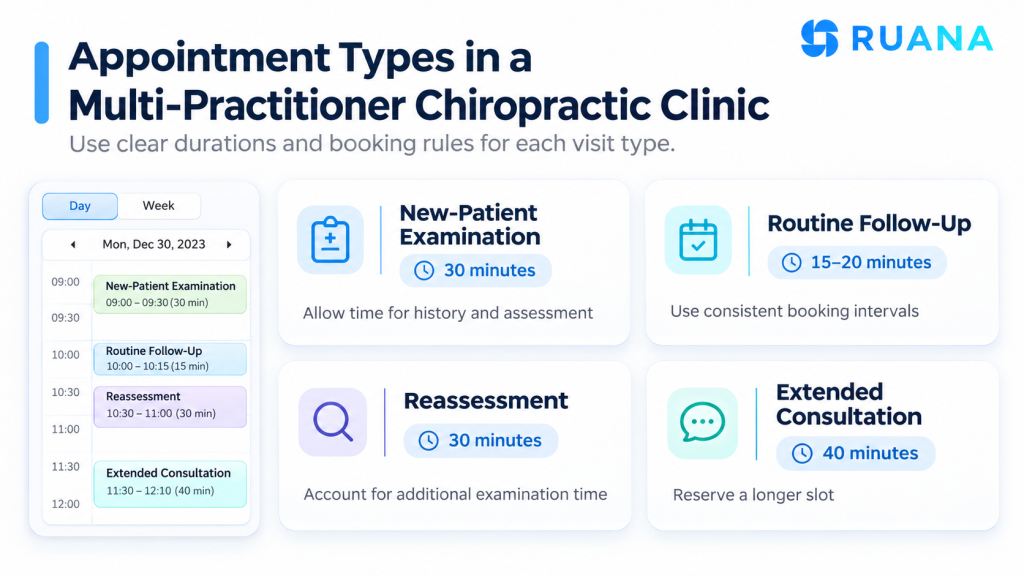
Not every chiropractic appointment requires the same amount of time. A new-patient examination may involve a detailed health history and assessment, while a routine follow-up visit may be shorter. Reassessments, extended consultations, or other specialized services may require additional time.
When appointment types aren’t standardized, receptionists may apply different rules to the same service. One staff member might book a new patient into a short opening, while another allows additional time. Clear appointment types help maintain a more predictable chiropractic schedule.
Use Realistic Durations, Not Automatic Defaults
Review the services your practice provides and agree on appropriate durations for each one. Allow practitioner-specific differences when necessary, but document those differences clearly so that receptionists know which booking rules apply.
Appointment type
Example duration
Scheduling consideration
New-patient examination
30 minutes
Allow time for history and assessment
Routine follow-up
15–20 minutes
Use consistent booking intervals
Reassessment
30 minutes
Account for additional examination time
Extended consultation
40 minutes
Reserve an appropriately longer slot
These durations are illustrative examples, not clinical recommendations. Every clinic should choose appointment lengths based on its services and professional requirements.
When configuring Ruana, remember that a 20-minute online booking interval doesn’t automatically mean every service lasts 20 minutes. The interval controls how frequently potential appointment start times appear, while service duration determines the actual length of the appointment.
Keeping those settings consistent is especially important when several chiropractors offer different services.
3. Use One Shared Calendar for the Entire Clinic
A shared calendar is one of the most useful tools for multi-practitioner scheduling. Instead of opening several separate schedules or checking with individual chiropractors, receptionists can see the entire clinic’s appointments in one place.
A clear calendar should show which practitioners are working, which appointments are booked, where openings remain, and whether a particular patient has arrived. Practitioner columns and color-coded appointments can make a busy clinic day easier to understand at a glance.
Ruana’s scheduling software includes a shared calendar, practitioner views, appointment statuses, and drag-and-drop rescheduling. These tools help front desk teams organize appointments and make routine changes without switching between separate scheduling systems.
Agree on What Appointment Statuses Mean
A shared calendar only works well when everyone uses it consistently. Decide who marks patients as arrived, who updates cancellations, and when an appointment should be considered complete.
These small conventions can help receptionists avoid duplicate work and reduce how often they need to interrupt practitioners for routine information. A calendar should represent what’s actually happening in the clinic, not merely the appointments that were originally booked.
4. Coordinate Online Booking With Internal Availability
Online booking can reduce routine scheduling calls, but it needs to reflect the clinic’s actual booking rules. Guide patients to the right appointment types and practitioners, rather than making them guess which service they need.
Before offering self-booking, decide which appointments patients can schedule directly and which situations require reception assistance. This is particularly important for multi-practitioner scheduling because different chiropractors may provide different services or have different appointment requirements.
The Ruana online booking setup guide explains the available booking settings, including appointment requests and options for configuring what patients can book.
Keep Public Booking Rules Deliberate
For example, a clinic might allow established patients to schedule routine follow-ups online while asking new patients with special circumstances to contact the office. Another practice may prefer to review certain appointment requests before confirming them.
The right approach depends on how your clinic operates. The goal is to make online booking convenient without losing control of practitioner availability or appointment requirements.
If your practice needs a specific restriction, such as displaying only certain parts of a practitioner’s working day online, verify that your current scheduling system supports that rule before relying on it.
5. Establish Rules for Rescheduling and Last-Minute Changes
Even a well-organized schedule will change during the day. Patients cancel appointments, practitioners occasionally run late, and unexpected openings become available. The key is to create a consistent process for managing those changes.
Decide which appointments receptionists can reschedule independently and which changes require practitioner approval. Staff should also understand how to handle patient preferences, particularly when offering an appointment with a different chiropractor.
If a patient’s usual practitioner becomes unavailable, reception may be able to offer another appointment time or an alternative provider. However, changing practitioners should never be treated as a purely administrative decision. The patient’s preferences and any relevant clinical considerations must remain part of the process.
Make Cancellations a Predictable Workflow
When a patient cancels, update the calendar promptly, inform the relevant practitioner when necessary, and determine whether the opening should become available to another patient. A consistent cancellation process makes last-minute scheduling changes easier to manage.
Automated appointment reminders can also support the workflow by keeping patients informed about upcoming visits. Ruana offers email reminders and optional SMS reminders, helping practices communicate appointment details without manually contacting every patient.
Although reminders cannot eliminate every missed appointment, they can make routine communication more consistent.
6. Create a Clear Front Desk Workflow
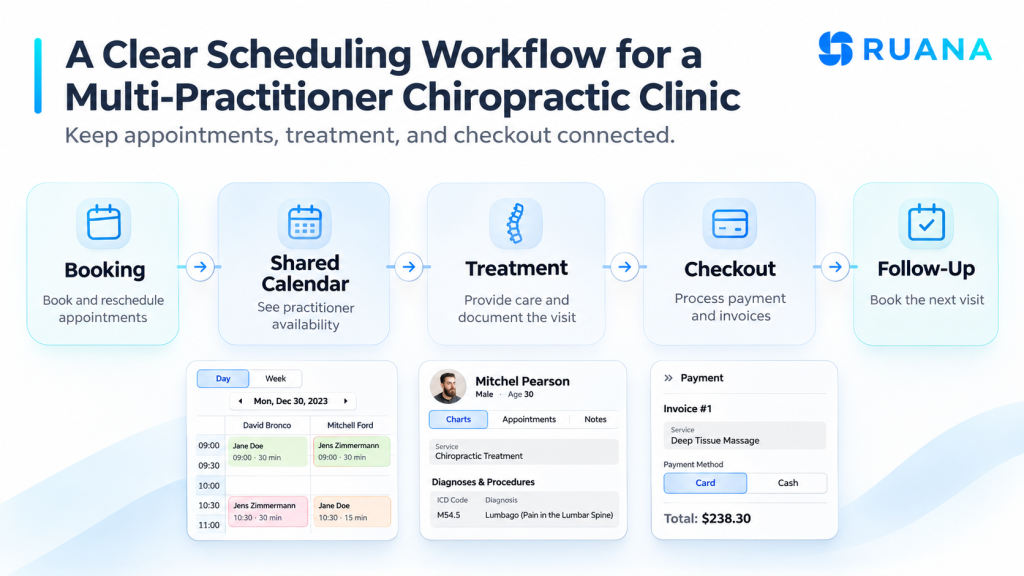
Receptionists in multi-practitioner clinics often manage several responsibilities simultaneously. They answer calls, greet patients, adjust appointments, process payments, and help patients schedule follow-up visits.
When responsibilities are unclear, staff may repeatedly interrupt chiropractors to confirm information that should already be available. A clear front desk workflow helps reduce administrative interruptions and keeps appointments moving.
One practical approach is to give reception staff responsibility for appointment booking, arrival status, and routine administrative changes, while chiropractors remain responsible for clinical decisions and documentation. After a visit, communicate relevant follow-up information clearly so receptionists can book the right appointment without guessing.
Imagine three chiropractors finishing appointments within the same ten-minute period. Several patients may arrive at reception simultaneously to pay, schedule follow-ups, or ask questions.
If every checkout requires multiple manual lookups, the front desk can quickly become congested. However, when appointment information is organized and accessible, the team can complete routine administrative steps more efficiently.
Review the busiest periods of your day and consider whether small changes to appointment start times could spread arrivals and checkouts more evenly.
7. Review Multi-Practitioner Scheduling Patterns Every Month
A scheduling process that works well today may need adjustment as your practice grows. Adding another chiropractor, extending opening hours, or changing appointment types can create new coordination challenges.
Schedule a short monthly review with your reception team and practitioners. Look for recurring late starts, unused appointment slots, frequent cancellations, and appointment types that regularly take longer than expected.
Ask staff which scheduling situations cause the most interruptions. Receptionists may notice recurring booking problems that aren’t obvious to practitioners, while chiropractors may identify appointments that need additional time.
Make one or two improvements at a time and observe whether they help. A consistent monthly review is often more useful than changing the scheduling rules after every difficult day.
Sample: Three Chiropractors, One Front Desk
Consider a chiropractic clinic with three practitioners and one receptionist. Each chiropractor has different working hours and appointment responsibilities, but they all use the same shared calendar.
Practitioner
Working hours
Main scheduling needs
Chiropractor A
9:00 AM–5:00 PM
New-patient examinations and follow-ups
Chiropractor B
10:00 AM–7:00 PM
Routine follow-ups and reassessments
Chiropractor C
9:00 AM–3:00 PM
Follow-ups and scheduled breaks
When a patient calls to reschedule, reception can compare openings across the team and confirm that the appointment type and duration match the available time. If the patient prefers to remain with their usual chiropractor, that preference stays part of the scheduling decision.
This is where a structured multi-practitioner scheduling system becomes valuable. It clarifies availability, reduces unnecessary back-and-forth communication, and helps everyone work from the same information.
What to Look for in Multi-Practitioner Scheduling Software
As your clinic grows, it’s worth reviewing whether your current scheduling tools still support the way your team works.
Some practices begin with a basic calendar or a combination of paper schedules and digital tools. These arrangements may work initially, but coordinating several practitioners often requires more structured scheduling options.
Look for software that supports individual working hours, service-specific appointment durations, shared calendars, appointment statuses, rescheduling tools, online booking, and automated reminders.
It’s also useful to consider how scheduling connects with the rest of the patient journey. If receptionists must repeatedly switch between unrelated systems to access appointment information, intake forms, and payment details, administrative work can remain unnecessarily complicated.
Ruana brings scheduling, digital intake forms, patient records, SOAP notes, and billing tools together in one practice management system. Explore Ruana’s chiropractic practice management software to see how these workflows fit together.
Final Thoughts
Good multi-practitioner scheduling involves more than filling empty appointment slots. It requires clear practitioner availability, consistent appointment types, an accurate shared calendar, and a dependable front desk process.
Start by identifying the scheduling problem that disrupts your clinic most. If receptionists frequently need to ask which practitioner is available, improve schedule visibility. If patients regularly book the wrong service, review your appointment types and online booking rules. When arrivals and checkouts become congested, look for ways to distribute appointments more effectively.
With consistent processes and the right scheduling tools, chiropractic practices can make daily appointment management easier for everyone involved.
About the Authors
★★★★★4.9 · 329 Reviews
Rouzbeh NoroozyChiropractor & Co-Founder · Palmer West · UC Berkeley · 14 Years of ExperienceRouzbeh Noroozy is a chiropractor with 14 years of clinical experience and co-founder of Ruana practice management software. He completed his undergraduate studies at the University of California, Berkeley and graduated from the renowned Palmer College of Chiropractic West in California. As a practicing clinician and clinic owner, he understands firsthand the administrative challenges practices face — and which digital tools genuinely help streamline day-to-day operations.
Anastasiia NoroozyMedical Graduate & Co-Founder · 8 Years of ExperienceAnastasiia Noroozy is a medical graduate and co-founder of Ruana with 8 years of experience working directly with patients at the clinic in Cologne. She manages the day-to-day flow of the practice and knows every patient-facing process from the inside out — from intake and scheduling to follow-up care. Her hands-on clinical and operational experience directly shapes how Ruana is built to work in the real world.
To provide the best experiences, we use technologies like cookies to store and/or access device information. Consenting to these technologies will allow us to process data such as browsing behavior or unique IDs on this site. Not consenting or withdrawing consent, may adversely affect certain features and functions.
Functional
Always active
The technical storage or access is strictly necessary for the legitimate purpose of enabling the use of a specific service explicitly requested by the subscriber or user, or for the sole purpose of carrying out the transmission of a communication over an electronic communications network.
Preferences
The technical storage or access is necessary for the legitimate purpose of storing preferences that are not requested by the subscriber or user.
Analytics
The technical storage or access that is used exclusively for statistical purposes.The technical storage or access that is used exclusively for anonymous statistical purposes. Without a subpoena, voluntary compliance on the part of your Internet Service Provider, or additional records from a third party, information stored or retrieved for this purpose alone cannot usually be used to identify you.
Marketing
The technical storage or access is required to create user profiles to send advertising, or to track the user on a website or across several websites for similar marketing purposes.
To provide the best experience for our practitioners, we use cookies to personalize content, analyze our traffic, and support our marketing efforts. By clicking 'Accept', you consent to our use of these technologies. You can manage your preferences at any time.
Functional
Always active
The technical storage or access is strictly necessary for the legitimate purpose of enabling the use of a specific service explicitly requested by the subscriber or user, or for the sole purpose of carrying out the transmission of a communication over an electronic communications network.
Preferences
The technical storage or access is necessary for the legitimate purpose of storing preferences that are not requested by the subscriber or user.
Analytics
The technical storage or access that is used exclusively for statistical purposes.The technical storage or access that is used exclusively for anonymous statistical purposes. Without a subpoena, voluntary compliance on the part of your Internet Service Provider, or additional records from a third party, information stored or retrieved for this purpose alone cannot usually be used to identify you.
Marketing
The technical storage or access is required to create user profiles to send advertising, or to track the user on a website or across several websites for similar marketing purposes.