Osteopathic Practice Management Software: Features You Actually Need
24.01.26
Running an osteopathic practice means balancing hands-on patient care with endless administrative demands. Discover the essential features your practice management software needs to streamline scheduling, documentation, billing, and patient communication while helping you focus on what matters most: patient outcomes.
Running an osteopathic practice means balancing hands-on patient care with the endless administrative demands of a modern healthcare business. Between managing appointments, documenting treatments, processing payments, and staying compliant with regulations, it’s easy to feel overwhelmed.
The right practice management software can transform your workflow, freeing you from administrative chaos so you can focus on what matters most: helping patients heal. But with countless options available, how do you know which features actually matter for osteopathic practitioners?
This guide breaks down the essential capabilities your osteopathic practice management software should have, helping you make an informed decision that supports both your business growth and patient outcomes.
Why Osteopaths Need Specialized Practice Management Software
Osteopathic medicine is unique. Your holistic, whole-body approach requires documentation tools that capture not just symptoms but the interconnected patterns you observe. You need software that understands the complexity of manual therapy, structural assessments, and individualized treatment plans.
Generic medical software often falls short because it wasn’t designed with osteopaths in mind. You deserve tools built to support your specific workflow, from intake assessments to hands-on treatment documentation to follow-up care planning.
Essential Feature #1: Intelligent Online Booking
Your patients lead busy lives. Forcing them to call during office hours to book an appointment creates unnecessary friction and can cost you new patient opportunities.
Modern online booking should work 24/7, allowing patients to schedule appointments from their phone, tablet, or computer whenever it’s convenient for them. Look for software that offers:
Real-time availability that syncs instantly with your calendar
Customizable appointment types for initial consultations, follow-up treatments, and specific modalities
Embedded booking pages you can add directly to your website
Appointment request options if you prefer to manually approve bookings
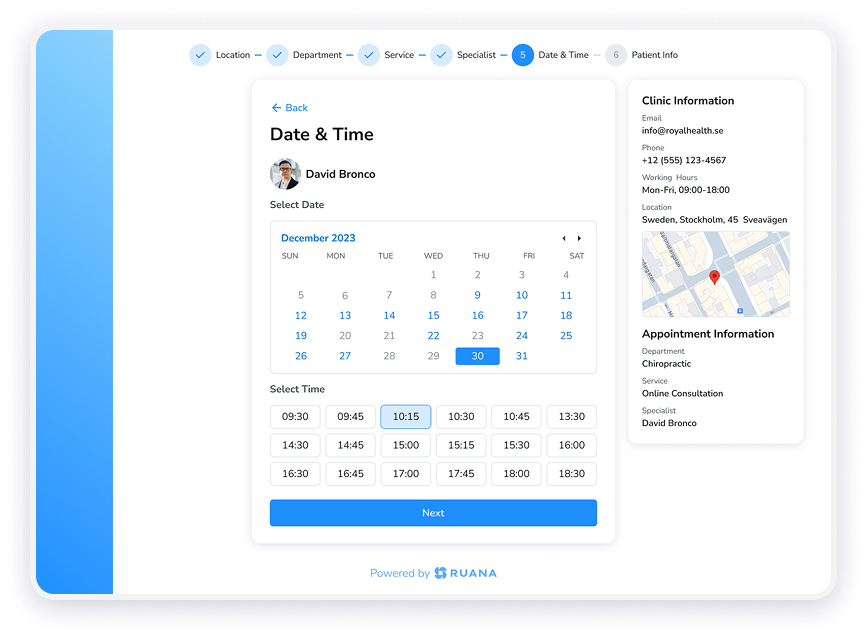
Online booking interface in Ruana where patients select date and time for appointments.
Ruana’s online booking system lets patients see your real-time availability and book instantly, reducing phone tag and filling your schedule even while you’re treating other patients. The booking page displays your clinic information, available practitioners, and service details, creating a professional first impression.
Your schedule changes constantly. Last-minute cancellations, urgent cases, and patients running late require flexibility that paper calendars or clunky software simply can’t provide.
A color-coded, drag-and-drop calendar makes schedule management effortless. You should be able to:
View multiple practitioners if you run a multi-osteopath practice
Reschedule appointments with a simple click-and-drag
Color-code by appointment type to quickly scan your day
Block off time for breaks, administrative tasks, or personal appointments
Switch between day, week, and month views for different planning needs
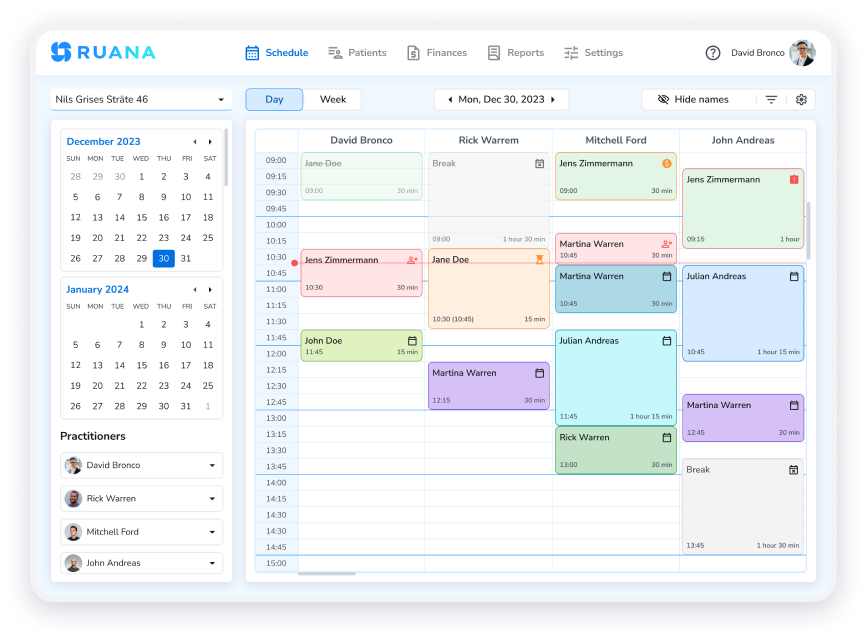
Calendar scheduling dashboard in Ruana practice management software.
Whether you’re solo or managing a team, intelligent scheduling software saves you precious time every single day. Ruana’s calendar keeps you organized with visual clarity, helping you maximize productivity while minimizing gaps in your schedule.
For chiropractors looking for similar functionality, our chiropractic practice management software offers the same powerful scheduling tools tailored to adjustment-focused practices.
Documentation is the backbone of quality care and regulatory compliance. But generic medical charting systems force osteopaths into templates designed for conventional medicine, not manual therapy.
Your practice management software should offer:
Flexible SOAP note templates you can customize for osteopathic assessments
Automatic Notes functionality that inserts pre-programmed findings with one click
Treatment plan tracking that follows patients through their care journey
Structural assessment tools for documenting palpatory findings and mobility restrictions
Secure, searchable patient records accessible from any device
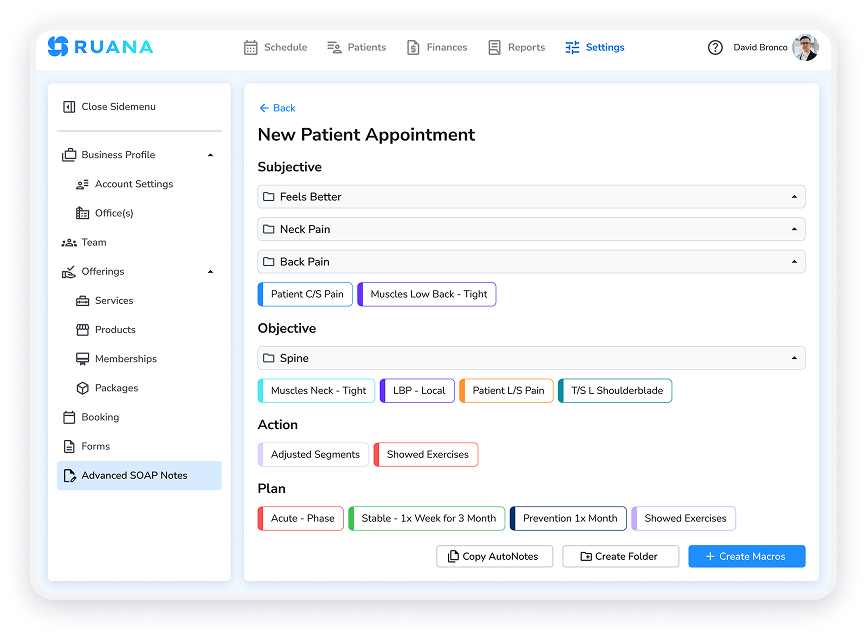
Create SOAP notes with customizable buttons and automatic notes.
The Automatic Notes feature saves osteopaths hours every week. Instead of typing the same observations repeatedly, you can create custom buttons that insert full sentences, treatment descriptions, or assessment findings instantly. This mirrors your actual treatment workflow, letting you document quickly without sacrificing detail or accuracy.
Essential Feature #4: Professional Billing & Invoicing
Financial administration shouldn’t consume hours of your week. The right software makes invoicing and payment tracking smooth for both you and your patients.
Look for capabilities including:
Professional invoice generation with your branding
ICD-10 code support for accurate billing
Automated receipt emails that go out immediately after payment
Payment tracking to monitor outstanding balances at a glance
Multiple payment method recording including card, cash, and check
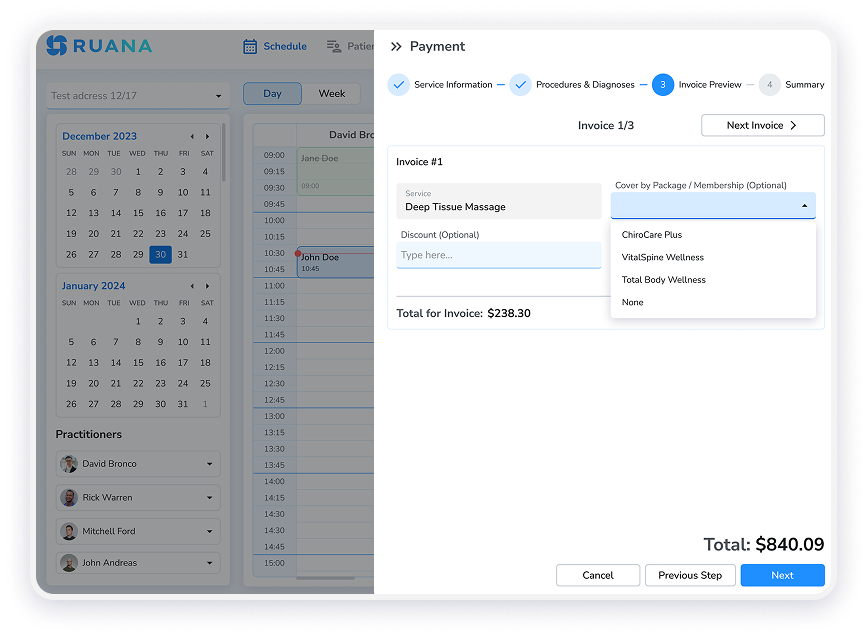
Patient checkout with option to apply memberships or wellness packages for payment.
Ruana tracks all transactions in one secure location, giving you complete financial transparency without complex accounting software. Generate professional invoices quickly and maintain clear records of all payments received.
When comparing options, check out detailed practice management software pricing to understand what features are included at each tier and how Ruana’s comprehensive billing tools can streamline your financial workflows.
Essential Feature #5: Digital Intake Forms
First impressions matter. Greeting new patients with clipboards and paper forms feels outdated and creates data entry work for your staff.
Digital intake forms should:
Go out automatically when patients book their first appointment
Be accessible on any device so patients can complete them at home
Pull data directly into patient records without manual transcription
Be fully customizable to gather osteopathic-specific health history
Include consent forms and policies patients sign electronically
This creates a professional experience while reducing paperwork, data entry errors, and front desk bottlenecks.
No-shows and last-minute cancellations hurt your practice financially and prevent other patients from accessing care. Automated reminders sent via both email and SMS dramatically reduce missed appointments.
Your software should send:
Automated appointment confirmations immediately after booking via email and SMS
Reminder messages at customizable intervals before appointments through both channels
Follow-up communications for treatment plan check-ins
Professional messaging that reinforces your brand across all touchpoints
These touchpoints keep patients engaged through their preferred communication channel while running completely on autopilot, so you never forget to send a reminder again. The combination of email and SMS ensures your messages reach patients wherever they are most responsive.
Essential Feature #7: Packages & Memberships
Many osteopathic patients need ongoing care rather than one-off treatments. Offering treatment packages or membership plans creates predictable revenue while making it easier for patients to commit to their healing journey.
Quality software should let you:
Create multi-session packages at discounted rates
Set up recurring memberships with automatic billing
Track credits and balances automatically
Set expiration dates and usage rules to protect your business
This feature transforms how you structure care plans, encouraging patient commitment while improving your cash flow.
Essential Feature #8: Analytics & Reports
You can’t improve what you don’t measure. Practice analytics help you understand:
Which services are most popular
When your busiest times occur
Revenue trends over time
Patient retention rates
Booking source effectiveness
Data-driven insights let you make smarter business decisions about staffing, marketing, and service offerings.
Essential Feature #9: Cloud-Based Access
Your practice doesn’t stop when you leave the office. Cloud-based software means you can:
Access patient information from anywhere on any device
Make schedule changes remotely when needed
Never worry about software updates (they happen automatically)
Eliminate server hardware costs and IT maintenance
Ensure automatic backups protect your data
This flexibility is especially valuable for osteopaths who teach, attend conferences, or work across multiple locations.
Essential Feature #10: Security & Compliance
Patient data protection isn’t optional. Your software must include:
Encryption for all data transmission and storage
HIPAA compliance (for US practices) and GDPR compliance (for European practices)
Secure cloud hosting with automatic backups
Role-based access controls if you have staff
Audit trails showing who accessed what information
Ruana hosts data on AWS servers in your region, ensuring compliance with local data protection regulations without compromising performance.
What You Don’t Actually Need
Not every feature adds value. Some software companies load their systems with bells and whistles that sound impressive but complicate daily use.
You probably don’t need built-in tools for patients to video chat with you during appointments. Patients can use their own video conferencing tools if remote consultations are relevant to your practice. Similarly, complex internal chat systems between practitioners and patients often go unused when simple email communication works perfectly well.
Focus on software that excels at core practice management functions rather than trying to do everything mediocrely.
Making the Switch: Implementation Considerations
Choosing new software is only half the battle. Successful implementation requires:
Data migration support to transfer existing patient records
Onboarding training so your team can use the system confidently
Dedicated customer support when questions arise
A reasonable learning curve that doesn’t disrupt patient care
Ruana includes free data import and a personalized onboarding call to ensure your transition is smooth. You’ll have unlimited support as you get comfortable with the platform.
Try Before You Commit
The best way to know if software fits your osteopathic practice is to actually use it. Look for platforms offering risk-free trials so you can test features with real patients and workflows.
Ruana offers a 14-day free trial with full feature access, letting you experience the complete system before making any financial commitment. No credit card required to start.
The Bottom Line: Software Should Support Your Practice, Not Complicate It
The right osteopathic practice management software feels like it was built specifically for your workflow. It removes administrative friction, saves you time on documentation and billing, and creates a professional experience for your patients from booking to payment.
While features matter, the best software ultimately comes down to three things: ease of use, reliable support, and a pricing structure that makes sense for your practice size.
Whether you’re starting a new practice or ready to leave behind outdated systems, investing in modern practice management software is one of the smartest decisions you can make for your business growth and work-life balance.
Ready to Streamline Your Osteopathic Practice?
See how Ruana can transform your daily workflow with intelligent scheduling, effortless documentation, and automated patient communication.
No credit card required. Full feature access. Import your existing patient data for free.
About Ruana
Ruana is cloud-based practice management software designed for health and wellness professionals, including osteopaths, chiropractors, massage therapists, and mental health practitioners. With features like 24/7 online booking, intelligent scheduling, customizable SOAP notes, automated billing, and email reminders, Ruana helps practices run more efficiently while improving patient experience. Learn more at getruana.com.
Join the Waitlist
Please fill in the fields below and we'll add you to the Waitlist.
Your message has been successfully sent.
Our team will review your inquiry and get back to you as soon as possible.