Weak notes create strong problems. They slow down SOAP charting, make insurance support harder, and leave too much room for missing details.
As more wellness practices move away from paper records, reliable SOAP notes software has become an essential part of daily documentation. A well-designed system helps practitioners create consistent, organized records in less time, while keeping patient information accurate, secure, and easy to access.
The need for efficient documentation continues to grow alongside demand for wellness services. According to the American Massage Therapy Association (AMTA), 71% of massage consumers received massage for a health or medical reason during the 12 months ending June 2025, while 29% sought massage specifically for pain relief or pain management. As massage therapy becomes increasingly integrated into healthcare, maintaining clear and defensible patient records is more important than ever.
In this guide, you’ll learn what SOAP notes software is, which features matter most, how digital documentation improves clinical workflows, and how to choose a solution that helps you spend less time on paperwork and more time with patients.
Table of Contents
- What Is SOAP Notes Software?
- Subjective: what to ask and what belongs in this section
- Objective: what to measure, observe, and record
- Assessment: where your clinical reasoning shows up
- Plan: what happens next and how to document it clearly
- Best SOAP Notes Software: Quick Comparison
- Everything You Need to Write SOAP Notes Faster
What Is SOAP Notes Software?
SOAP notes software is a digital documentation tool that helps practitioners record patient visits using the standard Subjective, Objective, Assessment, and Plan format. Instead of writing notes on paper, typing them into separate documents, or relying on generic templates, practitioners can create structured records directly inside the patient’s profile.
The best SOAP notes software solution does more than replace a paper form. It can help you document consistently, reuse relevant information, access previous notes, mark treatment areas on body charts, and keep records connected to appointments and patient history.
That distinction matters. A digital SOAP note template may help you type faster, yet dedicated software also supports the wider documentation workflow. It can reduce repetitive data entry, make records easier to review, and help multiple practitioners follow the same documentation standards.
💡For chiropractors, massage therapists, and wellness clinics, SOAP notes software can also help keep clinical documentation connected with scheduling, intake forms, billing details, and follow-up. This creates a clearer record of the full patient journey instead of leaving important information scattered across several systems.
Subjective: what to ask and what belongs in this section
The Subjective section captures what the patient reports. This includes symptoms, aggravating factors, relieving factors, functional complaints, and perceived changes since the last visit.
Think of Subjective as the patient’s voice inside the chart. You are not measuring here. You are documenting what the patient tells you in a clinically relevant way.
What belongs in Subjective
- Chief complaint
- Location of pain or tension
- Severity or pain rating
- Onset and duration
- Mechanism of injury or trigger
- Aggravating and relieving factors
- Functional limitations
- Changes since the last visit
- Patient goals
- Relevant home care compliance
Useful Subjective questions
- What brings you in today?
- Where exactly do you feel it?
- When did it start?
- Did it begin suddenly or gradually?
- How intense is it on a 0–10 scale?
- What makes it worse?
- What makes it better?
- Has it changed since your last visit?
- How is it affecting work, sleep, exercise, lifting, driving, or sitting?
- Have you tried anything at home since the last treatment?
A strong Subjective section is specific. “Neck pain x 2 weeks, worse with rotation and desk work, 6/10 today, improved temporarily after last session” is far more useful than “neck still hurts.”
Objective: what to measure, observe, and record
The Objective section includes what you can see, test, measure, or palpate. This is where you document findings instead of opinions.
For massage therapists, this may include posture, tissue texture changes, tenderness, muscle guarding, range of motion, and treatment delivered. For chiropractors, it may also include segmental findings, orthopedic tests, neurologic observations, gait, and motion palpation findings when clinically appropriate.
| Objective item | Massage therapy examples | Chiropractic examples | Why it matters |
|---|---|---|---|
| Observation | Guarded shoulder posture, limited arm swing | Antalgic posture, pelvic tilt, head carriage | Shows visible dysfunction |
| Palpation | Hypertonicity upper trapezius, trigger points in levator scapulae | Paraspinal spasm, joint tenderness, myofascial restriction | Supports local tissue findings |
| Range of motion | Cervical rotation restricted bilaterally | Lumbar flexion limited with pain | Adds measurable comparison over time |
| Tests/measures | Pain scale, functional tolerance | Orthopedic or neurologic findings when relevant | Strengthens clinical support |
| Treatment provided | Myofascial release, trigger point therapy, stretching | Manual therapy, spinal adjustment, soft tissue work, rehab guidance | Documents what happened during the visit |
Questions that help you fill the Objective section
- What did I observe on arrival?
- What was measurable today?
- What findings were reproducible?
- What areas showed restriction, tenderness, or asymmetry?
- What treatment or intervention did I perform?
- How did the patient respond during and immediately after care?
Keep this section factual. “Upper trap hypertonicity noted bilaterally, left greater than right, cervical rotation limited approximately 15 degrees left with end-range discomfort” is objective. “Patient looked bad today” is not.
Assessment: where your clinical reasoning shows up
Assessment is where you interpret the visit. This is the part many students rush, but it is often the section that separates a weak note from a useful one.
Your Assessment should connect the Subjective and Objective sections. It answers the question: what do today’s findings mean?
What belongs in Assessment
- Your impression of the patient’s current status
- Progress, plateau, flare-up, or regression
- Tolerance to treatment
- Clinical response compared with prior visits
- Reasoning that supports ongoing care or a change in approach
Assessment prompts
- Is the patient improving, unchanged, or worsening?
- Did today’s findings support the patient’s complaint?
- How did the patient respond to treatment?
- What does today’s visit suggest about function or progress?
- Does the plan need to continue, progress, or change?
A good Assessment sounds like this: “Findings remain consistent with mechanical cervical dysfunction and myofascial restriction. Patient reports reduced headache frequency since last visit but continued pain with prolonged desk work. Tolerated manual therapy well with modest immediate increase in left rotation.”
That is concise, clinical, and connected. It shows judgment without becoming vague. If you want to make notes easier for your whole team to standardize, this is exactly where template-driven SOAP note software helps most.
Plan: what happens next and how to document it clearly
The Plan section records the next steps. It should make the follow-up strategy obvious to anyone reading the chart later.
This section can include the next visit frequency, home care, exercises, activity modifications, referrals, re-evaluation timing, or changes to treatment focus.
| Plan element | Examples | Why it strengthens the note |
|---|---|---|
| Frequency | Continue 2x/week for 2 weeks | Shows treatment structure |
| Home care | Pectoral stretch, hydration, ice/heat guidance | Demonstrates ongoing management |
| Next-session focus | Reassess cervical ROM and left upper trap tone | Creates continuity between visits |
| Referral/escalation | Monitor neurologic symptoms; refer if worsening | Shows judgment and safety awareness |
| Patient instruction | Avoid provocative lifting for 48 hours | Supports patient compliance |
Useful Plan questions
- When should the patient return?
- What should the patient do between visits?
- What will I reassess next time?
- What change in care is needed based on today’s findings?
- Does anything need referral, imaging, or additional follow-up?
The strongest Plan sections are specific. “Return next week” is weak. “Follow up in 5–7 days, continue home stretching twice daily, reassess cervical rotation and headache frequency, progress care if functional tolerance improves” is much better.
Best SOAP Notes Software: Quick Comparison
Choosing the right tools isn’t about finding the fastest way to document patient visits. The right software for SOAP notes should fit naturally into your daily workflow, whether you’re running a solo practice or managing multiple practitioners. Some solutions focus almost entirely on documentation, while others combine SOAP notes with scheduling, intake forms, billing, and patient management.
The table below compares some of the most popular SOAP notes software options for wellness practices.
| Software | Best For | SOAP Templates | Body Charts | Scheduling | Billing |
| Ruana | Chiropractors & massage therapists | ✅ | ✅ | ✅ | ✅ |
| Noterro | Massage therapy | ✅ | Limited | ✅ | ✅ |
| Jane App | Multi-disciplinary clinics | ✅ | Limited | ✅ | ✅ |
| ClinicSense | Solo massage therapists | ✅ | Basic | ✅ | Limited |
| SimplePractice | Mental health & wellness | ✅ | ❌ | ✅ | ✅ |
Documentation Is Only One Part of the Workflow
Most modern SOAP notes software allows practitioners to create digital clinical notes, store patient records, and access previous documentation. The real differences appear in how well those notes connect with everything that happens before and after the appointment.
Some platforms focus primarily on documentation. They help practitioners replace paper notes with digital records while relying on separate tools for scheduling, intake forms, patient communication, or billing. For practices with simple workflows, that may be enough.
Other platforms are designed to manage the entire patient journey. Instead of treating SOAP notes as a standalone feature, they connect documentation with appointment scheduling, patient records, digital intake forms, reminders, billing, and reporting. This reduces duplicate data entry and makes patient information easier to find throughout the day.
Everything You Need to Write SOAP Notes Faster
Writing high-quality SOAP notes is much easier than you can imagine. The right note-taking software removes unnecessary admin work while helping practitioners create clear, consistent documentation for every visit.
Below, we’ve compiled a list of key features to help you chart faster without sacrificing clinical details.
Ready-to-Use SOAP Note Templates
Starting every note from scratch quickly becomes repetitive. Ready-made templates provide a consistent structure for documenting assessments, treatments, and follow-up plans while helping maintain the same documentation standard across every patient visit.
For practices with unique workflows, templates should also be flexible enough to adapt to different treatment styles and appointment types.
Custom Templates for Every Practitioner
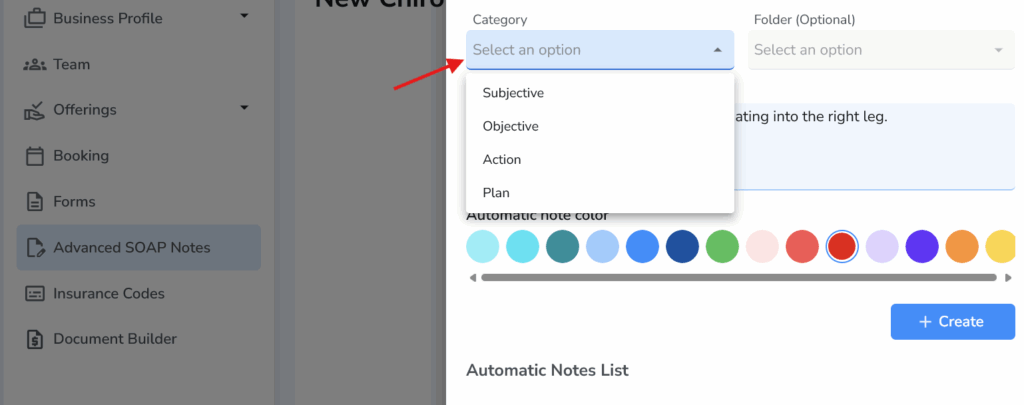
No two practitioners document care exactly the same way. Customizable templates let you build documentation around your own workflow, whether you’re performing chiropractic adjustments, massage therapy, rehabilitation exercises, or wellness treatments.
Instead of forcing your documentation into a fixed format, you can create templates that match the way you already practice.
Quick Selections That Remove Repetitive Typing
Many appointments involve the same assessments, treatments, and recommendations. Rather than typing identical phrases repeatedly, quick selection buttons allow you to insert frequently used findings, treatment techniques, or home care instructions with a single click.
Interactive Body Charts
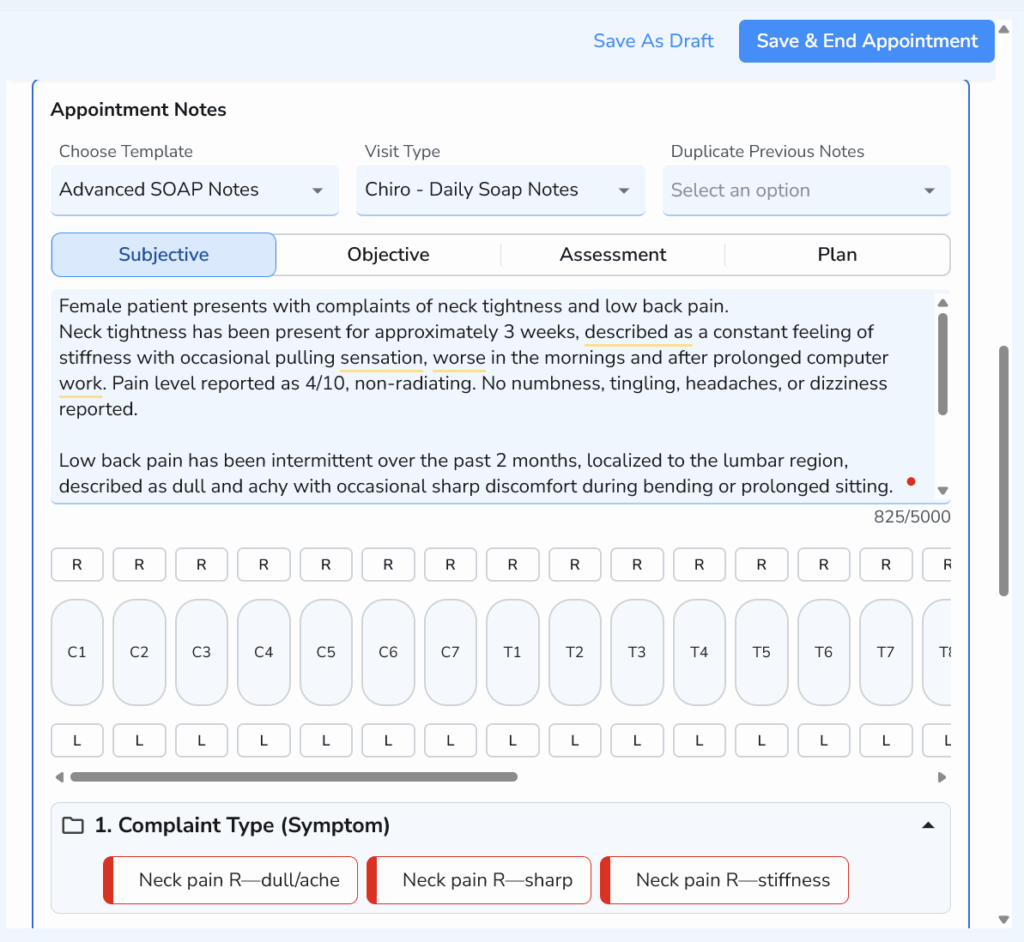
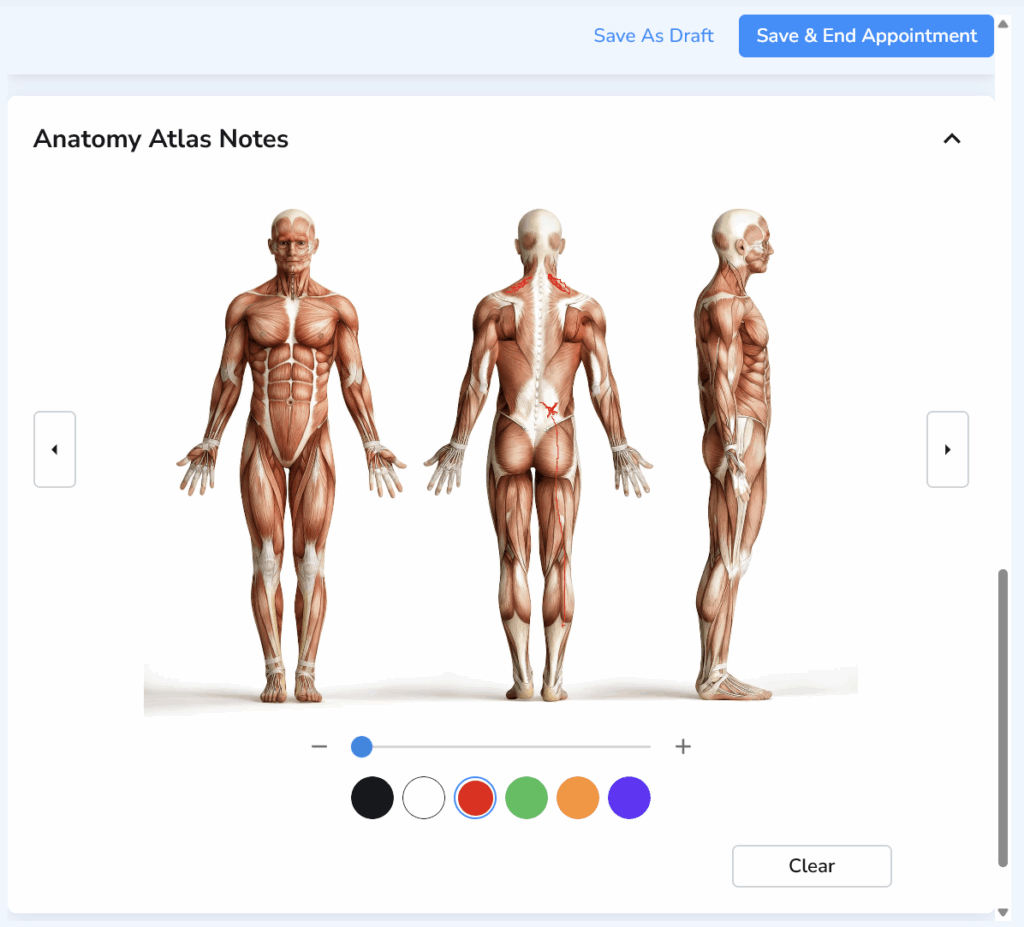
Some conditions are easier to explain visually than with text alone. Built-in body charts allow practitioners to mark pain locations, muscle involvement, treatment areas, and affected joints directly within the patient record.
Visual documentation helps create clearer clinical records and makes it easier to monitor changes over time.
Appointment-Linked Documentation
SOAP notes become much more valuable when they’re automatically connected to the appointment they belong to. Linking documentation with scheduling, patient history, and visit details keeps the entire clinical record organized and eliminates the need to search across multiple systems.
✨Built for Faster Clinical Workflows
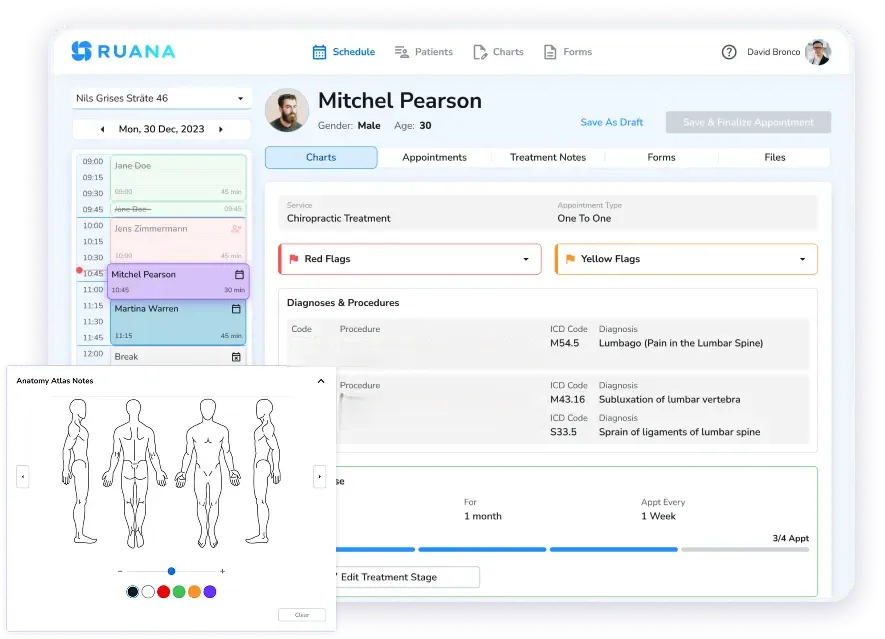
Ruana brings all of these features together in one connected workflow. Practitioners can schedule appointments, review intake forms, access patient history, complete SOAP notes using customizable templates and quick selections, update body charts, and move directly into billing without switching between separate applications.
The result is less administrative work, more consistent documentation, and more time spent focusing on patient care.
Conclusion
Whether you’re looking to replace paper charts or upgrade from disconnected tools, the right solution makes it easier to create consistent documentation, monitor patient progress, and spend less time on administrative work.
Opt for a software solution that will bring SOAP notes, scheduling, intake forms, patient records, and billing into one platform. It will help you simplify daily workflows without compromising the quality of your clinical records.